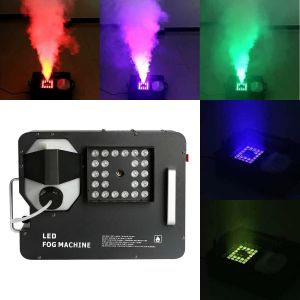
1500W REB 3 in 1 LED VERTICAL/Upward Fog Fogger Machine/LED RGBW/Stage DJ/Concert
What is a Vertical Upward Fogger?
A vertical upward fogger, also known as a stage DJ concert fogger, is a device designed to create an immersive atmosphere by producing fog or mist. Unlike traditional fog machines that emit fog horizontally, this 1500W LED vertical upward fogger directs the fog upwards, creating a visually stunning effect that enhances any performance.
Key Features of the 1500W LED Vertical Upward Fogger
- High Power Output: With a 1500W power output, this fogger machine can produce a large volume of fog, making it perfect for large venues and events.
- LED RGBW Lights: The fogger is equipped with built-in LED RGBW lights, which can change colors to match the mood and theme of your event.
- Vertical Upward Design: The fogger's design ensures that the fog is directed upwards, creating a unique visual effect that enhances the overall atmosphere.
Comparison with Traditional Fog Machines
Compared to traditional fog machines, the 1500W LED vertical upward fogger offers several advantages:
- Directional Fog: The fogger's vertical upward design creates a unique visual effect that is impossible to achieve with traditional fog machines.
- Colorful Lighting: The built-in LED RGBW lights provide a versatile lighting solution that can enhance any performance.
- High Output: With a 1500W power output, this fogger machine can produce a large volume of fog, making it perfect for large venues and events.
How to Use a Vertical Upward Fogger
Using a vertical upward fogger is simple and straightforward. Here are some tips to help you get started:
Setting Up Your Stage DJ Concert Fogger
- Choose a Suitable Location: Find a suitable location for your fogger machine that is close to the stage and out of the way of the audience.
- Connect the Power Supply: Connect the fogger machine to a power outlet using the included power cord.
- Add Fog Fluid: Add fog fluid to the fogger machine according to the manufacturer's instructions.
- Adjust the Settings: Adjust the settings on the fogger machine to achieve the desired effect.
Operating the LED RGBW Fogger
Operating the LED RGBW fogger is simple and straightforward. Here are some tips to help you get started:
- Turn On the Fogger: Turn on the fogger machine using the power switch.
- Adjust the Fog Output: Adjust the fog output using the control knob on the fogger machine.
- Change the Color Settings: Change the color settings using the control knob on the fogger machine.
- Monitor the Fog Output: Monitor the fog output to ensure that it is producing the desired effect.
Benefits of Using a Vertical Upward Fogger
Using a vertical upward fogger offers several benefits, including:
Enhancing Your Stage Performance
The fogger's vertical upward design creates a unique visual effect that enhances any performance. The built-in LED RGBW lights provide a versatile lighting solution that can enhance the mood and theme of your event.
Creating an Immersive Atmosphere
The fogger's high power output and directional fog create an immersive atmosphere that draws the audience into the performance. The fogger's unique design and versatile lighting solution make it a must-have for any stage DJ concert.
Maintenance & Troubleshooting Tips
Maintaining and troubleshooting your vertical upward fogger is essential to ensure that it continues to function properly. Here are some tips to help you get started:
Cleaning & Maintenance of the 1500W Fogger Machine
- Clean the Fogger: Clean the fogger machine after each use to remove any residue or debris.
- Check the Filters: Check the filters on the fogger machine to ensure that they are clean and free of debris.
- Replace the Filters: Replace the filters on the fogger machine if they become clogged or damaged.
- Store the Fogger: Store the fogger machine in a dry, cool place when not in use.
Troubleshooting Common Issues
If you experience any issues with your vertical upward fogger, here are some troubleshooting tips:
- Fog Not Producing: Check the fog fluid level and ensure that the fogger machine is properly connected to a power outlet.
- Color Settings Not Working: Check the control knob on the fogger machine to ensure that it is set to the desired color setting.
- Fog Output Too Low: Adjust the fog output using the control knob on the fogger machine.
- Fog Output Too High: Adjust the fog output using the control knob on the fogger machine.
In conclusion, the 1500W LED vertical upward fogger is a powerful tool for creating an immersive atmosphere at stage DJ concerts and other events. Its high power output, directional fog, and built-in LED RGBW lights make it a must-have for any performer looking to enhance their stage presence. With proper maintenance and troubleshooting, this fogger machine will continue to function properly and provide years of enjoyment.

Goodpriceshop
You May Also Like

Wilkinson M Series 52mm String Spacing Pre-set Wraparound Bridge for Les Paul SG Junior Special Style Electric Guitar

PCBS The Joy of Trusting God (Character You Can Count On) Dr. Bill Bright

Gold Plateds XLR Switching Selectors 2 Input Single Output Passive Sound Switcher For Microphones Signal Routing

Professional Hollow Guitar Pickup Protective Case Humbucker Cover Guitar Sound Enhancement for Electric Guitar Pickup

7LEDs DMX512 Moving Heads Stage Light: A Comprehensive Guide

Guitar String Tuners Kit Set Classical Guitar Tuning Peg Acoustic Guitar Tuners Knobs Replacement

CAHAYA Acoustic Guitar Bag Thick Padding Waterproof Dual Adjustable Shoulder Strap Guitar Case Gig Bag 40 41 inch with Back Hanger Loop

GY🌠🌠🌠 Creative Rock Hand Drum Stick Stand Drumstick Display Stand Rack Mallet Drumstick Bracket Home Decoration Funny Gift For Drummer

2-Point Electric Guitar Bridge Guitar Tremolo Bridge with Tremolo System Saddles Mounting accessories Easy to Install

20Pcs Electric Guitar Saddles Bridge Screw Stainless Steel Guitar Bridge Saddles Height Adjustment Screws with Wrench

Snow White and Other Grimms Fairy Tales (MinaLima Edition): Illustrated with Interactive Elements Hardcover by Jacob and Wilhelm Grimm