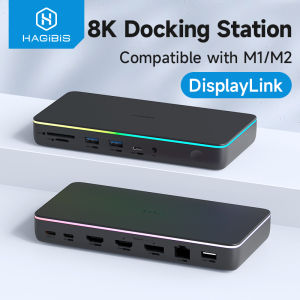
Hagibis DisplayLink USB C Docking Station: Triple Display Setup with DP MST Hub
Hagibis DisplayLink USB C Docking Station: Triple Display Setup with DP MST Hub
What is the Hagibis USB C Docking Station?
The Hagibis DisplayLink USB C Docking Station is a versatile and powerful hub designed to meet the needs of professionals working with multiple displays. This high-quality docking station supports up to three monitors, making it ideal for those looking to enhance their productivity with a triple display setup. With its DisplayPort Multi-Stream Transport (DP MST) hub, the Hagibis USB C Docking Station offers seamless connectivity and superior performance, providing a smooth and efficient workflow experience.
Key Features
- Triple Display Support: Connect up to three monitors using the DP MST Hub, HDMI, and DisplayPort outputs.
- 8K HDMI & 4K60Hz Support: Enjoy high-quality visuals with support for 8K HDMI and 4K60Hz resolutions.
- Power Delivery: Charge MacBook M1/M2 and other USB-C devices with 100W PD.
- Network Connectivity: Maximize network speed with a 2.5G Ethernet port.
- USB3.1 Ports: Transfer data at high speeds with USB3.1 ports.
Compatibility with MacBook M1/M2 and Windows
The Hagibis USB C Docking Station is compatible with both MacBook M1/M2 and Windows devices, making it a versatile choice for professionals working across different operating systems. Its compact design and sleek appearance make it easy to integrate into any workspace, while its robust build ensures long-lasting performance.
How to Set Up Your Triple Monitor Display
Setting up your triple monitor display with the Hagibis USB C Docking Station is simple and straightforward. Follow these steps to get started:
Connecting Monitors with DisplayPort MST Hub
- Connect the DP MST Hub to the USB-C port on your computer using the included cable.
- Connect your first monitor to the DP MST Hub using a DisplayPort cable.
- Connect your second and third monitors to the DP MST Hub using additional DisplayPort cables.
Configuring HDMI and DisplayPort Outputs
- Connect the HDMI output on the Hagibis USB C Docking Station to your desired monitor using an HDMI cable.
- Connect the DisplayPort output on the docking station to another monitor using a DisplayPort cable.
Enhancing Productivity with 8K HDMI & 4K60Hz Support
The Hagibis USB C Docking Station offers superior display quality with support for 8K HDMI and 4K60Hz resolutions. This high-quality output enhances productivity by providing clear visuals and smooth performance, making it easier to work with multiple monitors.
Boosting Efficiency with High-Quality Display Outputs
With the Hagibis USB C Docking Station, you can enjoy high-quality visuals on all three monitors, allowing you to work more efficiently and effectively. The DP MST Hub ensures seamless connectivity and superior performance, making it easy to switch between displays and manage multiple tasks simultaneously.
Optimizing Your Workflow with Multiple Monitors
Using multiple monitors with the Hagibis USB C Docking Station can significantly enhance your workflow. With the ability to view multiple applications at once, you can streamline your work process and increase productivity. The triple display setup provides ample space for multitasking, making it ideal for professionals working with complex projects.
Powering Your Devices with 100W PD & 2.5G RJ45
The Hagibis USB C Docking Station offers powerful charging capabilities with 100W PD, ensuring that your MacBook M1/M2 and other USB-C devices stay charged throughout the day. Additionally, the 2.5G Ethernet port maximizes network speed, providing fast and reliable connectivity.
Charging MacBook M1/M2 and Other USB-C Devices
The Hagibis USB C Docking Station supports fast charging with 100W PD, ensuring that your MacBook M1/M2 and other USB-C devices stay charged throughout the day. This powerful charging capability eliminates the need for separate chargers, making it easier to manage your devices.
Maximizing Network Speed with 2.5G Ethernet Port
With the 2.5G Ethernet port, the Hagibis USB C Docking Station provides fast and reliable network connectivity, ensuring that you stay connected at all times. This high-speed port is ideal for professionals working with large files and complex projects, as it provides the necessary bandwidth to transfer data quickly and efficiently.
Conclusion
The Hagibis DisplayLink USB C Docking Station is a powerful and versatile hub designed to meet the needs of professionals working with multiple displays. With its triple display support, 8K HDMI & 4K60Hz support, and powerful charging capabilities, this docking station offers superior performance and efficiency. Whether you're working with complex projects or simply looking to enhance your workflow, the Hagibis USB C Docking Station is the perfect choice for professionals looking to maximize their productivity.

Hagibis official store
Review
You May Also Like
Magnetic Cartridge Stylus Needle with Vinyls Needle for Turntable Record Player
Matte Wallet Case for iPhone X XS XR 8 7 6 6s Pro Plus Max Leather Flip Cover Magnetic Stand Card Holder Phone Casing
iPhone 16 Case Wallet: Durable & Protective Design

3 Rolls Elastic Braiding Thread 32.8Yard Per Roll Polyester Yarn Weaving Cord For Knitting Craft And Home Decoration

PC Tech Laptop Battery NGGX5 Compatible with DELL Latitude E5270 E5470 E5570 Series

Soft Silicone Phone Case for Apple 8 Luxury Leather Texture Protective Cover Full Edge Protection Anti-slip Creative Fall Proof

9H Hardness Full Cover Protector: A Comprehensive Guide
HUWEI Stylus Pen For Lenovo Xiaoxin Pad Pro 12.7 2023 2025 2022 Tablet Pen Xiaoxin Pad 2024 11 inch GT Pro 11.1 Touch Pen Pencil

Cartoon Style Apple 17Promax Full Cover Tempered Glass High Definition Invisible Pattern Enhanced Color Film
Pearl Cotton DSLR Camera Bag: A Comprehensive Guide
feibeinan66 10Pcs Metal Zipper Stopper Zipper Tail Clip Stop Tail Plug Head With Screw Diy Sewing Leather Hardware Craft