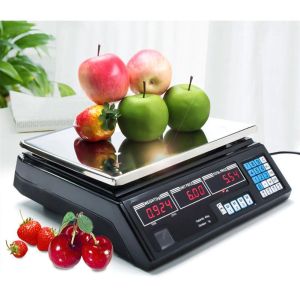
Buyyu Digital Price Computing Fruit Scale PD: A Comprehensive Guide
Buyyu Digital Price Computing Fruit Scale PD: A Comprehensive Guide
What is the Buyyu Digital Price Computing Fruit Scale PD?
The Buyyu Digital Price Computing Fruit Scale PD is a versatile and user-friendly device designed specifically for accurately measuring and pricing fruits. This precision digital scale is an excellent choice for small businesses, farmers, and individuals who want to streamline their fruit-selling process while ensuring accuracy and efficiency.
Key Features
The Buyyu Digital Price Computing Fruit Scale PD comes with several key features that set it apart from other digital scales on the market:
- High-precision weighing mechanism
- Large LCD display for easy reading
- User-friendly interface with intuitive controls
- Compact and portable design
- Automatic calibration and tare function
Benefits of Using the Scale
Using the Buyyu Digital Price Computing Fruit Scale PD offers numerous advantages, including:
- Improved accuracy and consistency in fruit pricing
- Increased efficiency in weighing and pricing fruits
- Enhanced customer satisfaction due to precise measurements
- Easy-to-use interface for both novice and experienced users
How to Choose the Right Digital Fruit Scale
When selecting a digital fruit scale, consider the following factors to ensure you find the perfect match for your needs:
Precision Digital Scale Considerations
Accuracy is crucial when measuring and pricing fruits. Look for a scale with a high-precision weighing mechanism and a reliable calibration system to ensure consistent results.
Portable Fruit Scale Options
If you plan to transport your fruit scale frequently, choose a compact and lightweight design that is easy to carry and store.
Easy-to-Use Scale Factors
Opt for a digital fruit scale with an intuitive interface and simple controls to minimize learning time and maximize efficiency.
How to Use the Buyyu Digital Price Computing Fruit Scale PD
Follow these steps to get started with the Buyyu Digital Price Computing Fruit Scale PD:
Setup and Calibration
- Place the scale on a flat, stable surface.
- Turn on the scale using the power button.
- Allow the scale to calibrate automatically by pressing the calibration button.
Measuring and Pricing Fruits
- Place the fruit on the weighing platform.
- Wait for the scale to display the weight.
- Enter the price per unit weight using the keypad.
- Press the pricing button to calculate the total price.
Cleaning and Maintenance
To keep your Buyyu Digital Price Computing Fruit Scale PD in top condition, follow these cleaning and maintenance tips:
- Clean the weighing platform regularly using a soft, damp cloth.
- Store the scale in a dry, cool place when not in use.
- Avoid exposing the scale to extreme temperatures or humidity.
Frequently Asked Questions About the Buyyu Digital Price Computing Fruit Scale PD
Common Issues and Solutions
Q: My scale isn't displaying the correct weight. A: Check if the scale has been calibrated properly. If the issue persists, contact customer support for further assistance.
Q: The scale isn't responding to button presses. A: Ensure the scale is powered on and try pressing the buttons again. If the problem continues, consult the user manual or reach out to customer support.
Tips for Maximizing Efficiency
- Familiarize yourself with the scale's features and controls to streamline the weighing and pricing process.
- Regularly calibrate the scale to maintain accuracy.
- Keep the weighing platform clean to prevent dirt or debris from affecting measurements.
Troubleshooting and Support
If you encounter any issues with your Buyyu Digital Price Computing Fruit Scale PD, refer to the user manual for troubleshooting steps or contact customer support for assistance.

BUYYU.PH
You May Also Like

PRIMEO Yarn Dyed Placemat 12x18 inches Set of 4 Heavy Duty Fabric 170gsm Premium Modern Italian Design
2 layer Corner Pull out Basket for Kitchen Cabinet 304 Stainless

Cuisinart Authentic/Original Nylon Slotted Spoon Black CTG04LSH-320

20pcs/box Pull-Out Kitchen Wipes Absorbent Microfiber Rub Kitchen Dishcloth Disposable Mini Towel

330ML JAPAN SUNTORY WHISKY GLASS BEER MUG FOR HOT AND COLD • JAPAN SURPLUS

6Pcs Kitchen Stainless Steel Sink Sponges Holder - Self Adhesive Drain Drying Rack Shelf - Household Wall Hooks - Storage Organizer
Ink And Style Ph - 600ml Personalized Sports Jug - Tumbler - For all ages-FREE PHOTO PRINT-FREE NAME
![[5 box] 900 pulls Magic Hd Interleaf Plastic bag plastic labo in a box](https://img.lazcdn.com/collect/social-img/17430d67a3fa41e7ad0251615c0aa6db_86bc0c5738e64c549116a22bec170790.png_300x300q80.png)
[5 box] 900 pulls Magic Hd Interleaf Plastic bag plastic labo in a box
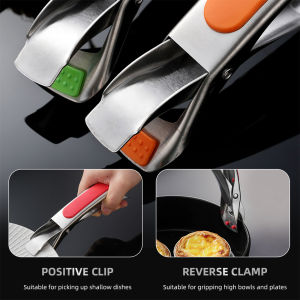
【Buy 1 Take 1】Kitchen Anti Scalding Bowl Clips Gripper Tray Lifter Bowl
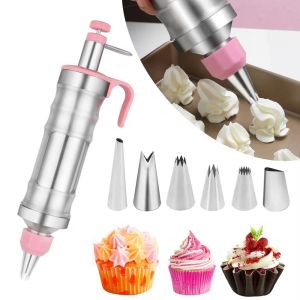
LIANG Non Stick Dessert Piping Set Wear Resistant Stainless Steel Cake Icing Decorating Tools Easy To Use Versatile Frosting Piping Kit Cupcake Decorating
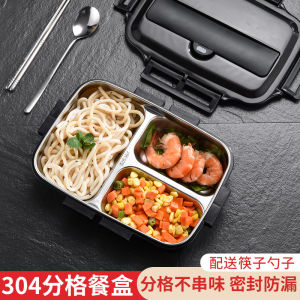
304 Stainless Steel Insulated Lunch Box: A Comprehensive Guide\\n\\n Introduction to 304 Stainless Steel Insulated Lunch Boxes\\n\\nA 304 stainless steel insulated lunch box is a portable, large-capacity, separated container designed to keep your food fresh and warm during your lunch break. Made from high-quality 304 stainless steel, these lunch boxes offer durability, hygiene, and insulation, making them ideal for students and office workers alike.\\n\\n What Makes 304 Stainless Steel Ideal for Lunch Boxes?\\n\\n304 stainless steel is known for its corrosion resistance, strength, and ease of cleaning. This material ensures that your lunch box remains hygienic and safe for food storage. Additionally, it provides excellent insulation properties, keeping your food warm or cold for hours. With its lightweight and durable nature, 304 stainless steel lunch boxes are perfect for daily use.\\n\\n Key Features of Portable Large Capacity Separated Lunch Boxes\\n\\nA portable large capacity separated lunch box offers several advantages:\\n\\n- **Large Capacity:** These lunch boxes have ample space to accommodate multiple meals and snacks, making them ideal for students and office workers who require variety in their diet.\\n- **Separated Compartments:** The separated compartments allow you to store different types of food items without mixing flavors or compromising hygiene.\\n- **Portability:** Lightweight and easy to carry, these lunch boxes are perfect for on-the-go lifestyles.\\n\\n Choosing the Right Lunch Box for Students and Office Workers\\n\\nWhen selecting a lunch box, it's essential to consider the specific needs of students and office workers.\\n\\n Bento Plate Lunch Box Suit: An Ideal Choice for Students\\n\\nA bento plate lunch box suit is an excellent choice for students due to its compact size and versatility. With multiple compartments, it allows students to pack a balanced meal, including protein, vegetables, and carbohydrates. Additionally, the attractive design and vibrant colors make it appealing to children and teenagers.\\n\\n Lunch Box Suit for Office Workers: A Must-Have Accessory\\n\\nOffice workers benefit from a lunch box suit that is both functional and stylish. A well-designed lunch box suit not only keeps food fresh and warm but also adds a touch of professionalism to your office attire. Look for lunch boxes with secure lids, easy-to-clean surfaces, and convenient carrying handles.\\n\\n How to Maximize Your Lunch Box Experience\\n\\nTo get the most out of your 304 stainless steel insulated lunch box, consider these tips:\\n\\n Tips for Efficiently Using Your Lunch Box\\n\\n- **Plan Ahead:** Prepare your meals the night before to save time and ensure a healthy, balanced diet.\\n- **Utilize Separated Compartments:** Store different food items in separate compartments to maintain hygiene and prevent flavor mixing.\\n- **Keep It Cool:** Use ice packs or cooling gels to keep perishable items fresh during transportation.\\n\\n Maintaining Your 304 Stainless Steel Insulated Lunch Box\\n\\nTo ensure your lunch box remains in excellent condition, follow these maintenance tips:\\n\\n- **Clean Regularly:** Wash your lunch box after each use with warm, soapy water and dry thoroughly.\\n- **Avoid Harsh Chemicals:** Refrain from using abrasive cleaners or harsh chemicals that may damage the surface.\\n- **Store Properly:** Store your lunch box in a cool, dry place away from direct sunlight.\\n\\n Conclusion: Why Invest in a High-Quality Lunch Box?\\n\\nInvesting in a high-quality 304 stainless steel insulated lunch box offers numerous benefits, including durability, hygiene, and insulation. By choosing the right lunch box for your needs, you can enjoy fresh, warm meals while reducing waste and saving money. Follow our tips for efficient use and maintenance to maximize your lunch box experience.\n}