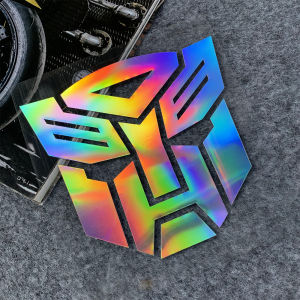
Laser Autobot Transformers Emblem Badge Graphics Car Waterproof Decal 13cm Sticker
Laser Autobot Transformers Emblem Badge Graphics Car Waterproof Decal 13cm Sticker
Introduction to Laser Autobot Transformers Emblem Badge Graphics
Transform your vehicle with the stunning Laser Autobot Transformers Emblem Badge Graphics, featuring a waterproof decal sticker design that measures 13cm. This eye-catching car graphic is perfect for fans of the Transformers franchise, providing a unique and stylish addition to your vehicle.
Key Features & Benefits
- 100% Brand New: Our Laser Autobot Transformers Emblem Badge Graphics are brand new and come with high-quality assurance.
- Easy Installation: With our simple installation process, you can quickly and easily apply the decal sticker to your vehicle.
- Waterproof Design: Our decal sticker is waterproof, making it perfect for all weather conditions.
- Transformers Decal Design: Featuring the iconic Autobot emblem, this decal sticker is sure to turn heads and show off your love for Transformers.
Installation Process Overview
Before installing your Laser Autobot Transformers Emblem Badge Graphics, it's essential to prepare your vehicle surface and follow the installation steps carefully. This will ensure a successful application and long-lasting results.
Choosing the Right Laser Autobot Transformers Emblem Badge Graphics
When selecting the right Laser Autobot Transformers Emblem Badge Graphics for your vehicle, consider the following factors:
Identifying Your Vehicle Compatibility
Before purchasing, make sure the decal sticker is compatible with your vehicle model. Check the dimensions and design to ensure it will fit perfectly on your car.
Selecting the Right Size & Design
Choose the appropriate size and design for your vehicle. Our 13cm decal sticker is perfect for most cars, but if you have a larger or smaller vehicle, consider adjusting the size accordingly.
How to Install Laser Autobot Transformers Emblem Badge Graphics
Follow these steps to install your Laser Autobot Transformers Emblem Badge Graphics:
Preparing Your Vehicle Surface
- Clean the surface of your vehicle thoroughly using soap and water.
- Allow the surface to dry completely before applying the decal sticker.
Applying the Decal Sticker
- Peel off the backing paper from the decal sticker.
- Position the decal sticker on the desired location on your vehicle.
- Press down firmly on the decal sticker to ensure it adheres properly.
Final Touches & Maintenance
- Remove any air bubbles by gently pressing down on the decal sticker.
- Apply a clear coat to protect the decal sticker from wear and tear.
FAQs & Troubleshooting Tips
Common Installation Issues
- Peeling or Lifting Decal Sticker: If the decal sticker starts peeling or lifting, reapply the decal sticker following the installation steps above.
- Air Bubbles: To remove air bubbles, use a credit card or similar tool to gently press down on the decal sticker.
Cleaning & Maintenance Tips
- Regular Cleaning: Clean the decal sticker regularly using soap and water to maintain its appearance.
- Avoid Harsh Chemicals: Do not use harsh chemicals or abrasive materials when cleaning the decal sticker, as this may damage the design.

INYU
You May Also Like

Car Accessories Sun Visor Seat Back Tissue Holder Car Interior Hanging Tissue Rack Car Tissue Clip
Brake Pedal Spring for TMX 155/125 - Durable Replacement Part
SEAMETAL Retractable Car Windshield Wiper Blade Long Handle Rearview Mirror Window Glass Wash Cleaning Brush Auto Cleaner Wiper

Quiet Tank 300 Sill Strip Modification: Stainless Steel Pedal Decoration & Carbon Fiber Pattern
Creative Decoration Sticker Protection Film for Tesla Model 3 Charging Port Revitalizing Adhesive Decal Car Accessories\\n\\n Introduction to Sticker Protection for Charging Ports\\n\\n What is Sticker Protection for Charging Ports?\\n\\nSticker protection for charging ports is a specialized adhesive film designed to protect the charging port of electric vehicles like the Tesla Model 3. This film serves multiple purposes, including shielding the port from dust, dirt, and moisture while also enhancing the overall appearance of the vehicle.\\n\\n Benefits of Using Sticker Protection for Charging Ports\\n\\nUsing sticker protection for charging ports offers numerous benefits, such as:\\n\\n- **Protection:** Shielding the charging port from contaminants helps maintain its functionality and prolongs its lifespan.\\n- **Aesthetic Appeal:** Decorative sticker films can transform the look of your Tesla Model 3, making it stand out from other electric vehicles.\\n- **Ease of Application:** Sticker protection films are simple to install, requiring minimal tools and effort.\\n\\n Choosing the Right Sticker Protection for Charging Ports\\n\\nWhen selecting a sticker protection film for your Tesla Model 3 charging port, consider factors such as:\\n\\n- **Material Quality:** Opt for films made from high-quality materials that offer superior durability and resistance to wear and tear.\\n- **Design Options:** Choose from a wide range of designs to match your personal style and preferences.\\n- **Compatibility:** Ensure the chosen film is compatible with your Tesla Model 3 charging port.\\n\\n How to Install Adhesive Decal Car Accessories\\n\\n Tools & Materials Needed for Installation\\n\\nTo install adhesive decal car accessories, gather the following tools and materials:\\n\\n- Adhesive decal film\\n- Cleaning solution\\n- Microfiber cloth\\n- Scissors\\n- Squeegee\\n\\n Step-by-Step Guide to Installing Adhesive Decal Car Accessories\\n\\nFollow these steps to install adhesive decal car accessories on your Tesla Model 3 charging port:\\n\\n1. Clean the charging port surface using a cleaning solution and microfiber cloth.\\n2. Carefully peel off the backing paper from the adhesive decal film.\\n3. Position the film over the charging port, aligning it with the edges.\\n4. Use a squeegee to remove any air bubbles and ensure proper adhesion.\\n\\n Tips for a Smooth Installation Process\\n\\nTo achieve a flawless installation, keep these tips in mind:\\n\\n- Work in a clean, dust-free environment to prevent contamination.\\n- Take your time during installation to avoid mistakes.\\n- Allow the film to settle for at least 24 hours before exposing the vehicle to extreme temperatures or weather conditions.\\n\\n Revitalizing Car Decals: Creative Decoration Sticker Film\\n\\n Choosing the Right Design for Your Tesla Model 3\\n\\nWhen selecting a creative decoration sticker film for your Tesla Model 3, consider factors such as:\\n\\n- **Personal Style:** Choose designs that reflect your personality and preferences.\\n- **Vehicle Compatibility:** Ensure the chosen design is compatible with your Tesla Model 3 charging port.\\n- **Durability:** Opt for high-quality materials that offer superior durability and resistance to wear and tear.\\n\\n How to Apply Creative Decoration Sticker Film\\n\\nFollow these steps to apply creative decoration sticker film on your Tesla Model 3 charging port:\\n\\n1. Clean the charging port surface using a cleaning solution and microfiber cloth.\\n2. Carefully peel off the backing paper from the sticker film.\\n3. Position the film over the charging port, aligning it with the edges.\\n4. Use a squeegee to remove any air bubbles and ensure proper adhesion.\\n\\n Maintaining Your New Sticker Film\\n\\nTo keep your new sticker film looking its best, follow these maintenance tips:\\n\\n- Clean the film regularly using a gentle cleaning solution and microfiber cloth.\\n- Avoid exposing the film to extreme temperatures or weather conditions.\\n- Inspect the film periodically for signs of wear and tear, and replace it if necessary.\\n\\n Conclusion: Enhancing Your Tesla Model 3 with Sticker Protection & Decals\\n\\nBy using sticker protection films and creative decoration sticker films, you can enhance the functionality and aesthetic appeal of your Tesla Model 3 charging port. With proper installation and maintenance, these accessories will provide long-lasting protection and a stylish touch to your electric vehicle.\n}
For Kawasaki Z900 Z900SE Z900RS Z1000 Z1000SX Z1000R Z800 Z400 Z650 Mototcycle Rearview Side Mirror Bolt Screws Side Mirror Bolt Mirror Hole Plug Screw
12V Lead Acid Battery Charger na Ganap na Awtomatikong Clip-On Charging para sa Pangkalahatang Paggamit
2 PCS Motorcycle Mini Driving Lights High Low Yellow/White LED Headlight with Domino 3 Way Switch

iMESTOU Motorcycle Wireless 15W Qi/USB Quick Charger 3.0 Phone Holder 2 in 1 Mount on 22-32mm Handlebar or Rear-View Mirror Fast Charging for 3.5-6.8 inch Cellphones
HOTSPEED Car Battery Charger 12V 24V Heavy Duty Japan for Motorcycle Intelligent Pulse Repair Baterrycharger Fast Charging Automatic Voltage Power Saving
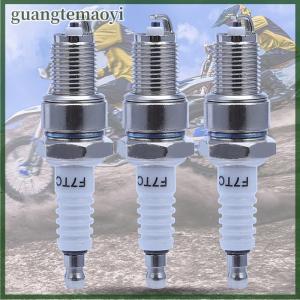
guangtemaoyi 1Pcs Spark Plug F7TC For Engine GX120 GX160 GX270 GX340 GX390 pumplawn mover