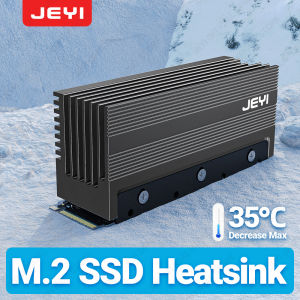
JEYI M.2 2280 SSD HeatSink Cooler Heavy Duty Aluminum Convective Heat Sink Passive Heat Sinks with Fins (35 degrees Decrease Max)

JEYI M.2 2280 SSD HeatSink Cooler Heavy Duty Aluminum Convective Heat Sink Passive Heat Sinks with Fins (35 degrees Decrease Max)

Introduction to JEYI M.2 2280 SSD Cooler

In today's fast-paced world, data storage is crucial for every computer user. Solid State Drives (SSDs) have become the go-to storage option due to their speed, reliability, and compact size. However, like any electronic device, SSDs can overheat during operation, leading to performance issues and reduced lifespan. To combat this problem, JEYI has introduced the M.2 2280 SSD HeatSink Cooler, a heavy-duty aluminum convective heat sink that promises a maximum temperature decrease of 35 degrees Celsius.

Overview of the Product

The JEYI M.2 2280 SSD HeatSink Cooler is designed to fit M.2 2280 SSDs and provide passive cooling through its aluminum fins. This heat sink is made from high-quality aluminum, which has excellent thermal conductivity, ensuring efficient heat dissipation. The cooler measures 76mm x 24mm x 35mm and weighs only 100 grams, making it easy to install and integrate into any system. The model number is Finscold IceGlacier, and it is manufactured by JEYI in Mainland China.

Key Features of the Heat Sink

  • Material: High-quality aluminum
  • Thermal Conductivity: 203 W/mK
  • Weight: 100 grams
  • Dimension: 76mm x 24mm x 35mm
  • Type: M.2 SSD Cooler
  • Model Number: Finscold IceGlacier
  • Brand Name: JEYI
  • Origin: Mainland China
  • Heatsink Material: Aluminum
  • Suitable: M.2 2280 SSD
  • Features: M.2 SSD NVMe Heat Sink, NVMe NGFF Heat Sink, For M2 2280 SSD Hard Disk

Benefits of Using a Convective Heat Sink for SSD

Installing a convective heat sink, such as the JEYI M.2 2280 SSD HeatSink Cooler, offers several advantages for your SSD and overall system performance.

Temperature Reduction and Performance Improvement

The primary benefit of using a convective heat sink is the reduction in SSD temperature. By dissipating heat efficiently, the JEYI M.2 2280 SSD HeatSink Cooler can lower the operating temperature by up to 35 degrees Celsius. This temperature decrease helps maintain optimal performance levels, ensuring that your SSD operates at its best capacity.

Extending the Lifespan of Your SSD

Another significant advantage of using a convective heat sink is the extended lifespan of your SSD. By reducing the operating temperature, the cooler helps minimize wear and tear on the SSD components, leading to a longer-lasting drive. This benefit is particularly important for users who rely heavily on their SSDs for critical tasks or long-term storage.

Installation and Usage Guide

Installing the JEYI M.2 2280 SSD HeatSink Cooler is a straightforward process that requires minimal effort. Follow these steps to ensure proper installation and usage:

Preparing for Installation

Before installing the cooler, gather the necessary tools and components, such as a screwdriver and thermal paste. Ensure that your system is powered off and disconnected from any power sources to avoid electrical hazards.

Installing the Heat Sink

  1. Carefully remove the existing M.2 2280 SSD from your system's motherboard.
  2. Apply a thin layer of thermal paste to the top surface of the SSD.
  3. Align the cooler with the SSD and secure it in place using the provided screws.
  4. Reinsert the SSD into the motherboard slot.

Proper Maintenance

To maintain optimal performance, periodically clean the cooler's fins using compressed air or a soft brush. This process helps remove dust and debris that may accumulate over time, hindering heat dissipation.

Conclusion

In summary, the JEYI M.2 2280 SSD HeatSink Cooler offers numerous benefits for users looking to enhance their SSD performance and longevity. By providing efficient cooling through its heavy-duty aluminum fins, the cooler can significantly reduce operating temperatures, resulting in improved performance and extended lifespan. With its easy installation process and low weight, this convective heat sink is an excellent choice for any M.2 2280 SSD user.

Final Thoughts on the JEYI M.2 2280 SSD Cooler

The JEYI M.2 2280 SSD HeatSink Cooler is a reliable and effective solution for maintaining optimal SSD performance and longevity. Its high-quality aluminum construction, efficient cooling capabilities, and ease of installation make it a valuable addition to any computer system. Whether you're a casual user or a professional, this cooler is worth considering for your next M.2 2280 SSD upgrade.

JEYI Official Store
JEYI Official Store

Seller ratings 98%

You May Also Like

Mini UPS Battery Backup V380 Pro: A Compact & Reliable Solution for Outdoor Devices
00:38

Mini UPS Battery Backup V380 Pro: A Compact & Reliable Solution for Outdoor Devices

12v DC Power Supplyto 5V3A15W DC24v DC Power Supply to 5V Converter Power Supply MiniUSB Micro USB Male Female Type-C 5v Power
01:21

12v DC Power Supplyto 5V3A15W DC24v DC Power Supply to 5V Converter Power Supply MiniUSB Micro USB Male Female Type-C 5v Power

Beelink Mini S Intel N5095 New Compact Gaming PC 8GB RAM 128GB SSD Windows 11 with Dual Channel DDR4 - 12 Month Warranty
00:56

Beelink Mini S Intel N5095 New Compact Gaming PC 8GB RAM 128GB SSD Windows 11 with Dual Channel DDR4 - 12 Month Warranty

Two Ball Bearing 12038 AC Fan Heavy Duty Cooling 110V 120V High CFM For Electronics Ventilation Exhaust
00:20

Two Ball Bearing 12038 AC Fan Heavy Duty Cooling 110V 120V High CFM For Electronics Ventilation Exhaust

3/2/1PCS SO-DIMM To PC DIMM Card Memory Adapter Card Laptop To Desktop Memory Adapter DDR3 DDR4 DDR5 Connector Card Memory Stick
00:19

3/2/1PCS SO-DIMM To PC DIMM Card Memory Adapter Card Laptop To Desktop Memory Adapter DDR3 DDR4 DDR5 Connector Card Memory Stick

High Fidelitys USB C Sound Adapter for Listenings and Broadcasting with Integrated Sound Card and Fast Charging Feature
00:12

High Fidelitys USB C Sound Adapter for Listenings and Broadcasting with Integrated Sound Card and Fast Charging Feature

Laptop LCD Screen 17.3 inches 40 Pins 144Hz Full HD 1920 x 1080 Thin Bezel Borderless B173HAN04.9 No Brackets\\n\\n Introduction to B173HAN04.9 Borderless Screen\\n\\nThe B173HAN04.9 Borderless Screen is a high-quality 17.3-inch LCD display that offers an exceptional viewing experience. This 40 Pins Full HD Display boasts a resolution of 1920 x 1080 pixels, providing sharp and clear visuals for your laptop. With its 144Hz refresh rate and thin bezel design, this screen is perfect for gaming enthusiasts and professionals alike who demand top-notch performance and quality.\\n\\n Key Features & Specifications\\n\\n* 17.3 inches 40 Pins Full HD Display\\n* 1920 x 1080 Resolution\\n* 144Hz Thin Bezel Monitor\\n* No Brackets design\\n\\n Benefits of Thin Bezel Design\\n\\nThe B173HAN04.9 Borderless Screen features a thin bezel design that offers several benefits:\\n\\n* **Enhanced Immersion**: The narrow borders allow for a more immersive viewing experience, making it ideal for gaming, watching movies, or working on graphic-intensive tasks.\\n* **Increased Screen-to-Body Ratio**: With less bezel area, the screen-to-body ratio is higher, resulting in a more compact and sleek appearance.\\n* **Improved Multi-Monitor Setup**: The thin bezels make it easier to align multiple monitors side by side, creating a seamless viewing experience.\\n\\n Compatibility with Various Laptops\\n\\nThe B173HAN04.9 Borderless Screen is compatible with a wide range of laptops, including popular models such as Dell, HP, Lenovo, and Acer. To ensure compatibility, check the specifications of your laptop and verify that it supports a 40 Pins Full HD Display with a 1920 x 1080 resolution.\\n\\n How to Install the 17.3 Inch 40 Pins Full HD 144Hz Screen\\n\\nInstalling the B173HAN04.9 Borderless Screen is a straightforward process. Follow these steps to install the screen on your laptop:\\n\\n Tools & Materials Needed\\n\\n* Screwdriver\\n* Spudger\\n* Plastic opening tool\\n* Pliers\\n* Heat gun\\n* Replacement screen (B173HAN04.9)\\n\\n Step-by-Step Installation Guide\\n\\n1. Power off your laptop and remove the battery if possible.\\n2. Use a screwdriver to remove the screws securing the back cover of your laptop.\\n3. Carefully lift the back cover and disconnect any cables connected to the old screen.\\n4. Use a spudger to gently pry the old screen away from the laptop frame.\\n5. Disconnect the ribbon cable connecting the old screen to the motherboard.\\n6. Remove the old screen and install the new B173HAN04.9 Borderless Screen.\\n7. Reconnect the ribbon cable and secure the new screen in place.\\n8. Replace the back cover and screws.\\n9. Power on your laptop and test the new screen.\\n\\n Troubleshooting Common Issues\\n\\n* **Screen Not Working**: Ensure that the ribbon cable is securely connected and that the screen is properly seated.\\n* **Incorrect Resolution**: Adjust the display settings in your laptop's control panel to match the 1920 x 1080 resolution.\\n* **Color Distortion**: Check that the color settings are correct and adjust if necessary.\\n\\n Performance & Quality of the 1920 x 1080 Resolution Screen\\n\\nThe B173HAN04.9 Borderless Screen offers excellent performance and quality:\\n\\n Color Accuracy & Brightness\\n\\nThe screen features accurate color reproduction and brightness levels, making it ideal for graphic design, photo editing, and gaming.\\n\\n Refresh Rate & Response Time\\n\\nWith a 144Hz refresh rate and fast response time, the B173HAN04.9 Borderless Screen delivers smooth and lag-free visuals, even during fast-paced gaming sessions.\\n\\n Image Quality & Clarity\\n\\nThe 1920 x 1080 resolution provides sharp and clear images, ensuring that every detail is visible and crisp.\\n\\n Conclusion & Final Thoughts\\n\\nThe B173HAN04.9 Borderless Screen is a top-notch 17.3-inch LCD display that offers exceptional performance and quality. With its thin bezel design, 144Hz refresh rate, and 1920 x 1080 resolution, this screen is perfect for gaming enthusiasts and professionals alike. Whether you're looking to enhance your laptop's display capabilities or replace a damaged screen, the B173HAN04.9 Borderless Screen is an excellent choice.\"
00:52

Laptop LCD Screen 17.3 inches 40 Pins 144Hz Full HD 1920 x 1080 Thin Bezel Borderless B173HAN04.9 No Brackets\\n\\n Introduction to B173HAN04.9 Borderless Screen\\n\\nThe B173HAN04.9 Borderless Screen is a high-quality 17.3-inch LCD display that offers an exceptional viewing experience. This 40 Pins Full HD Display boasts a resolution of 1920 x 1080 pixels, providing sharp and clear visuals for your laptop. With its 144Hz refresh rate and thin bezel design, this screen is perfect for gaming enthusiasts and professionals alike who demand top-notch performance and quality.\\n\\n Key Features & Specifications\\n\\n* 17.3 inches 40 Pins Full HD Display\\n* 1920 x 1080 Resolution\\n* 144Hz Thin Bezel Monitor\\n* No Brackets design\\n\\n Benefits of Thin Bezel Design\\n\\nThe B173HAN04.9 Borderless Screen features a thin bezel design that offers several benefits:\\n\\n* **Enhanced Immersion**: The narrow borders allow for a more immersive viewing experience, making it ideal for gaming, watching movies, or working on graphic-intensive tasks.\\n* **Increased Screen-to-Body Ratio**: With less bezel area, the screen-to-body ratio is higher, resulting in a more compact and sleek appearance.\\n* **Improved Multi-Monitor Setup**: The thin bezels make it easier to align multiple monitors side by side, creating a seamless viewing experience.\\n\\n Compatibility with Various Laptops\\n\\nThe B173HAN04.9 Borderless Screen is compatible with a wide range of laptops, including popular models such as Dell, HP, Lenovo, and Acer. To ensure compatibility, check the specifications of your laptop and verify that it supports a 40 Pins Full HD Display with a 1920 x 1080 resolution.\\n\\n How to Install the 17.3 Inch 40 Pins Full HD 144Hz Screen\\n\\nInstalling the B173HAN04.9 Borderless Screen is a straightforward process. Follow these steps to install the screen on your laptop:\\n\\n Tools & Materials Needed\\n\\n* Screwdriver\\n* Spudger\\n* Plastic opening tool\\n* Pliers\\n* Heat gun\\n* Replacement screen (B173HAN04.9)\\n\\n Step-by-Step Installation Guide\\n\\n1. Power off your laptop and remove the battery if possible.\\n2. Use a screwdriver to remove the screws securing the back cover of your laptop.\\n3. Carefully lift the back cover and disconnect any cables connected to the old screen.\\n4. Use a spudger to gently pry the old screen away from the laptop frame.\\n5. Disconnect the ribbon cable connecting the old screen to the motherboard.\\n6. Remove the old screen and install the new B173HAN04.9 Borderless Screen.\\n7. Reconnect the ribbon cable and secure the new screen in place.\\n8. Replace the back cover and screws.\\n9. Power on your laptop and test the new screen.\\n\\n Troubleshooting Common Issues\\n\\n* **Screen Not Working**: Ensure that the ribbon cable is securely connected and that the screen is properly seated.\\n* **Incorrect Resolution**: Adjust the display settings in your laptop's control panel to match the 1920 x 1080 resolution.\\n* **Color Distortion**: Check that the color settings are correct and adjust if necessary.\\n\\n Performance & Quality of the 1920 x 1080 Resolution Screen\\n\\nThe B173HAN04.9 Borderless Screen offers excellent performance and quality:\\n\\n Color Accuracy & Brightness\\n\\nThe screen features accurate color reproduction and brightness levels, making it ideal for graphic design, photo editing, and gaming.\\n\\n Refresh Rate & Response Time\\n\\nWith a 144Hz refresh rate and fast response time, the B173HAN04.9 Borderless Screen delivers smooth and lag-free visuals, even during fast-paced gaming sessions.\\n\\n Image Quality & Clarity\\n\\nThe 1920 x 1080 resolution provides sharp and clear images, ensuring that every detail is visible and crisp.\\n\\n Conclusion & Final Thoughts\\n\\nThe B173HAN04.9 Borderless Screen is a top-notch 17.3-inch LCD display that offers exceptional performance and quality. With its thin bezel design, 144Hz refresh rate, and 1920 x 1080 resolution, this screen is perfect for gaming enthusiasts and professionals alike. Whether you're looking to enhance your laptop's display capabilities or replace a damaged screen, the B173HAN04.9 Borderless Screen is an excellent choice.\"

Sktc Tx01 Mini Small Chassis Thin ITX Chassis Mute Industrial Control Palm Computer Mini Half Height Back Hanging
00:45

Sktc Tx01 Mini Small Chassis Thin ITX Chassis Mute Industrial Control Palm Computer Mini Half Height Back Hanging

0~40V 120W Step-Down Stabilized Voltages Current Regulator Converter Constant Voltages Current Step Down Module Easy Use
00:20

0~40V 120W Step-Down Stabilized Voltages Current Regulator Converter Constant Voltages Current Step Down Module Easy Use

4CH 9CH 18CH DC Power Distribution CCTV Power Supply Box PCB Board Terminal Block 5V 12V 24V 36V 60W/120W/180W/240W/300W/360W Switch Power Supply
00:28

4CH 9CH 18CH DC Power Distribution CCTV Power Supply Box PCB Board Terminal Block 5V 12V 24V 36V 60W/120W/180W/240W/300W/360W Switch Power Supply

GPUHOLD Aluminum Universal Graphics Card Holder with Base Video Card Bracket GPU Support Stand for RTX4090/4080/4070/4060 RX580
00:15

GPUHOLD Aluminum Universal Graphics Card Holder with Base Video Card Bracket GPU Support Stand for RTX4090/4080/4070/4060 RX580

Dahua DHI-LM24-B200S 23.8" FHD Monitor with Built-in Speaker | 75Hz Refresh Rate | Wide View Angle | Low Blue Light
00:58

Dahua DHI-LM24-B200S 23.8" FHD Monitor with Built-in Speaker | 75Hz Refresh Rate | Wide View Angle | Low Blue Light