NICELECT 4MP Dual Lens WiFi Camera: A Comprehensive Guide

NICELECT 4MP Dual Lens WiFi Camera: A Comprehensive Guide

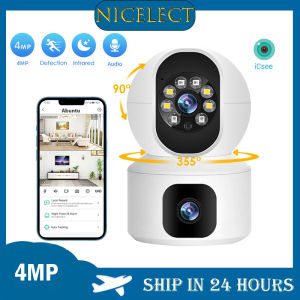
The NICELECT 4MP Dual Lens WiFi Camera is a top-of-the-line indoor home security camera designed to provide unparalleled video surveillance and baby monitoring capabilities. With its advanced AI human detection technology and auto tracking feature, this camera ensures peace of mind for parents and homeowners alike.

What is the NICELECT 4MP Dual Lens WiFi Camera?

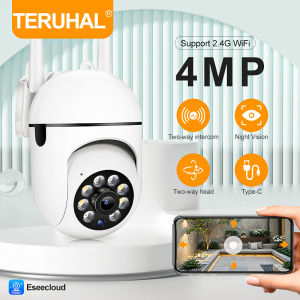
The NICELECT 4MP Dual Lens WiFi Camera is a versatile security camera that offers dual screen video surveillance, making it ideal for monitoring both indoor and outdoor environments. It features a 4MP resolution for crystal-clear images and videos, allowing you to capture every detail.

Key Features

  • 4MP resolution for crystal-clear images and videos
  • Dual lens design for wide-angle coverage
  • WiFi connectivity for easy setup and remote access
  • AI human detection technology for intelligent surveillance
  • Auto tracking feature for monitoring babies and pets

Benefits of Using the Camera

By choosing the NICELECT 4MP Dual Lens WiFi Camera, you'll enjoy a range of benefits, including:

  • Enhanced home security with 24/7 video surveillance
  • Peace of mind knowing your loved ones are safe and secure
  • Easy installation and setup process
  • Remote access to live video feeds via mobile app
  • Advanced AI technology for intelligent surveillance

How to Install & Set Up Your Camera

Setting up your NICELECT 4MP Dual Lens WiFi Camera is a straightforward process. Follow these steps to get started:

Step-by-Step Installation Process

  1. Unbox your camera and locate the power adapter, mounting bracket, and other accessories.
  2. Choose a suitable location for your camera, such as a corner of a room or above a doorway.
  3. Mount the camera using the included bracket and screws.
  4. Connect the power adapter to the camera and plug it into a nearby outlet.
  5. Download the NICELECT app from the App Store or Google Play Store.
  6. Follow the app's on-screen instructions to connect your camera to your WiFi network.
  7. Once connected, you can start monitoring your home or baby remotely.

Connecting to WiFi & Setting Up Dual Screen Video Surveillance

After installing your camera, you'll need to connect it to your WiFi network and set up dual screen video surveillance. Here's how:

  1. Open the NICELECT app and select your camera from the list of available devices.
  2. Tap the gear icon to access the camera settings.
  3. Scroll down to the dual screen video surveillance option and enable it.
  4. Adjust the camera angles and zoom levels as desired.
  5. Save your changes and start monitoring your home or baby.

Enhancing Home Security with AI Human Detection

One of the standout features of the NICELECT 4MP Dual Lens WiFi Camera is its AI human detection technology. This advanced feature allows the camera to intelligently detect and track humans within its field of view, providing enhanced home security and peace of mind.

How AI Human Detection Works

AI human detection works by using machine learning algorithms to analyze video footage and identify human shapes and movements. When a human is detected, the camera will trigger an alert, allowing you to take immediate action.

Benefits of AI Human Detection

By incorporating AI human detection into your home security system, you'll enjoy several benefits, including:

  • Real-time alerts for potential intruders
  • Intelligent surveillance that minimizes false alarms
  • Customizable alert settings for different scenarios
  • Improved overall security and peace of mind

Maximizing Baby Monitoring Capabilities

In addition to home security, the NICELECT 4MP Dual Lens WiFi Camera is also an excellent baby monitor. Its auto tracking feature and other parent-friendly features make it the perfect choice for monitoring your little one.

Auto Tracking Feature for Babies

The auto tracking feature allows the camera to automatically follow your baby as they move around the room. This ensures that you never miss a moment, whether your baby is sleeping, playing, or crying.

Additional Features for Parents

Parents will appreciate the NICELECT 4MP Dual Lens WiFi Camera's additional features, such as:

  • Two-way audio for talking to your baby
  • Night vision for monitoring in low-light conditions
  • Adjustable viewing angles for optimal coverage
  • Remote access to live video feeds via mobile app

Conclusion

The NICELECT 4MP Dual Lens WiFi Camera is a versatile and reliable security camera that offers a range of features for both home security and baby monitoring. With its advanced AI human detection technology and auto tracking feature, this camera provides peace of mind for parents and homeowners alike. Whether you're looking to protect your home or keep an eye on your little one, the NICELECT 4MP Dual Lens WiFi Camera is the perfect choice.

NICELECT Mall
NICELECT Mall

Seller ratings 97%

Review

Oops
This video has no reviews.

You May Also Like

HIKVISION DS-2CE11D8T-PIRL 2 MP Ultra Low Light PIR Fixed Mini Bullet Camera\\n\\n What is the HIKVISION DS-2CE11D8T-PIRL?\\n\\nThe HIKVISION DS-2CE11D8T-PIRL is a compact outdoor surveillance camera designed to provide high sensitivity security coverage in low light conditions. This 2 MP Ultra Low Light Camera is perfect for residential and commercial applications that require reliable monitoring around the clock.\\n\\n Compact Outdoor Surveillance Camera Overview\\n\\nThe DS-2CE11D8T-PIRL is a PIR Fixed Mini Bullet Camera that features a compact design, making it easy to install and blend seamlessly into its surroundings. Its weather-resistant construction ensures durability in various outdoor environments, while its low light capabilities enable clear visibility even in challenging lighting conditions.\\n\\n High Sensitivity Security Camera Features\\n\\nSome notable features of the HIKVISION DS-2CE11D8T-PIRL include:\\n\\n- **2 Megapixel Resolution**: Capture high-definition images and videos for improved clarity and detail.\\n- **Ultra Low Light Sensitivity**: Experience clear visibility even in dimly lit areas thanks to its exceptional low light performance.\\n- **PIR Motion Detection**: Automatically detect motion and trigger recording, reducing false alarms and saving storage space.\\n- **Weather-Resistant Design**: With an IP66 rating, this camera is built to withstand harsh weather conditions and extreme temperatures.\\n\\n How to Install the HIKVISION DS-2CE11D8T-PIRL\\n\\nInstalling the HIKVISION DS-2CE11D8T-PIRL is a straightforward process. Follow these step-by-step instructions to ensure a successful setup:\\n\\n Step-by-Step Installation Guide\\n\\n1. Choose a suitable location for the camera, taking into account factors like coverage area, potential obstructions, and power supply availability.\\n2. Mount the camera securely using the included mounting hardware.\\n3. Connect the camera to a power source and network cable, ensuring proper connectivity.\\n4. Access the camera's settings through a compatible video management software (VMS) or mobile app.\\n5. Configure the camera's settings according to your preferences, including resolution, frame rate, and motion detection sensitivity.\\n\\n Connecting to Power Supply and Network\\n\\nTo connect the HIKVISION DS-2CE11D8T-PIRL to power and network, follow these steps:\\n\\n1. Locate a power outlet near the camera's installation location.\\n2. Connect the camera's power adapter to the outlet.\\n3. Connect the camera to a network cable, ensuring it is securely plugged into both the camera and router.\\n\\n Maximizing the Performance of HIKVISION DS-2CE11D8T-PIRL\\n\\nTo get the most out of your HIKVISION DS-2CE11D8T-PIRL, consider these tips:\\n\\n Optimal Placement for Maximum Coverage\\n\\n- Position the camera at a height that allows for optimal coverage of the desired area.\\n- Minimize obstructions between the camera and its target area.\\n- Ensure the camera is mounted securely to prevent movement or vibration that may affect image quality.\\n\\n Adjusting Settings for Day & Night Surveillance\\n\\n- Adjust the camera's resolution and frame rate settings to balance image quality and storage requirements.\\n- Configure motion detection sensitivity according to the desired level of activity monitoring.\\n- Enable日夜监控功能,以确保在各种光照条件下都能获得清晰的图像。
00:58

HIKVISION DS-2CE11D8T-PIRL 2 MP Ultra Low Light PIR Fixed Mini Bullet Camera\\n\\n What is the HIKVISION DS-2CE11D8T-PIRL?\\n\\nThe HIKVISION DS-2CE11D8T-PIRL is a compact outdoor surveillance camera designed to provide high sensitivity security coverage in low light conditions. This 2 MP Ultra Low Light Camera is perfect for residential and commercial applications that require reliable monitoring around the clock.\\n\\n Compact Outdoor Surveillance Camera Overview\\n\\nThe DS-2CE11D8T-PIRL is a PIR Fixed Mini Bullet Camera that features a compact design, making it easy to install and blend seamlessly into its surroundings. Its weather-resistant construction ensures durability in various outdoor environments, while its low light capabilities enable clear visibility even in challenging lighting conditions.\\n\\n High Sensitivity Security Camera Features\\n\\nSome notable features of the HIKVISION DS-2CE11D8T-PIRL include:\\n\\n- **2 Megapixel Resolution**: Capture high-definition images and videos for improved clarity and detail.\\n- **Ultra Low Light Sensitivity**: Experience clear visibility even in dimly lit areas thanks to its exceptional low light performance.\\n- **PIR Motion Detection**: Automatically detect motion and trigger recording, reducing false alarms and saving storage space.\\n- **Weather-Resistant Design**: With an IP66 rating, this camera is built to withstand harsh weather conditions and extreme temperatures.\\n\\n How to Install the HIKVISION DS-2CE11D8T-PIRL\\n\\nInstalling the HIKVISION DS-2CE11D8T-PIRL is a straightforward process. Follow these step-by-step instructions to ensure a successful setup:\\n\\n Step-by-Step Installation Guide\\n\\n1. Choose a suitable location for the camera, taking into account factors like coverage area, potential obstructions, and power supply availability.\\n2. Mount the camera securely using the included mounting hardware.\\n3. Connect the camera to a power source and network cable, ensuring proper connectivity.\\n4. Access the camera's settings through a compatible video management software (VMS) or mobile app.\\n5. Configure the camera's settings according to your preferences, including resolution, frame rate, and motion detection sensitivity.\\n\\n Connecting to Power Supply and Network\\n\\nTo connect the HIKVISION DS-2CE11D8T-PIRL to power and network, follow these steps:\\n\\n1. Locate a power outlet near the camera's installation location.\\n2. Connect the camera's power adapter to the outlet.\\n3. Connect the camera to a network cable, ensuring it is securely plugged into both the camera and router.\\n\\n Maximizing the Performance of HIKVISION DS-2CE11D8T-PIRL\\n\\nTo get the most out of your HIKVISION DS-2CE11D8T-PIRL, consider these tips:\\n\\n Optimal Placement for Maximum Coverage\\n\\n- Position the camera at a height that allows for optimal coverage of the desired area.\\n- Minimize obstructions between the camera and its target area.\\n- Ensure the camera is mounted securely to prevent movement or vibration that may affect image quality.\\n\\n Adjusting Settings for Day & Night Surveillance\\n\\n- Adjust the camera's resolution and frame rate settings to balance image quality and storage requirements.\\n- Configure motion detection sensitivity according to the desired level of activity monitoring.\\n- Enable日夜监控功能,以确保在各种光照条件下都能获得清晰的图像。

1080p Infrared Night Vision Portable Recorder Motion Detection Mini Camera Wifi Security Body Camera Digital Video Recorder
00:15

1080p Infrared Night Vision Portable Recorder Motion Detection Mini Camera Wifi Security Body Camera Digital Video Recorder

CCTV Waterproof Junction Box Universal Outdoor Wall Ceiling Mount Bracket For Camera Hide Cable
00:28

CCTV Waterproof Junction Box Universal Outdoor Wall Ceiling Mount Bracket For Camera Hide Cable

tp-link VIGI NVR1008H 8 Channel Network Video Recorder | TP-Link VIGI by EJD
00:10

tp-link VIGI NVR1008H 8 Channel Network Video Recorder | TP-Link VIGI by EJD

Celestron Omni 4mm 6mm 9mm 12mm 15mm 32mm 40mm and 2x Eyepiece and Barlow Lens Fully Multi-Coated Metal Astronomy Telescope
00:22

Celestron Omni 4mm 6mm 9mm 12mm 15mm 32mm 40mm and 2x Eyepiece and Barlow Lens Fully Multi-Coated Metal Astronomy Telescope

360 GO Pro Camera Vlogging Action Camera Motorcycle 4K HD Underwater Video Recording Wifi Waterproof Sports Camera
01:00

360 GO Pro Camera Vlogging Action Camera Motorcycle 4K HD Underwater Video Recording Wifi Waterproof Sports Camera

LS VISION 3MP WIFI/4G Intelligent Alert Trail Solar Powered Camera
00:26

LS VISION 3MP WIFI/4G Intelligent Alert Trail Solar Powered Camera

Fuji Kodak Color Negative Film Sweet Heart 200VIBE All-Match Portrait Film for Office Equipment And Supplies Related Services
00:12

Fuji Kodak Color Negative Film Sweet Heart 200VIBE All-Match Portrait Film for Office Equipment And Supplies Related Services

YOOSEE Y40 6MP 3 Lens HD 1080P CCTV camera outdoor 360° Panoramic monitoring waterproof wireless IP Security Cameras Full Color Night Vision Two way Vioce cam for Home 3-camera WIFI camera
00:50

YOOSEE Y40 6MP 3 Lens HD 1080P CCTV camera outdoor 360° Panoramic monitoring waterproof wireless IP Security Cameras Full Color Night Vision Two way Vioce cam for Home 3-camera WIFI camera

Monocular Telescope 16X52: A High Magnification Non-Infrared Low Light Night Vision All-Optical Telescope
00:28

Monocular Telescope 16X52: A High Magnification Non-Infrared Low Light Night Vision All-Optical Telescope

Solid CCTV Camera Fixture Universal Plastic Waterproof Junction Box Mount for Dome Surveillances Security Camera
00:12

Solid CCTV Camera Fixture Universal Plastic Waterproof Junction Box Mount for Dome Surveillances Security Camera

DNY HD 1080P Wifi Camera Wireless 360°Pan/Tilt EZVIZ TY1 Indoor IP Cam Camera Connect Cellphone With Speaker Smart Night Vision Two-Way Talk CCTV Surveillance Baby Camera Hidden Camera Mini Spy Cam
00:28

DNY HD 1080P Wifi Camera Wireless 360°Pan/Tilt EZVIZ TY1 Indoor IP Cam Camera Connect Cellphone With Speaker Smart Night Vision Two-Way Talk CCTV Surveillance Baby Camera Hidden Camera Mini Spy Cam