Synology VisualStation VS960HD Video Decoder
Synology VisualStation VS960HD Video Decoder
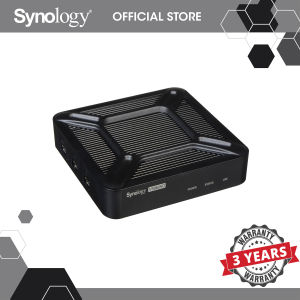
Synology VisualStation VS960HD is a network video decoder designed for high-definition video playback and media streaming. This ultra-compact companion system works seamlessly with Synology NAS, providing users with a PC-less surveillance management solution. It offers features of Surveillance Station, including live view and management tools.
What is Synology VisualStation VS960HD?
The Synology VisualStation VS960HD is a high-performance video decoder that enables users to view and manage surveillance footage without the need for a PC. This compact device supports HDMI output, allowing for high-definition video playback on LCD monitors or TVs. It also features USB ports for additional connectivity options.
Key Features & Specifications
- Ultra-compact design with dimensions of 32 x 130 x 130 mm and a weight of 380 g
- Supports HDMI output with resolutions up to 4K (3840 x 2160, 30Hz/60Hz) and 1080p (1920 x 1080, 60 Hz)
- USB ports: USB 3.0 x 1, USB 2.0 x 2
- LAN port: Gigabit x 1
- AC input power voltage: 100V to 240V AC
- Power frequency: 50Hz to 60Hz, single phase
PC-less Surveillance Management Solution
The Synology VisualStation VS960HD is the perfect alternative for users facing space or budget constraints. By connecting an Ethernet cable, users can easily set up a monitoring station with just an LCD monitor or TV and log in to Synology Surveillance Station for live view and management tools.
How to Set Up Synology VisualStation VS960HD
Setting up the Synology VisualStation VS960HD is straightforward and simple. Follow these steps to get started:
- Connect the Ethernet cable to the LAN port on the VisualStation VS960HD and your network router.
- Connect the HDMI cables to the VisualStation VS960HD and your display device (LCD monitor or TV).
- Power on the VisualStation VS960HD using the AC adapter.
- Log in to Synology Surveillance Station on your display device.
Connecting Ethernet & Display Devices
To connect the VisualStation VS960HD to your network, simply plug in the Ethernet cable to the LAN port on the device and your network router. Next, connect the HDMI cables to the VisualStation VS960HD and your display device. The VisualStation VS960HD supports both mirrored and extended display output, allowing for flexible viewing options.
Logging Into Synology Surveillance Station
After connecting the VisualStation VS960HD to your network and display device, power on the device using the AC adapter. Once powered on, log in to Synology Surveillance Station on your display device. From here, you can access live view and management tools for your surveillance system.
Benefits of Using Synology VisualStation VS960HD
The Synology VisualStation VS960HD offers several benefits for users looking for a high-quality video playback and management solution.
Space & Budget Constraints
The ultra-compact design of the VisualStation VS960HD makes it ideal for users with limited space. Additionally, its PC-less surveillance management solution allows for cost-effective monitoring without the need for a dedicated computer.
High-Quality Video Playback & Management
With support for HDMI output and resolutions up to 4K, the VisualStation VS960HD provides high-quality video playback for your surveillance system. Its integration with Synology Surveillance Station also offers advanced management tools for efficient monitoring and control.
Frequently Asked Questions About Synology VisualStation VS960HD
Supported Video Output Resolution
The VisualStation VS960HD supports HDMI output with resolutions up to 4K (3840 x 2160, 30Hz/60Hz) and 1080p (1920 x 1080, 60 Hz).
Power Supply & Compatibility
The VisualStation VS960HD requires an AC input power voltage of 100V to 240V AC and operates at a power frequency of 50Hz to 60Hz, single phase. It is compatible with a wide range of display devices, including LCD monitors and TVs.

Synology
Review

You May Also Like
BOBLOV B4K1 4K Body Mini Sports Action Camera: GPS, Night Vision & More
Automotive Reverse Camera Decoders Chip Maintains Original Images Orientation Improves Video Quality for RNS315 Systems
Xiaomi V380: A Comprehensive Guide to the 5G WiFi Smart Security Camera
V380 pro E27 LED cctv bulb camera HD 1080P PTZ Controls indoor and outdoor waterproof 360 rotation night vision two way audio wireless 2.4G wifi motion detection connection mobile phone remote monitoring CCTV camera
Microscope Lens Adapter M42 to C Mount Adapters Coupling Adapter Rings for Microscope M42x0.75mm Female to C Male

V380 Pro Q4S 4MP HD 1080P dual lens CCTV Camera 360 Wifi Security Camera Connect to Cellphone with voice Two Direction wide angle 1080P night visionbaby Motion Detection HD 1080P wireless indoor CCTV Camera two-way audio Surveillance
5W LED 2.5X/3.5X Head Wearing Dental Binocular Magnifier Medical Oral Headlight Rechargeable Lithium Battery
SC002 4K Hd Motion Camera Mini Sport Camera Portable Video Recorder Support Wifi 170° Wide Angle 1050mAh Battery IP68 Waterproof

8MP WIFI Dual-Lens Camera with Intelligent Tracking Color Night Vision and 5X Digital Zoom
SVBONY SV503 Professional Astronomical Telescope: Accurate Focus & ED Double Separation Lens

Hikvision Closed Circuit 2MP4CH8CHDVR with Audio Dome Bullet CCTV Camera Set with HD Mobile Phone Remote Monitoring IP67 Outdoor Waterproof Security Camera