NIIMBOT D11/D110/D101/H1/H1S Label Printer Paper & Mini Colorful Label Maker
NIIMBOT D11/D110/D101/H1/H1S Label Printer Paper & Mini Colorful Label Maker
What is NIIMBOT D11/D110/D101/H1/H1S Label Printer Paper?
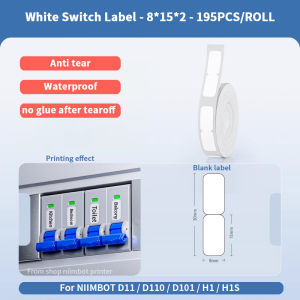
NIIMBOT D11/D110/D101/H1/H1S Label Printer Paper is a specialized thermal label printer paper designed for use with NIIMBOT's mini colorful label maker series. This paper is compatible with D11, D110, D101, H1, and H1S label printers, allowing users to print waterproof, anti-oil, and scratch-resistant labels for various applications such as cable labeling, wire cord data line price stick, and more.
Key Features of NIIMBOT Label Printer Paper
- Waterproof & Anti-Oil Stickers: These stickers can withstand exposure to water and oil, making them ideal for labeling items that may come into contact with liquids or greasy substances.
- Scratch-Resistant Label Tape: The label tape is designed to resist scratches, ensuring that the printed labels remain legible and visually appealing over time.
Compatible Devices: D11, D110, D101, H1, H1S
NIIMBOT D11/D110/D101/H1/H1S Label Printer Paper is compatible with the following devices:
- D11
- D110
- D101
- H1
- H1S
How to Use NIIMBOT D11/D110/D101/H1/H1S Label Printer Paper?
To make the most out of your NIIMBOT label printer paper, follow these step-by-step instructions for loading and printing labels.
Step-by-Step Guide: Loading & Printing Labels
- Load the Label Printer Paper: Open the label printer's cover and carefully insert the roll of label printer paper. Ensure that the paper is properly aligned with the printer's rollers.
- Connect the Label Printer: Connect the label printer to your computer or mobile device using the provided USB cable or Bluetooth connection.
- Design Your Labels: Use the NIIMBOT label maker software to design your labels. Choose from various fonts, colors, and layouts to create custom labels that meet your needs.
- Print Your Labels: Once you've designed your labels, send them to the label printer for printing. The printer will automatically cut the labels and dispense them for easy application.
Troubleshooting Common Issues
If you encounter any issues while using NIIMBOT D11/D110/D101/H1/H1S Label Printer Paper, refer to the following troubleshooting tips:
- Label Printer Not Printing: Check that the label printer is properly connected to your computer or mobile device. Ensure that the label printer paper is loaded correctly and that there are no obstructions blocking the printer's rollers.
- Labels Not Cutting Properly: Adjust the label printer's settings to ensure that the labels are being cut at the correct length. Check that the label printer's cutting blade is sharp and free of debris.
Benefits of Using NIIMBOT D11/D110/D101/H1/H1S Label Printer Paper
Using NIIMBOT D11/D110/D101/H1/H1S Label Printer Paper offers several benefits, including:
- Waterproof & Anti-Oil Stickers: These stickers can withstand exposure to water and oil, making them ideal for labeling items that may come into contact with liquids or greasy substances.
- Scratch-Resistant Label Tape: The label tape is designed to resist scratches, ensuring that the printed labels remain legible and visually appealing over time.
Where to Buy NIIMBOT D11/D110/D101/H1/H1S Label Printer Paper?
NIIMBOT D11/D110/D101/H1/H1S Label Printer Paper is available for purchase at local retailers and online marketplaces.
Local Stock Availability & Pricing
Check with local retailers to see if they carry NIIMBOT D11/D110/D101/H1/H1S Label Printer Paper in stock. Prices may vary depending on the retailer and location.
Online Shopping Options
Purchase NIIMBOT D11/D110/D101/H1/H1S Label Printer Paper online from trusted online marketplaces such as Amazon, eBay, and Walmart. Prices may vary depending on the seller and shipping options.

NIIMBOT Printer
You May Also Like
![[COD] Laogeliang Waste Ink Collector Box For Epson L1250 L3110 L3158 L3160 L3210 L3250 L1110 Printer Maintenance Box Waste Ink Pad Sponge](https://img.lazcdn.com/g/p/015e84366d0272f5f112fde47195fb18.jpg_300x300q80.jpg)
[COD] Laogeliang Waste Ink Collector Box For Epson L1250 L3110 L3158 L3160 L3210 L3250 L1110 Printer Maintenance Box Waste Ink Pad Sponge
DTF Adhesive Powder Hot Melt Powder High Quality 1Kg For DTF Printer PET Film Laser Toners
Color Photo Print Mini Printer Can Print Labels Photos Images Text URLs Gift Choice57*25mm Print
Fast Delivery Take a Number System Ticket Machine for Counter Queuing System with 3 Digit Roll Paper
3D Printer Tips Nozzle Assembly 3 Piece Set High Temperature Resistant Steel Enhances Durability For AD5X
QUAFF Magic photo00 Dye Ink for All Types of Inkjet Printer 100ml
NIIMBOT N1 Label Printer Portable Label Maker with Black Ribbon Cartridge and White Labels Support Multi-Color Printing Label Maker Machine for Indoor/Outdoor Equipment & Cable
2 Inch Bluetooth USB Barcode Label Printer: A Compact & Efficient Solution
Industrial Label Rewinder Automatic Speed Adjustment 12cm Paper Length Support

Memoking Print PodsPrinter - Inkless Sticker Printer Machine M02 Print Pod Bluetooth PortablePrinter for iPhone Thermal Pocket Printer Sticky Note Printer for Note Photo DIY Scrapbook
New Handheld Printer Portable Mini Intelligent Hand-Held Inkjet Printer Full-Automatic Small Inkjet Printers Date Of Production