RAYCO WiFi Smart LED Bulb: A Comprehensive Guide
RAYCO WiFi Smart LED Bulb: A Comprehensive Guide
Introduction to RAYCO WiFi Smart LED Bulb
What is a RAYCO WiFi Smart LED Bulb?
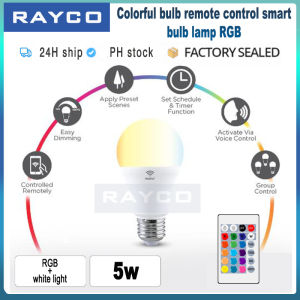
RAYCO WiFi Smart LED Bulbs are energy-efficient, voice-controlled lighting solutions that allow you to customize your home lighting experience. Available in 5W, 10W, and 15W options, these smart bulbs come equipped with advanced features that make them compatible with both Siri and Google Assistant.
Key Features & Benefits
- Voice Control: Easily adjust lighting settings using voice commands with Siri and Google Assistant.
- Color Changing Capabilities: Create vibrant color scenes and synchronize with music and movies for a personalized experience.
- Energy Efficiency: Save energy and reduce electricity bills by choosing the perfect wattage for your needs.
- Compatibility: Seamlessly integrate RAYCO WiFi Smart LED Bulbs with other smart devices and create custom automations.
Why Choose RAYCO?
RAYCO offers a wide range of smart LED bulbs that cater to different home automation needs. With its compatibility with popular voice assistants and color-changing capabilities, RAYCO provides a versatile solution for enhancing your smart home experience.
Setting Up Your RAYCO WiFi Smart LED Bulb
Installation Process
To install your RAYCO WiFi Smart LED Bulb, simply screw it into a standard light socket and plug it in. Make sure to follow the manufacturer's instructions for optimal performance.
Connecting to WiFi & Voice Control
To connect your RAYCO WiFi Smart LED Bulb to your home network, download the RAYCO app and follow the on-screen instructions. Once connected, you can control your bulbs using voice commands with Siri and Google Assistant.
Pairing with Siri & Google Assistant
Pairing your RAYCO WiFi Smart LED Bulbs with Siri and Google Assistant allows you to control your lighting with ease. Simply follow the setup process within the RAYCO app to get started.
Exploring RAYCO's Color Changing Capabilities
How to Change Colors
Using the RAYCO app, you can easily change the color of your smart LED bulbs. Simply select the desired color and adjust the brightness to achieve the perfect ambiance.
Creating Custom Color Scenes
Create custom color scenes tailored to your preferences by saving specific color combinations within the RAYCO app. This allows you to quickly switch between different lighting moods.
Syncing with Music & Movies
RAYCO WiFi Smart LED Bulbs can sync with your music and movies, creating a dynamic lighting experience that enhances your entertainment. Connect your devices to the RAYCO app to get started.
Maximizing Your Smart Home Experience
Integrating with Other Smart Devices
Seamlessly integrate RAYCO WiFi Smart LED Bulbs with other smart devices to create a cohesive home automation system. This allows you to control all your smart devices from one central hub.
Creating Custom Automations
Take your smart home experience to the next level by creating custom automations using the RAYCO app. Set up routines that automatically turn on or off your lights based on specific triggers.
Security & Privacy Considerations
When using RAYCO WiFi Smart LED Bulbs, it's important to prioritize security and privacy. Make sure to follow best practices for securing your home network and regularly update your smart devices.

RAYCO
You May Also Like
LED Ceiling Light Three-color Dimmable Energy-saving Chandelier Ring Dislocation Splicing Side Light Recessed Ceiling Indoor Lighting Fixtures Simplicity Bedroom Living Room Corridor Aisle Lamps
1-10PCS Outdoor Solar Tea Lights Realistic LED Candles for Patio Garden & Holiday Displays
Unbreakable Mirror Stickers Thicken Self-adhesive DIY Art Mirror Full Body Wall Stickers Decoration wardrobe Bathroom HD

1PC Natural Dragon Blood Stone Crystal Point Reiki Healing Stone Hexagonal Prisms Obelisk Wand Tower Energy Meditation DIY Gift

Creative Moon Light Projector Lamp Bedroom Table Lamp Earth Planet Atmosphere Lamp Children Night Light Photography Props

YESPERY 6Pcs 2025 New Year Red Lantern String with Chinese Knot Tassel Chinese Spring Festival Hanging Silk Lantern Window Door Traditional Festive Supplies

Vimite Solid Wood Motion sensing Wall Lights Paste Magnet Adsorption For Living Room Study Bedroom Bedside Hotel Corridor Night Light Decorative Lights
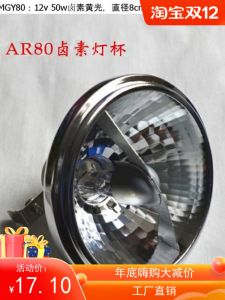
50W AR80 Iodine Lamp Quartz G5.3 Bulb Reflective Cup Tungsten Halogen Light Bulb Bold Concentrated Spotlight Home Decor Lighting
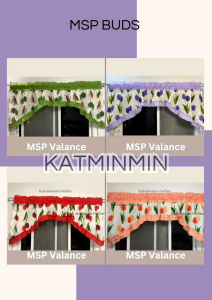
Geena Fabric Curtain: A Comprehensive Guide to Printed Curtain Buds & Decorative Window Curtains

Flower Printed Chair Pad for Outdoor Rocking Chair Cushion with Back Support Cushion Back Cushion for Car

One Head Lily Artificial Lily Artificial Flower With Leaves Flower Gift For Home/Office/Garden Decor