SHURE MOTIV MV7X VERSION Podcast Microphone [MV7-XLR]
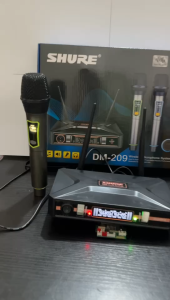
Shure. Shure Microphone Original Condenser: The original condenser pickup system is designed with the original microphone in mind. Shure Wireless Microphone Original: Noise-canceling microphone reduces ambient noise and enhances sound quality. Shure Sm57 Windscreen: Sm57 windscreen is engineered to absorb the sound of the mic. Condenser Mic Shure: The mv7 is equipped with a multi-directional microphone shure that automatically picks up and mounts to the sound of the microphone. Dynamic Microphone: The mv7 pickup microphone reduces ambient noise and picks up with a triple-reinforced, flexible mic that picks perfectly with your voice. Inspired by the legendary SM7B, the MV7 is a dynamic microphone with both USB and XLR outputs for use with computers and professional interfaces alike. Connect via USB and explore additional set-up features and Auto Level Mode within our ShurePlus MOTIV app, to control your vocal tone, and distance from the microphone. With Auto Level Mode, you can let the

SHURE
Review
You May Also Like

Replacement Earbuds Tips For Tune Beam Earphones Soft Silicone Earbuds Covers Comfort And Securedly Fit During Workouts

P2961 Wireless Headphone Bluetooth Foldable Headset with Built-in Microphone

BOSCA D10 OK HIFI Amplifier Board: A Comprehensive Guide\\n\\n Introduction to BOSCA D10 OK HIFI Amplifier Board\\n\\nThe BOSCA D10 OK HIFI Amplifier Board is a versatile, high-quality power amplifier designed to provide an exceptional audio experience for car enthusiasts and audiophiles alike. This amplifier board supports both AC 220V and DC 12V/24V power sources, making it compatible with a wide range of devices. It also features a built-in Bluetooth 5.0 module, allowing seamless connectivity to various Bluetooth-enabled devices.\\n\\n Key Features of the Amplifier Board\\n\\n- **Supports AC 220V and DC 12V/24V power sources**: Ensuring compatibility with a wide range of devices and applications.\\n- **Built-in Bluetooth 5.0 module**: Enables wireless connectivity to Bluetooth-enabled devices, providing a hassle-free audio experience.\\n- **High-quality audio output**: The BOSCA D10 OK HIFI Amplifier Board delivers crystal-clear sound with excellent bass response, making it perfect for enhancing your car audio system.\\n\\n How to Choose the Right Amplifier Board\\n\\nWhen selecting an amplifier board, consider the following factors:\\n\\n- **Power requirements**: Ensure the amplifier board is compatible with your power source, whether it's AC 220V or DC 12V/24V.\\n- **Audio quality**: Look for an amplifier board that offers high-quality audio output, with a focus on clear sound and excellent bass response.\\n- **Connectivity options**: Consider the available connectivity options, such as Bluetooth, to ensure seamless integration with your existing audio devices.\\n\\n Setting Up Your Amplifier Board\\n\\nTo set up your BOSCA D10 OK HIFI Amplifier Board, follow these steps:\\n\\n Connecting Power Sources: AC 220V & DC 12V/24V\\n\\n- **For AC 220V**: Connect the power cord to the amplifier board and plug it into a standard AC outlet.\\n- **For DC 12V/24V**: Connect the DC line to the amplifier board and connect the other end to your vehicle's battery or a DC power supply.\\n\\n Connecting the Remote Control & Speaker Cable\\n\\n- **Remote control**: Insert the remote control's batteries and press the \"ON/OFF\" button to turn on the amplifier board.\\n- **Speaker cable**: Connect the speaker cable to the amplifier board and your speakers.\\n\\n Using the BOSCA D10 OK HIFI Amplifier Board\\n\\nNow that your amplifier board is set up, you can start enjoying your music!\\n\\n How to Connect the Amplifier Board to Bluetooth Devices\\n\\n1. Press the \"SOURCE\" button on the remote control until \"BT\" appears on the display.\\n2. On your Bluetooth-enabled device, go to the Bluetooth settings and search for available devices.\\n3. Select \"BOSCA D10 OK HIFI Amplifier Board\" from the list of available devices.\\n4. Once connected, you can stream music wirelessly from your device to the amplifier board.\\n\\n Controlling the Amplifier Board Using the Remote Control\\n\\nUse the remote control to adjust the volume, switch between audio sources, and access other features.\\n\\n Troubleshooting Common Issues\\n\\nIf you encounter any issues while using the BOSCA D10 OK HIFI Amplifier Board, try the following solutions:\\n\\n Amplifier Board Not Turning On\\n\\n- Check the power source connection and ensure it's properly connected.\\n- Verify that the remote control's batteries are inserted correctly and have sufficient power.\\n\\n Audio Quality Issues\\n\\n- Adjust the equalizer settings on your audio source device to optimize the sound output.\\n- If you're experiencing interference or static, try moving the amplifier board away from potential sources of electromagnetic interference.\\n\\n Conclusion & Final Thoughts\\n\\nThe BOSCA D10 OK HIFI Amplifier Board is a powerful, high-quality amplifier that offers a versatile audio solution for car enthusiasts and audiophiles. With its support for AC 220V and DC 12V/24V power sources, built-in Bluetooth 5.0 module, and easy-to-use remote control, this amplifier board is a must-have addition to any audio setup. Enjoy your music like never before with the BOSCA D10 OK HIFI Amplifier Board!\"\n}

QKZ AK6 Ares/Plus/Day Dynamic Earphone HIFI Music Ear Earphones Sport Noise Cancelling Earphones

ZK-TB21 Bluetooth 2.1 Channel Amplifier 160W*2+220W DIY Digital Audio Module na may Subwoofer

Soundcore K20i Wireless Earbuds: A Comprehensive Guide

Kevler ZLX-10D 10 inch 300 watts Active Plastic Moulded Loudspeaker ( 1 PC )

Compact Stereo Amplifier Module TB21 Bluetooth 50 TDA7498E Subwoofer

JBL Wave Beam True Wireless Bluetooth Earbuds

JBL Bar 1000 | 7.1.4 Channel Soundbar

【Local Shipping】Authentic Sony WH-1000XM4 Headphones Bluetooth with Mic Wireless Noise Canceling Gaming Headset Bluetooth Sony Headset Wireless


![SHURE MOTIV MV7X VERSION Podcast Microphone [MV7-XLR]](https://img.lazcdn.com/g/p/99e8099e25d72bf34115d75c1676da7c.png_300x300q80.png)