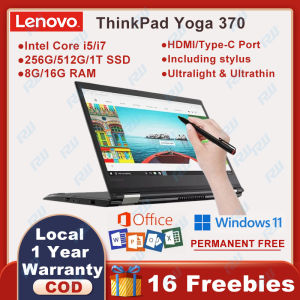
Lenovo ThinkPad Yoga 260 & 370: A Comprehensive Guide
Lenovo ThinkPad Yoga 260 & 370: A Comprehensive Guide
Introduction to Lenovo ThinkPad Yoga 260 & 370
The Lenovo ThinkPad Yoga 260 and 370 are two powerful 2-in-1 tablet computers that cater to both personal and business needs. Both models come equipped with Intel i7/i5 dual-core processors, Windows 11 Pro with MS Office, and a 12.5 inch touch screen laptop design, making them perfect for online classes, learning, and productivity.
Key Features & Specifications
Lenovo ThinkPad Yoga 260
- Processor: Intel Quad/Dual-Core i7/i5 6600u/6200u @ 2.6GHz-3.4GHz / 2.3GHz-2.8GHz
- RAM: DDR4 8G/16G
- SSD: NVME 128G/256G/512G/1T
- Display Size: 12.5 Inches
- Ports: 2 x USB 3.0 (one Always On) + Mini DisplayPort™ + HDMI + microSD + Combo audio/microphone jack
Lenovo ThinkPad Yoga 370 / X380
- Processor: Intel Dual-Core i5/I7 7200u/7600u @ 2.5GHz-3.9Hz (Yoga 370), Intel Quad-Core i5/I7 8250u/8550u @1.60 GHz - 4.00 GHz (Yoga X380)
- RAM: DDR4 8G/16G
- SSD: 256G/512G/1T
- Display Size: 13.3 Inch FHD
- Ports: 2x USB 3.0 (1x mit Always-On-Ladefunktion), Thunderbolt™ 3 , microSD , HDMI , Audio,Type-C
Comparison Between Yoga 260 & Yoga 370
Both models offer similar features, but the Yoga 370 has a slightly larger display size (13.3 inches) and a more powerful processor compared to the Yoga 260. Additionally, the Yoga 370 has a Thunderbolt™ 3 port, while the Yoga 260 has a Mini DisplayPort™.
How to Choose the Right Lenovo ThinkPad Yoga for Your Needs
Identifying Your Primary Use Case
Before choosing between the Yoga 260 and 370, consider your primary use case. If you're looking for a device primarily for online classes and learning, the Yoga 260 may be sufficient. However, if you need a more powerful device for work or demanding applications, the Yoga 370 might be a better fit.
Evaluating Processor & RAM Requirements
Both models offer Intel i7/i5 dual-core processors and DDR4 8G/16G RAM. If you require a more powerful processor for work or demanding applications, consider the Yoga 370.
Considering Display Size & Resolution
The Yoga 260 has a 12.5-inch display, while the Yoga 370 has a 13.3-inch FHD display. Consider your preference for screen size and resolution before making a decision.
Setting Up Your Lenovo ThinkPad Yoga
Unboxing & Initial Setup
Upon unboxing your new Lenovo ThinkPad Yoga, follow the initial setup instructions to connect to Wi-Fi, install necessary software, and set up your account.
Connecting Peripherals & Accessories
Both models come with a variety of freebies, including a laptop bag, mouse, mouse pad, keyboard protective film, USB flash drive, USB hub, laptop bracket, USB LED lamp, USB fan, earphone, screen protection film, Windows 11 Pro, MS Office, and a review reward of 200P.
Installing Necessary Software & Updates
Make sure to install all necessary software and updates to ensure optimal performance and security.
Maximizing Productivity With Lenovo ThinkPad Yoga
Utilizing the 2-in-1 Design & Stylus Pen
The 2-in-1 design allows you to switch between tablet and laptop modes, making it perfect for online classes, learning, and productivity. Additionally, the stylus pen allows for precise drawing and note-taking.
Customizing Settings for Optimal Performance
Customize settings such as power management, display brightness, and audio settings to optimize performance and battery life.
Managing Battery Life & Power Consumption
To maximize battery life, adjust power settings, close unnecessary applications, and limit screen brightness.
Conclusion & Final Thoughts
The Lenovo ThinkPad Yoga 260 and 370 are powerful 2-in-1 tablet computers that cater to both personal and business needs. Both models come equipped with Intel i7/i5 dual-core processors, Windows 11 Pro with MS Office, and a 12.5 inch touch screen laptop design, making them perfect for online classes, learning, and productivity. Consider your primary use case, processor and RAM requirements, and display size and resolution before choosing between the two models.

RoWind PC
You May Also Like
Intelligent Power Reset Cable Router Rebooter WiFi Reset Router Timing Restart Module 24/72 Hour Automatic Restart
1.5V Li Box With Overcharge Protections for Electronics Toy Household Devices Power Supply
MCU-93 MLX90333 Module Handle Joystick Sensory Absolute Position Digital Three Dimensional Angled Sensory Module
Multiple Protocols Charging Triggering Board Stable Voltages Output Via DIP Switches Control Type C USB Compatible
Wireless 15.6-inch Portable Monitor suitable for Wi-Fi projection on laptops Mac computers iphone and Android phon
120mm 12cm 220V Axial fan 220V cooling fan 220V exhaust fan for incubator blower fan slim
EcoFlow Delta 3 Portable Power Station Ultra-Quiet Operation for Backup Power Home Office Outdoors
LRS Switching Power Supply Mingwei 50/100W/350w220V to 24V DC 12V Monitoring Led Transformer Adjustable
Type C to 3.5mm Auxs Adapter 3.5 Jacks Headphone Sound Adapter for 3.5mm Auxs Adputer
(Cod)- Avr-2000va 1600watts Avr Intelligent Voltage Regulator 160-260v Voltage Stabilizers 220v 110v Output Protect Your PC
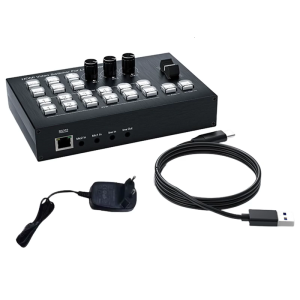
30Hz Alterer 1080P Output Multiple Device Agreement Live Broadcast Studio Video Combiner