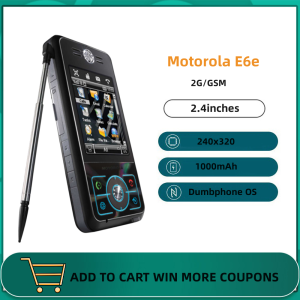
Original Motorola E6e 2.4 Inches GSM 1 SIM 2MP Camera JAVA 1000mAh Bar MP3 Unlocked Cellphone
Original Motorola E6e 2.4 Inches GSM 1 SIM 2MP Camera JAVA 1000mAh Bar MP3 Unlocked Cellphone
Overview of the Motorola E6e
The Motorola E6e is a classic GSM smartphone that offers a reliable and user-friendly experience. This unlocked phone supports 1 SIM card and comes equipped with a 2MP camera, making it perfect for capturing memorable moments. The device is compatible with Java applications, allowing users to enjoy a wide range of features. Additionally, the Motorola E6e boasts a 1000mAh battery and an integrated MP3 player for extended entertainment.
Key Features
- 2.4-inch screen for easy navigation
- 1 SIM card support
- 2MP camera for capturing memories
- Java compatibility for a wide range of applications
- 1000mAh battery for extended use
- Integrated MP3 player for music enjoyment
Included Accessories
The Motorola E6e comes with a variety of accessories to enhance your experience:
- 1 x Original phone
- 1 x Quality battery
- 1 x New charger (EU, UK, US charger offer)
- 1 x Earphone
- 1 x User manual
- 1 x Box
How to Use the Motorola E6e
Setting Up Your Phone
To get started with your Motorola E6e, follow these simple steps:
- Charge your phone using the provided charger.
- Insert your SIM card into the designated slot.
- Power on your device by pressing and holding the power button.
- Follow the on-screen instructions to set up your phone.
Making Calls & Sending Text Messages
Using the Motorola E6e to make calls and send text messages is straightforward:
- To make a call, dial the desired number using the keypad and press the green call button.
- To send a text message, open the messaging app, enter the recipient's number, type your message, and press the send button.
Using the Camera & MP3 Player
Capture memories and enjoy music with the Motorola E6e's built-in features:
- Access the camera app to take photos and videos.
- Use the integrated MP3 player to listen to your favorite tunes.
Battery Life & Charging Tips
Battery Capacity
The Motorola E6e is equipped with a 1000mAh battery, providing sufficient power for everyday use. To maximize battery life, consider the following tips:
- Adjust screen brightness according to your needs.
- Turn off Wi-Fi and Bluetooth when not in use.
- Limit the number of running applications.
Charging Options
Charge your Motorola E6e using the included charger, which supports EU, UK, and US plug types. Connect the charger to a power outlet and insert the other end into the phone's charging port. The charging process will begin automatically.
Troubleshooting Common Issues
If you encounter any issues with your Motorola E6e, refer to the user manual or contact customer support for assistance. Some common problems and their solutions include:
- Phone not turning on: Ensure the battery is properly charged and inserted.
- Unable to connect to Wi-Fi: Check if the Wi-Fi network is available and try resetting the phone's network settings.
- Slow performance: Clear cache and close unnecessary applications.

Refly
Review

You May Also Like
SOYES XS24 Pro 3G: A Compact Smartphone with Big Features
Sony Ericsson W350 Original Unlocked W350C W350i 2.0 inches 2MP Mobile Phones
Global Version Mini S24Ultra 4G Smartphone: A Comprehensive Guide
KUH T3 Single Core Rugged Mobile Phone: A Perfect Companion for Outdoor Adventures

Realistic Fish and Star Shaped Mobile Phone Lanyard Handmade Keychain Pendant Mobile Accessories for Men and Women
Unlocked Nokia 5310 XpressMusic: Features & Benefits
Apple iPhone 17 Pro (6.3 inch)
HTC U Ultra Mobile Phone Original Unlocked 4GB RAM 64GB ROM LTE 12MP Camera 2160P Dual SIM Fingerprint Android Phone
Blackberry Leap Z20 Original Dual Core 5.0" 4G TouchScreen 16GB ROM 8MP Camera Mobile Phones
POCO C65/C75 Smartphone 8GM + 256GB ROM 50MP AI Triple Camera 6.88" Smooth 90Hz Display
Samsung Galaxy Note 2 II N7105 8MP Camera Quad-Core 5.5 Touch Lte Note2 Original Unlocked Smartphone