Terminal Box 4 Port LC/UPC Duplex: High-Speed Data Transfer Solutions
Terminal Box 4 Port LC/UPC Duplex: High-Speed Data Transfer Solutions
What is a Terminal Box 4 Port LC/UPC Duplex?
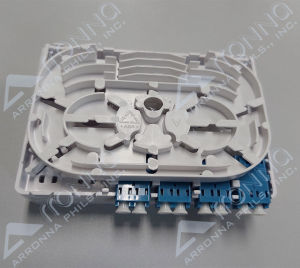
A Terminal Box 4 Port LC/UPC Duplex is a network terminal box designed specifically for high-speed data transfer applications. It is equipped with four LC/UPC duplex connectors, which enable reliable and efficient optical fiber connections. These connectors ensure minimal signal loss and interference, making the Terminal Box 4 Port LC/UPC Duplex an ideal choice for businesses and organizations that require robust, high-performance data transfer solutions.
Key Features of Terminal Box 4 Port LC/UPC Duplex
-
High-speed data transfer: The Terminal Box 4 Port LC/UPC Duplex is built to handle large volumes of data at high speeds, making it perfect for applications that require fast and reliable connectivity.
-
LC/UPC duplex connectors: Each port features an LC/UPC duplex connector, providing a secure and low-loss connection for optical fibers.
-
Compact design: Despite its powerful capabilities, the Terminal Box 4 Port LC/UPC Duplex has a compact form factor, making it easy to install and integrate into existing network infrastructures.
-
Compatibility: This terminal box is compatible with a wide range of optical fiber types, ensuring seamless integration with various network configurations.
Benefits of Using Terminal Box 4 Port LC/UPC Duplex
By choosing a Terminal Box 4 Port LC/UPC Duplex, businesses and organizations can enjoy numerous benefits, including:
-
Improved network performance: With its high-speed data transfer capabilities, this terminal box can significantly enhance overall network performance and efficiency.
-
Reliable connectivity: The LC/UPC duplex connectors provide secure and low-loss connections, ensuring consistent and reliable data transmission.
-
Scalability: The Terminal Box 4 Port LC/UPC Duplex can easily accommodate future network expansions, allowing businesses to adapt and grow as needed.
-
Cost-effective: By investing in a high-quality terminal box, businesses can avoid costly downtime and maintenance associated with inferior alternatives.
How to Choose the Right Terminal Box 4 Port LC/UPC Duplex
Selecting the appropriate Terminal Box 4 Port LC/UPC Duplex requires careful consideration of several factors, including:
-
Network requirements: Assess the specific needs of your network infrastructure to determine the most suitable terminal box.
-
Compatibility: Ensure the terminal box is compatible with your existing optical fiber types and network configurations.
-
Performance: Consider the desired level of data transfer speed and reliability when choosing a Terminal Box 4 Port LC/UPC Duplex.
-
Budget: Determine the budget for your terminal box purchase and find a solution that offers the best value for money.
Comparing Terminal Box 4 Port LC/UPC Duplex Models
When comparing different models of Terminal Box 4 Port LC/UPC Duplex, pay attention to the following aspects:
-
Connector quality: Opt for terminal boxes with high-quality LC/UPC duplex connectors to ensure optimal performance.
-
Build quality: Look for terminal boxes with durable construction to withstand the demands of daily use.
-
Brand reputation: Choose terminal boxes from reputable manufacturers known for producing high-quality products.
-
Customer support: Consider the level of customer support offered by the manufacturer, as this can be crucial in resolving any issues that may arise.
Setting Up Your Terminal Box 4 Port LC/UPC Duplex
To set up your Terminal Box 4 Port LC/UPC Duplex, follow these steps:
-
Install the terminal box: Mount the terminal box in a convenient location within your network infrastructure.
-
Connect the optical fibers: Attach the optical fibers to the LC/UPC duplex connectors on the terminal box.
-
Configure the terminal box: Set up the terminal box according to the manufacturer's instructions to ensure proper operation.
-
Test the connection: Verify the quality of the connections by testing the data transfer speed and reliability.
Configuring a Terminal Box 4 Port LC/UPC Duplex for High-Speed Data Transfer
To optimize the performance of your Terminal Box 4 Port LC/UPC Duplex, consider the following configuration tips:
-
Use high-quality optical fibers: Invest in top-notch optical fibers to minimize signal loss and interference.
-
Keep connections clean: Regularly inspect and clean the LC/UPC duplex connectors to maintain optimal performance.
-
Monitor network traffic: Track data transfer patterns to identify potential bottlenecks and optimize network efficiency.
-
Upgrade hardware as needed: Replace outdated or worn-out components to keep your network running smoothly.
Maintaining Your Terminal Box 4 Port LC/UPC Duplex
To ensure the longevity and optimal performance of your Terminal Box 4 Port LC/UPC Duplex, adhere to these maintenance best practices:
-
Regular inspections: Conduct routine checks to identify any issues that may affect performance.
-
Cleaning: Clean the LC/UPC duplex connectors regularly to prevent dust buildup and contamination.
-
Monitoring: Continuously monitor network traffic to detect potential problems early on.
-
Software updates: Keep the terminal box's firmware up-to-date to take advantage of the latest features and improvements.
Troubleshooting Common Issues with Terminal Box 4 Port LC/UPC Duplex
If you encounter any issues with your Terminal Box 4 Port LC/UPC Duplex, refer to the following troubleshooting tips:
-
Check connections: Verify that all optical fibers are securely connected to the LC/UPC duplex connectors.
-
Inspect hardware: Look for any signs of damage or wear on the terminal box components.
-
Check software settings: Review the terminal box's configuration settings to ensure they are optimized for your network requirements.
-
Contact support: Reach out to the manufacturer's customer support team for assistance if you're unable to resolve the issue on your own.

Arronna Phils Inc
Review

You May Also Like
Replace Curtis 1244 1244-5561 1244-5651 1244-6661 36V 48V 60V 72V 80V 500A 600A SEPEX Motor Controller 36 48 60 72 80 Volt 500 600 Amp for Curtis Industrial Vehicle Material Handling Truck Personnel Carrier Golf Cart Pallet

Retail And Wholesale 304 Universal Rotatable Fuller Faucet Home Tools Brass Wall Single Cold Kitchen Balcony Water Taps

Heavy Duty Magnetic Hook Strong Neodymium Magnets Hooks Refrigerator Grill Key Towel Holder for Home Office

【10/30/50Pcs】Transparent Strong Adhesive Hooks Wholesale Clear Wall Hooks Door Back Hooks for Hanging Kitchen Bathroom Storage Holders Hanger

KLIMO Thumb Up Shape Hook soft Wire Cable Holder Multifunctional Plant Vines Clip Random Color 10pcs

6MM (1.0P) BH HEX BOLT | GOLD PLATED CAPSCREW ORDINARY | TETANIZED HEXAGONAL BOLT

YANGS 3M Sticker Adhesive Stainless Steel Wall Hook Black Hanging Bags Key Hangers Multi-Purpose Heavy Duty Towel Holder for Home
PVC Blue Coupling Water Pipeline Fittings Straight Equal Connector 1/2\" 3/4 1

D-4143 1PCS Resettable 3 Digit Combination Lock Padlock for Suitcase

YS【COD】【24H delivery】 304 stainless steel barrier-free toilet room disabled toilet toilet washbasin safe handrail for urin 304 stainless steel Bathroom Tub Toilet Stainless Steel Handrail Grab Bar Shower Safety Support Hand

Pet Fur Remover Roller Dog Cat Hair Lint Remover Reusable Sofa Clothing Hair Cleaning Brush