XPRINTER Waybill Printer: Specifications & Online Selling

XPRINTER Waybill Printer: Specifications & Online Selling

What is an XPRINTER Waybill Printer?

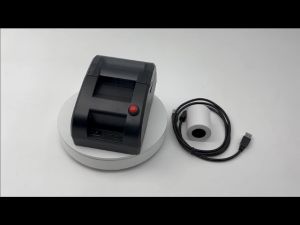
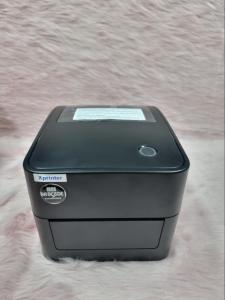
An XPRINTER Waybill Printer is a high-performance device designed specifically for printing shipping labels, waybills, and other essential documents for e-commerce businesses and logistics companies. With its compact size, ease of use, and reliable performance, the XPRINTER Waybill Printer is the perfect solution for businesses looking to streamline their shipping operations.

Key Features of the XPRINTER Waybill Printer

The XPRINTER Waybill Printer boasts several features that make it stand out from other waybill printers on the market:

  • High-speed printing: With a print speed of up to 150 mm/s, the XPRINTER Waybill Printer can quickly generate shipping labels and waybills, reducing downtime and increasing efficiency.
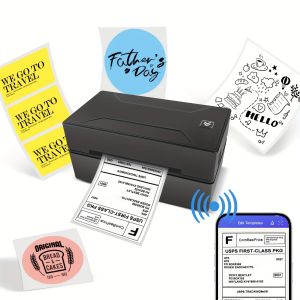
  • Bluetooth connectivity: The printer supports Bluetooth 4.0, allowing for seamless integration with smartphones, tablets, and other mobile devices.
  • Compact design: The printer's small footprint makes it easy to fit into tight spaces, such as workstations or delivery vehicles.
  • Durable construction: Built with high-quality materials, the XPRINTER Waybill Printer is designed to withstand the rigors of daily use in a busy shipping environment.

How Does the XPRINTER Waybill Printer Work?

The XPRINTER Waybill Printer works by connecting to a compatible device, such as a smartphone or tablet, via Bluetooth. Once connected, users can easily generate shipping labels and waybills using a compatible app or software. The printer then prints the document using thermal technology, which produces crisp, clear images that are resistant to fading and smudging.

Choosing the Right Waybill Printer for Your Business

When selecting a waybill printer for your business, it's important to consider several factors, including print speed, connectivity options, and ease of use. Two popular types of waybill printers are Bluetooth airwaybill printers and thermal waybill printers.

Bluetooth Airwaybill Printer vs Thermal Waybill Printer

While both types of printers offer similar functionality, there are some key differences to consider:

  • Print speed: Thermal waybill printers generally have faster print speeds than Bluetooth airwaybill printers, making them ideal for businesses that need to generate large volumes of shipping labels and waybills quickly.
  • Connectivity options: Bluetooth airwaybill printers typically offer wireless connectivity via Bluetooth, while thermal waybill printers may support wired connections via USB or Ethernet.
  • Ease of use: Both types of printers are relatively easy to use, but thermal waybill printers may require more setup and configuration compared to Bluetooth airwaybill printers.

Online Selling Waybill Printer: Pros & Cons

For online sellers, choosing the right waybill printer can help streamline their shipping operations and improve efficiency. Some advantages of using a waybill printer include:

  • Increased speed: Waybill printers can quickly generate shipping labels and waybills, reducing the time it takes to prepare orders for shipment.
  • Improved accuracy: Waybill printers can reduce errors caused by manual data entry, ensuring that shipping labels and waybills are accurate and up-to-date.
  • Cost savings: By reducing the time and effort required to prepare orders for shipment, waybill printers can help online sellers save money on labor costs.

However, there are some potential drawbacks to consider as well:

  • Initial investment: Waybill printers can be expensive upfront, which may be a barrier for some online sellers.
  • Maintenance: Like any piece of equipment, waybill printers require regular maintenance and upkeep to ensure they continue to function properly.

Setting Up Your XPRINTER Waybill Printer

Setting up your XPRINTER Waybill Printer is a straightforward process that can be completed in just a few simple steps. Here's a step-by-step guide to get you started:

  1. Unbox and inspect the printer: Carefully remove the printer from its packaging and inspect it for any damage or defects.
  2. Connect the power adapter: Plug the power adapter into the printer and then into a power outlet.
  3. Install the thermal paper roll: Insert the thermal paper roll into the printer according to the manufacturer's instructions.
  4. Connect the printer to your device: Pair the printer with your smartphone, tablet, or other compatible device via Bluetooth.
  5. Install the app or software: Download and install the compatible app or software on your device.
  6. Generate shipping labels and waybills: Use the app or software to generate shipping labels and waybills, then print them using the XPRINTER Waybill Printer.

Troubleshooting Common Issues

If you encounter any issues with your XPRINTER Waybill Printer, here are some common solutions:

  • Printer not connecting: Ensure that Bluetooth is enabled on both the printer and your device. If the issue persists, try resetting the printer or reinstalling the app/software.
  • Print quality issues: Check that the thermal paper roll is properly installed and not damaged. If the issue persists, try cleaning the printer's print head or replacing the thermal paper roll.

Maximizing Efficiency with Your XPRINTER Waybill Printer

To get the most out of your XPRINTER Waybill Printer, consider implementing these tips for optimal performance:

  • Regular maintenance: Clean the printer's print head and other components regularly to ensure optimal print quality.
  • Proper storage: Store the printer in a cool, dry place when not in use to prevent damage.
  • Use high-quality thermal paper: Using high-quality thermal paper can help improve print quality and reduce the risk of paper jams.
  • Keep the app/software up-to-date: Regularly updating the app/software can help ensure compatibility with the printer and improve performance.

Conclusion & Final Thoughts

In conclusion, the XPRINTER Waybill Printer is a powerful tool for e-commerce businesses and logistics companies looking to streamline their shipping operations. With its high-speed printing, Bluetooth connectivity, and durable construction, the XPRINTER Waybill Printer offers a reliable solution for generating shipping labels and waybills.

If you're considering purchasing an XPRINTER Waybill Printer, be sure to check out our additional resources and support options, including our online forums, customer service team, and user manual.

brocode philippines
brocode philippines

Seller ratings 100%

Review

Oops
This video has no reviews.

You May Also Like

In Stock Dx11 Xp600 Printhead Cap Top Capping for Eco Solvent Printer Machine
00:10

In Stock Dx11 Xp600 Printhead Cap Top Capping for Eco Solvent Printer Machine

Metal Textured Bed Plate Cold Plate Strong Adhesion Double Sided Epoxy Coated For H2D 3D Printer Accessories
00:12

Metal Textured Bed Plate Cold Plate Strong Adhesion Double Sided Epoxy Coated For H2D 3D Printer Accessories

AOS Compatible TN267 Toner Cartridge for Brother HL-L3210CW/3230CDN/3270CDW DCP-L3551CDW MFC-L3735CDN/L3750CDW/L3770CDW\\n\\n Introduction to AOS Compatible TN267 Toner Cartridge\\n\\nThe AOS Compatible TN267 Toner Cartridge is a high-quality replacement toner designed specifically for select Brother printer models. This toner cartridge is compatible with Brother HL-L3210CW/3230CDN/3270CDW, DCP-L3551CDW, and MFC-L3735CDN/L3750CDW/L3770CDW printers. With its superior printing performance, cost-effective solution, and easy installation process, the AOS Compatible TN267 Toner Cartridge is an ideal choice for businesses and individuals looking for a reliable alternative to Brother's original toner cartridges.\\n\\n Key Features of AOS Compatible TN267 Toner Cartridge\\n\\n High-Quality Printing Performance\\n\\nThe AOS Compatible TN267 Toner Cartridge delivers sharp, clear, and consistent print quality that rivals Brother's original toner cartridges. The toner particles are evenly distributed, ensuring a smooth and uniform finish on every page. This makes it perfect for printing documents, reports, presentations, and other important materials that require high-quality output.\\n\\n Cost-Effective Solution\\n\\nCompared to Brother's original toner cartridges, the AOS Compatible TN267 Toner Cartridge offers significant cost savings without compromising on print quality. By choosing AOS Compatible TN267 Toner Cartridge, users can save up to 50% on their printing costs, making it an excellent choice for businesses and individuals looking to reduce their printing expenses.\\n\\n Easy Installation Process\\n\\nInstalling the AOS Compatible TN267 Toner Cartridge is simple and straightforward. Just follow these steps:\\n\\n1. Turn off the printer and unplug it from the power source.\\n2. Open the printer cover and remove the old toner cartridge.\\n3. Carefully remove the new AOS Compatible TN267 Toner Cartridge from its packaging.\\n4. Insert the new toner cartridge into the printer and close the cover.\\n5. Plug the printer back into the power source and turn it on.\\n\\n Compatible Brother Printer Models\\n\\nThe AOS Compatible TN267 Toner Cartridge is compatible with the following Brother printer models:\\n\\n- DCP-L3551CDW\\n- MFC-L3735CDN/L3750CDW/L3770CDW\\n- Brother HL-L3210CW/3230CDN/3270CDW\\n\\n How to Choose the Right Toner Cartridge\\n\\nWhen selecting a toner cartridge for your Brother printer, consider the following factors:\\n\\n Assessing Printer Compatibility\\n\\nMake sure the toner cartridge you choose is compatible with your specific Brother printer model. The AOS Compatible TN267 Toner Cartridge is designed for select Brother printer models, including DCP-L3551CDW, MFC-L3735CDN/L3750CDW/L3770CDW, and Brother HL-L3210CW/3230CDN/3270CDW.\\n\\n Evaluating Quality and Reliability\\n\\nLook for a toner cartridge that delivers high-quality print results consistently. The AOS Compatible TN267 Toner Cartridge is known for its superior print quality, making it a reliable choice for businesses and individuals.\\n\\n Considering Cost and Value\\n\\nConsider the cost of the toner cartridge and its value relative to other options available. The AOS Compatible TN267 Toner Cartridge offers significant cost savings compared to Brother's original toner cartridges, making it an excellent value for users.\\n\\n Conclusion & Next Steps\\n\\nIn conclusion, the AOS Compatible TN267 Toner Cartridge is a high-quality replacement toner cartridge designed specifically for select Brother printer models. With its superior print quality, cost-effective solution, and easy installation process, it is an excellent choice for businesses and individuals looking for a reliable alternative to Brother's original toner cartridges. We encourage users to try the AOS Compatible TN267 Toner Cartridge and experience the benefits firsthand.\"
00:28

AOS Compatible TN267 Toner Cartridge for Brother HL-L3210CW/3230CDN/3270CDW DCP-L3551CDW MFC-L3735CDN/L3750CDW/L3770CDW\\n\\n Introduction to AOS Compatible TN267 Toner Cartridge\\n\\nThe AOS Compatible TN267 Toner Cartridge is a high-quality replacement toner designed specifically for select Brother printer models. This toner cartridge is compatible with Brother HL-L3210CW/3230CDN/3270CDW, DCP-L3551CDW, and MFC-L3735CDN/L3750CDW/L3770CDW printers. With its superior printing performance, cost-effective solution, and easy installation process, the AOS Compatible TN267 Toner Cartridge is an ideal choice for businesses and individuals looking for a reliable alternative to Brother's original toner cartridges.\\n\\n Key Features of AOS Compatible TN267 Toner Cartridge\\n\\n High-Quality Printing Performance\\n\\nThe AOS Compatible TN267 Toner Cartridge delivers sharp, clear, and consistent print quality that rivals Brother's original toner cartridges. The toner particles are evenly distributed, ensuring a smooth and uniform finish on every page. This makes it perfect for printing documents, reports, presentations, and other important materials that require high-quality output.\\n\\n Cost-Effective Solution\\n\\nCompared to Brother's original toner cartridges, the AOS Compatible TN267 Toner Cartridge offers significant cost savings without compromising on print quality. By choosing AOS Compatible TN267 Toner Cartridge, users can save up to 50% on their printing costs, making it an excellent choice for businesses and individuals looking to reduce their printing expenses.\\n\\n Easy Installation Process\\n\\nInstalling the AOS Compatible TN267 Toner Cartridge is simple and straightforward. Just follow these steps:\\n\\n1. Turn off the printer and unplug it from the power source.\\n2. Open the printer cover and remove the old toner cartridge.\\n3. Carefully remove the new AOS Compatible TN267 Toner Cartridge from its packaging.\\n4. Insert the new toner cartridge into the printer and close the cover.\\n5. Plug the printer back into the power source and turn it on.\\n\\n Compatible Brother Printer Models\\n\\nThe AOS Compatible TN267 Toner Cartridge is compatible with the following Brother printer models:\\n\\n- DCP-L3551CDW\\n- MFC-L3735CDN/L3750CDW/L3770CDW\\n- Brother HL-L3210CW/3230CDN/3270CDW\\n\\n How to Choose the Right Toner Cartridge\\n\\nWhen selecting a toner cartridge for your Brother printer, consider the following factors:\\n\\n Assessing Printer Compatibility\\n\\nMake sure the toner cartridge you choose is compatible with your specific Brother printer model. The AOS Compatible TN267 Toner Cartridge is designed for select Brother printer models, including DCP-L3551CDW, MFC-L3735CDN/L3750CDW/L3770CDW, and Brother HL-L3210CW/3230CDN/3270CDW.\\n\\n Evaluating Quality and Reliability\\n\\nLook for a toner cartridge that delivers high-quality print results consistently. The AOS Compatible TN267 Toner Cartridge is known for its superior print quality, making it a reliable choice for businesses and individuals.\\n\\n Considering Cost and Value\\n\\nConsider the cost of the toner cartridge and its value relative to other options available. The AOS Compatible TN267 Toner Cartridge offers significant cost savings compared to Brother's original toner cartridges, making it an excellent value for users.\\n\\n Conclusion & Next Steps\\n\\nIn conclusion, the AOS Compatible TN267 Toner Cartridge is a high-quality replacement toner cartridge designed specifically for select Brother printer models. With its superior print quality, cost-effective solution, and easy installation process, it is an excellent choice for businesses and individuals looking for a reliable alternative to Brother's original toner cartridges. We encourage users to try the AOS Compatible TN267 Toner Cartridge and experience the benefits firsthand.\"

Graceful 10PCS Price Tag 20mm Tag s Refill Ink Rolls Ink for MX5500
00:08

Graceful 10PCS Price Tag 20mm Tag s Refill Ink Rolls Ink for MX5500

Canon MC-G01 & MAXIFY Printer Parts: A Comprehensive Guide
00:35

Canon MC-G01 & MAXIFY Printer Parts: A Comprehensive Guide

Genuine ink 664 black or colored 70ml
00:17

Genuine ink 664 black or colored 70ml

For Lab Lithophane CMYK Led Panel LED Backlight Board Basic Lithophane 3D Print Lithophane Photo Accessories
00:12

For Lab Lithophane CMYK Led Panel LED Backlight Board Basic Lithophane 3D Print Lithophane Photo Accessories

Double Sided PEI Build Plate 264x276mm Magnetic Build Plate Platform Sheet for S1 3D Printer Hot Bed Accessories
00:12

Double Sided PEI Build Plate 264x276mm Magnetic Build Plate Platform Sheet for S1 3D Printer Hot Bed Accessories

Reset chip MLT-D111S D111S D111L D111S (1 piece) 1.8k page yield for Samsung Xpress M2022 Xpress M2022W Xpress M2020 Xpress M2021 Xpress M2020W Xpress M2021W Xpress M2070 Xpress M2071 Xpress M2070W Xpress M2071W Xpress M2070F
00:26

Reset chip MLT-D111S D111S D111L D111S (1 piece) 1.8k page yield for Samsung Xpress M2022 Xpress M2022W Xpress M2020 Xpress M2021 Xpress M2020W Xpress M2021W Xpress M2070 Xpress M2071 Xpress M2070W Xpress M2071W Xpress M2070F

Brother MFC-T4500DW Ink Tank Printer A3 Refill Ink Tank Multi-Function
01:20

Brother MFC-T4500DW Ink Tank Printer A3 Refill Ink Tank Multi-Function

AOS T04D1 Waste Ink Pad for Epson L14150
00:12

AOS T04D1 Waste Ink Pad for Epson L14150

MP2501 Photo Conductor Unit PCU Compatible with Mp1813 1913 2013 2001 2501
00:25

MP2501 Photo Conductor Unit PCU Compatible with Mp1813 1913 2013 2001 2501