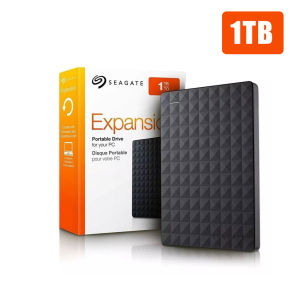
Seagate Expansion HDD 1TB & 2TB USB3.0 Portable External Hard Disk Drive 📌2.5 Inches

Seagate Expansion HDD 1TB & 2TB USB3.0 Portable External Hard Disk Drive 📌2.5 Inches

Key Features & Benefits

Compact Design & Compatibility

The Seagate Expansion HDD 1TB / 2TB USB3.0 Portable External Hard Disk Drive is a compact storage solution designed to fit in your pocket or backpack. This 2.5-inch external hard disk drive is perfect for users who want to store their important files, documents, photos, and videos in a portable device. With its sleek and lightweight design, it is easy to carry around and use on-the-go.

Plug & Play Functionality

Seagate Expansion HDD is designed for convenience, making it easy to set up and use right out of the box. Simply connect the included data cable to your computer or laptop, and start saving files instantly. No drivers or software installation is required, thanks to its plug-and-play functionality.

Data Security & Warranty

Seagate takes data security seriously, offering a 3-year warranty for this external hard disk drive. The warranty covers any manufacturing defects or issues that may arise during normal use. In addition, the Seagate Expansion HDD is built to withstand drops and shocks, providing reliable protection for your data.

Product Specifications

USB Interface & Operating Systems

The Seagate Expansion HDD supports both USB3.0 and USB 2.0 (High Speed) interfaces, ensuring compatibility with a wide range of devices. It is compatible with Windows and MAC OS operating systems, making it a versatile storage solution for users of both platforms.

Storage Capacity & Format

Available in two storage capacities, 1TB and 2TB, the Seagate Expansion HDD provides ample space for storing large files and multimedia content. The default formatting is ExFAT, which allows for seamless plug-and-play functionality on both Windows and MAC OS systems. NTFS formatting is not supported.

Physical Dimensions & Weight

With dimensions of 2.5 inches, the Seagate Expansion HDD is compact and lightweight, weighing just a few ounces. It is easy to carry around and store in your bag or pocket, making it the perfect companion for on-the-go users.

Installation & Setup Guide

Unboxing & Assembly

Upon unboxing, you will find the Seagate Expansion HDD, data cable, and user manual included in the package. No assembly is required; simply connect the data cable to your device and start using the external hard disk drive.

Connecting to Your Device

To connect the Seagate Expansion HDD to your computer or laptop, plug the data cable into the USB port on your device. Once connected, the drive will automatically detect and mount itself, allowing you to start saving files immediately.

Formatting & Initializing

The Seagate Expansion HDD comes pre-formatted with ExFAT, enabling seamless plug-and-play functionality on both Windows and MAC OS systems. NTFS formatting is not supported, so please use ExFAT to make the necessary format changes.

Frequently Asked Questions

Is NTFS formatting supported?

No, NTFS formatting is not supported for the Seagate Expansion HDD. The default formatting is ExFAT, which allows for seamless plug-and-play functionality on both Windows and MAC OS systems.

Can I use this drive with both Windows & MAC OS?

Yes, the Seagate Expansion HDD is compatible with both Windows and MAC OS operating systems. It supports USB3.0 and USB 2.0 (High Speed) interfaces, ensuring compatibility with a wide range of devices.

Is there a warranty for this product?

Yes, the Seagate Expansion HDD comes with a 3-year warranty, covering any manufacturing defects or issues that may arise during normal use. The warranty is provided by the Seagate warranty center.

BOVE HDD
BOVE HDD

Seller ratings 89%

You May Also Like

High Speed SD Storage Card Camera TF Card Tablet Phone Memory Card
00:33

High Speed SD Storage Card Camera TF Card Tablet Phone Memory Card

Portable Samsung SSD16TB External Hard Drive 4TB 8TB High Speed Solid State Drive Hard Disk Type-C USB 3.1 Electronics for Laptop&Phone
01:00

Portable Samsung SSD16TB External Hard Drive 4TB 8TB High Speed Solid State Drive Hard Disk Type-C USB 3.1 Electronics for Laptop&Phone

1977s Top of the Pops TOTP Music MTV Show 23 Episodes with 64GB USB Flash Drive with Plus Free Surprise Gift
01:04

1977s Top of the Pops TOTP Music MTV Show 23 Episodes with 64GB USB Flash Drive with Plus Free Surprise Gift

4 in 1 Memory Reader USB2.0 Reader for TF/MS Reader Adapter for Camera Phone Laptop Accessories
00:12

4 in 1 Memory Reader USB2.0 Reader for TF/MS Reader Adapter for Camera Phone Laptop Accessories

10Gbps SSD Enclosure HDD Docking Station M2 NVME SATA SSD Case Reading Writing External For PC Dual Protocol Solid State Adapter
00:32

10Gbps SSD Enclosure HDD Docking Station M2 NVME SATA SSD Case Reading Writing External For PC Dual Protocol Solid State Adapter

Hard Shell Case for 14inch Models A3112 A3185 A2779 A2442 A3401 A2918 A2992 Laptops Protector
00:20

Hard Shell Case for 14inch Models A3112 A3185 A2779 A2442 A3401 A2918 A2992 Laptops Protector

External Hard Drive Loaded with Movies TV Series Anime K-Drama Disney Movie Cartoons
00:41

External Hard Drive Loaded with Movies TV Series Anime K-Drama Disney Movie Cartoons

128GB Ultra Micro Flash SD Card Memory Card Microsd Card High-Speed TF Card Expansion Card for multi-purpose
00:39

128GB Ultra Micro Flash SD Card Memory Card Microsd Card High-Speed TF Card Expansion Card for multi-purpose

Toshiba U301 USB Flash Drive: A Comprehensive Guide
00:31

Toshiba U301 USB Flash Drive: A Comprehensive Guide

ADATA HV320-2TB Hard Drive: A Compact & High-Performance Storage Solution
00:19

ADATA HV320-2TB Hard Drive: A Compact & High-Performance Storage Solution

2.5 Inch Hard Drive Case with dusts & Shock Resistance Laptop Hard Disk Protections Easy to Carry for
00:20

2.5 Inch Hard Drive Case with dusts & Shock Resistance Laptop Hard Disk Protections Easy to Carry for

2025 Langke 1T Mobile SSD Z Slim Series High Speed USB3.1 Mobile Phone Computer Universal Type-C Interface\\n\\n Introduction to Slim Series Mobile SSD\\n\\nIntroducing the 2025 Langke 1T Mobile SSD Z Slim Series, a revolutionary storage solution designed specifically for mobile devices. With its sleek and lightweight design, this high-speed USB3.1 Type-C interface SSD offers unparalleled convenience and performance for both personal and professional use. \\n\\n Key Features of Slim Series Mobile SSD\\n\\nThe Slim Series Mobile SSD boasts a range of features that make it stand out in the market:\\n\\n- **High Speed USB3.1 SSD:** With transfer speeds up to 5 Gbps, this mobile SSD ensures lightning-fast data transfer, making it perfect for transferring large files, streaming media, and more.\\n- **Universal Compatibility with Mobile Phone SSD:** The Langke 1T Mobile SSD is compatible with a wide range of devices, including smartphones, tablets, laptops, and desktop computers, thanks to its USB3.1 Type-C interface.\\n- **Lightweight and Portable Design:** Weighing just a few grams, the Slim Series Mobile SSD is easy to carry around and fits seamlessly into any pocket or bag.\\n\\n Benefits of High Speed USB3.1 SSD\\n\\nThe high-speed USB3.1 SSD offers several benefits that make it an excellent choice for users who require fast data transfer and storage capabilities:\\n\\n- **Faster Data Transfer:** With transfer speeds up to 5 Gbps, the Slim Series Mobile SSD allows you to transfer large files quickly and efficiently, saving time and increasing productivity.\\n- **Increased Storage Capacity:** With a 1TB storage capacity, the Langke 1T Mobile SSD provides ample space for storing photos, videos, documents, and more.\\n- **Compatibility with Multiple Devices:** Thanks to its USB3.1 Type-C interface, the Slim Series Mobile SSD is compatible with a wide range of devices, making it a versatile storage solution for users on-the-go.\\n\\n Universal Compatibility with Mobile Phone SSD\\n\\nThe Langke 1T Mobile SSD is designed to work seamlessly with a wide range of devices, including smartphones, tablets, laptops, and desktop computers. Its USB3.1 Type-C interface ensures compatibility with the latest devices, while its compact design makes it easy to carry around.\\n\\n How to Use Langke 1T USB3.1 Type-C SSD\\n\\nUsing the Langke 1T Mobile SSD is simple and straightforward. Follow these steps to get started:\\n\\n1. Connect the Langke 1T Mobile SSD to your device using the USB3.1 Type-C interface.\\n2. Once connected, your device will automatically recognize the SSD and prompt you to format it if necessary.\\n3. Once formatted, you can start transferring files to and from the SSD using your device's file explorer or management software.\\n\\n Step-by-step Guide to Using Langke 1T Mobile SSD\\n\\nTo use the Langke 1T Mobile SSD, follow these steps:\\n\\n1. Connect the SSD to your device using the USB3.1 Type-C interface.\\n2. Format the SSD if prompted by your device.\\n3. Transfer files to and from the SSD using your device's file explorer or management software.\\n\\n Troubleshooting Common Issues with Langke 1T Mobile SSD\\n\\nIf you encounter any issues while using the Langke 1T Mobile SSD, try the following troubleshooting steps:\\n\\n- **Check Connection:** Ensure that the SSD is properly connected to your device using the USB3.1 Type-C interface.\\n- **Check Compatibility:** Make sure that your device is compatible with the Langke 1T Mobile SSD by checking its specifications.\\n- **Check for Software Updates:** Ensure that your device's operating system and software are up-to-date.\\n\\n Ordering and Delivery Information\\n\\nTo order the Langke 1T Mobile SSD, please follow these guidelines:\\n\\n- **Pre-order Guidelines and Requirements:** Before placing an order, please enter the exact phone number and address where you want the product delivered. Once ordered, we do not accept changes to the name, number, address, or item.\\n- **Order Confirmation and Delivery Process:** After placing your order, you will receive an order confirmation email. Your Langke 1T Mobile SSD will be shipped within 3-5 business days and delivered to your specified address.\\n- **Customer Service and Support for Langke 1T Mobile SSD:** If you have any questions or concerns about your Langke 1T Mobile SSD, please contact our customer service team. We strive to provide excellent support and assistance to all our customers.\\n\\nThank you for choosing the Langke 1T Mobile SSD Z Slim Series! We hope you enjoy the convenience and performance it provides.\n}
00:55

2025 Langke 1T Mobile SSD Z Slim Series High Speed USB3.1 Mobile Phone Computer Universal Type-C Interface\\n\\n Introduction to Slim Series Mobile SSD\\n\\nIntroducing the 2025 Langke 1T Mobile SSD Z Slim Series, a revolutionary storage solution designed specifically for mobile devices. With its sleek and lightweight design, this high-speed USB3.1 Type-C interface SSD offers unparalleled convenience and performance for both personal and professional use. \\n\\n Key Features of Slim Series Mobile SSD\\n\\nThe Slim Series Mobile SSD boasts a range of features that make it stand out in the market:\\n\\n- **High Speed USB3.1 SSD:** With transfer speeds up to 5 Gbps, this mobile SSD ensures lightning-fast data transfer, making it perfect for transferring large files, streaming media, and more.\\n- **Universal Compatibility with Mobile Phone SSD:** The Langke 1T Mobile SSD is compatible with a wide range of devices, including smartphones, tablets, laptops, and desktop computers, thanks to its USB3.1 Type-C interface.\\n- **Lightweight and Portable Design:** Weighing just a few grams, the Slim Series Mobile SSD is easy to carry around and fits seamlessly into any pocket or bag.\\n\\n Benefits of High Speed USB3.1 SSD\\n\\nThe high-speed USB3.1 SSD offers several benefits that make it an excellent choice for users who require fast data transfer and storage capabilities:\\n\\n- **Faster Data Transfer:** With transfer speeds up to 5 Gbps, the Slim Series Mobile SSD allows you to transfer large files quickly and efficiently, saving time and increasing productivity.\\n- **Increased Storage Capacity:** With a 1TB storage capacity, the Langke 1T Mobile SSD provides ample space for storing photos, videos, documents, and more.\\n- **Compatibility with Multiple Devices:** Thanks to its USB3.1 Type-C interface, the Slim Series Mobile SSD is compatible with a wide range of devices, making it a versatile storage solution for users on-the-go.\\n\\n Universal Compatibility with Mobile Phone SSD\\n\\nThe Langke 1T Mobile SSD is designed to work seamlessly with a wide range of devices, including smartphones, tablets, laptops, and desktop computers. Its USB3.1 Type-C interface ensures compatibility with the latest devices, while its compact design makes it easy to carry around.\\n\\n How to Use Langke 1T USB3.1 Type-C SSD\\n\\nUsing the Langke 1T Mobile SSD is simple and straightforward. Follow these steps to get started:\\n\\n1. Connect the Langke 1T Mobile SSD to your device using the USB3.1 Type-C interface.\\n2. Once connected, your device will automatically recognize the SSD and prompt you to format it if necessary.\\n3. Once formatted, you can start transferring files to and from the SSD using your device's file explorer or management software.\\n\\n Step-by-step Guide to Using Langke 1T Mobile SSD\\n\\nTo use the Langke 1T Mobile SSD, follow these steps:\\n\\n1. Connect the SSD to your device using the USB3.1 Type-C interface.\\n2. Format the SSD if prompted by your device.\\n3. Transfer files to and from the SSD using your device's file explorer or management software.\\n\\n Troubleshooting Common Issues with Langke 1T Mobile SSD\\n\\nIf you encounter any issues while using the Langke 1T Mobile SSD, try the following troubleshooting steps:\\n\\n- **Check Connection:** Ensure that the SSD is properly connected to your device using the USB3.1 Type-C interface.\\n- **Check Compatibility:** Make sure that your device is compatible with the Langke 1T Mobile SSD by checking its specifications.\\n- **Check for Software Updates:** Ensure that your device's operating system and software are up-to-date.\\n\\n Ordering and Delivery Information\\n\\nTo order the Langke 1T Mobile SSD, please follow these guidelines:\\n\\n- **Pre-order Guidelines and Requirements:** Before placing an order, please enter the exact phone number and address where you want the product delivered. Once ordered, we do not accept changes to the name, number, address, or item.\\n- **Order Confirmation and Delivery Process:** After placing your order, you will receive an order confirmation email. Your Langke 1T Mobile SSD will be shipped within 3-5 business days and delivered to your specified address.\\n- **Customer Service and Support for Langke 1T Mobile SSD:** If you have any questions or concerns about your Langke 1T Mobile SSD, please contact our customer service team. We strive to provide excellent support and assistance to all our customers.\\n\\nThank you for choosing the Langke 1T Mobile SSD Z Slim Series! We hope you enjoy the convenience and performance it provides.\n}