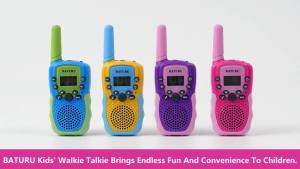
WLN Walkie Talkie Battery for KD-C1, KD-C1 PLUS, KD-C51, and KD-C10 Walkie Talkie Radio

WLN Walkie Talkie Battery for KD-C1, KD-C1 PLUS, KD-C51, and KD-C10 Walkie Talkie Radio

What is the WLN Walkie Talkie Battery?

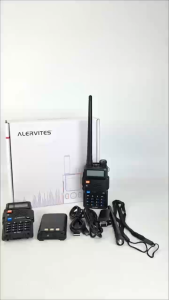
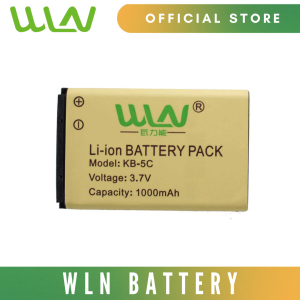
The WLN Walkie Talkie Battery is a high-capacity, lithium-ion battery designed specifically for use with the WLN KD-C1, KD-C1 PLUS, KD-C51, and KD-C10 walkie talkie radios. These batteries offer reliable power, extended runtime, and a long service life, making them ideal for both personal and professional applications.

Specifications of the WLN Walkie Talkie Battery

  • Fit For: WLN KD-C1, KD-C1 PLUS, KD-C51, and KD-C10
  • High Capacity: 1000mAh LI-ION
  • Battery Voltage: 3.7V
  • Factory packed and New: Perfect replacement or spare for the radio
  • Provides excellent discharge characteristic

Compatibility with KD-C1, KD-C1 PLUS, KD-C51, and KD-C10

The WLN Walkie Talkie Battery is compatible with the following models:

  • KD-C1: A compact, lightweight walkie talkie that offers reliable communication over short distances.
  • KD-C1 PLUS: An upgraded version of the KD-C1, featuring enhanced audio quality and improved range.
  • KD-C51: A versatile walkie talkie that supports multiple channels and provides clear, distortion-free audio.
  • KD-C10: A powerful, long-range walkie talkie designed for outdoor enthusiasts, emergency responders, and industrial users.

How to Choose the Right Walkie Talkie Battery?

Selecting the right walkie talkie battery can significantly impact the performance and longevity of your device. Here are some factors to consider when choosing a walkie talkie battery:

Factors to Consider When Selecting a Walkie Talkie Battery

  • Capacity: Higher capacity batteries provide longer runtime and can help prevent premature shutdown during critical moments.
  • Voltage: Ensure the battery voltage matches the specifications of your walkie talkie to avoid damage or reduced performance.
  • Brand and Quality: Opt for reputable brands known for producing high-quality, reliable batteries.
  • Compatibility: Verify that the battery is compatible with your specific walkie talkie model.

Long-Term Benefits of Choosing High-Quality Walkie Talkie Batteries

Investing in high-quality walkie talkie batteries can result in several long-term benefits, including:

  • Extended Runtime: High-capacity batteries provide longer runtime, reducing the frequency of battery replacements.
  • Improved Performance: Reliable batteries help maintain optimal performance, ensuring clear audio and consistent range.
  • Cost Savings: High-quality batteries often have a longer service life, resulting in lower replacement costs over time.

How to Replace Your Walkie Talkie Battery?

Replacing the battery in your walkie talkie is a simple process that can be completed in just a few steps. Follow this step-by-step guide to replace your WLN Walkie Talkie Battery:

Step-by-Step Guide to Replacing Your Walkie Talkie Battery

  1. Turn Off the Walkie Talkie: Ensure the device is powered off before attempting to remove the battery.
  2. Locate the Battery Compartment: Identify the location of the battery compartment on your walkie talkie.
  3. Remove the Battery Cover: Carefully remove the battery cover using a small screwdriver or your fingernails.
  4. Remove the Old Battery: Gently remove the old battery from the compartment.
  5. Insert the New Battery: Align the new WLN Walkie Talkie Battery with the contacts in the compartment and insert it securely.
  6. Replace the Battery Cover: Carefully secure the battery cover back onto the walkie talkie.
  7. Turn On the Walkie Talkie: Power on the device to verify that the new battery is functioning properly.

Troubleshooting Common Issues with Walkie Talkie Batteries

If you encounter any issues with your WLN Walkie Talkie Battery, refer to the following troubleshooting tips:

  • Battery Not Charging: Ensure the battery is properly seated in the compartment and that the contacts are clean and free of debris.
  • Battery Draining Quickly: Verify that the battery voltage matches the specifications of your walkie talkie and consider replacing the battery if it has reached the end of its service life.
  • Battery Not Recognized: Check that the battery is compatible with your specific walkie talkie model and consult the user manual for further guidance.

Why Choose WLN Walkie Talkie Batteries?

The WLN Walkie Talkie Battery offers several advantages over other walkie talkie batteries on the market, including:

  • High Capacity and Voltage: With a capacity of 1000mAh LI-ION and a voltage of 3.7V, these batteries provide reliable power and extended runtime.
  • Factory Packed and New: Each WLN Walkie Talkie Battery is factory-packed and new, ensuring a perfect replacement or spare for your radio.

Conclusion

Investing in high-quality WLN Walkie Talkie Batteries for your KD-C1, KD-C1 PLUS, KD-C51, or KD-C10 walkie talkie can significantly enhance the performance and longevity of your device. By choosing the right battery and following proper maintenance procedures, you can enjoy reliable communication and peace of mind during critical moments.

WLN PHILIPPINES
WLN PHILIPPINES

Seller ratings 98%

You May Also Like

RAYHAYES RG-VX2 Metal Wireless Microphone UHF Professional Rechargeable Handheld Mic for Anime Space Performance Focus
00:57

RAYHAYES RG-VX2 Metal Wireless Microphone UHF Professional Rechargeable Handheld Mic for Anime Space Performance Focus

Live Storm Surge 18 at 70K 18inch 7000W RMS 6 inches Voice Coil Triple Magnet Speaker
00:51

Live Storm Surge 18 at 70K 18inch 7000W RMS 6 inches Voice Coil Triple Magnet Speaker

V2S PB801TWS 8.8 Karaoke Rechargeable Stereo Portable Wireless Bluetooth Speaker With Wired Microphone W/ LED Light
00:55

V2S PB801TWS 8.8 Karaoke Rechargeable Stereo Portable Wireless Bluetooth Speaker With Wired Microphone W/ LED Light

Cyberzone Original JBL C100SI In-ear Earphones Headset Headphones With Microphone 3.5mm Jack Wired Headset For Huawei Xiaomi Samsung
01:00

Cyberzone Original JBL C100SI In-ear Earphones Headset Headphones With Microphone 3.5mm Jack Wired Headset For Huawei Xiaomi Samsung

Edifier W830NB Wireless Over-ear Headphones with Active Noise Cancelation
00:40

Edifier W830NB Wireless Over-ear Headphones with Active Noise Cancelation

HOMEVISION LED FOG MACHINE 1800W( RGB )
00:30

HOMEVISION LED FOG MACHINE 1800W( RGB )

HUAYU KUKU AM-381BTS Solar Rechargeable Radio with Emergency Light Bluetooth Radio FM AM SW 8 BAND USB/TF PLAYE
00:31

HUAYU KUKU AM-381BTS Solar Rechargeable Radio with Emergency Light Bluetooth Radio FM AM SW 8 BAND USB/TF PLAYE

TNW X23C Mini Wireless Lavalier Microphone AI Noise Cancelling Microphone Mini Mic For Vlogging
00:54

TNW X23C Mini Wireless Lavalier Microphone AI Noise Cancelling Microphone Mini Mic For Vlogging

NEW BTS-2286 Bluetooth speaker with cool light  portable and suitable for outdoor square dancing
00:29

NEW BTS-2286 Bluetooth speaker with cool light portable and suitable for outdoor square dancing

KEBIDU Wireless Microphone: Dual Handheld Dynamic Karaoke Microphone & Rechargeable Receiver for Wedding Party
00:31

KEBIDU Wireless Microphone: Dual Handheld Dynamic Karaoke Microphone & Rechargeable Receiver for Wedding Party

Baofeng UV-5RH Walkie Talkie Extended version Battery Type-C Charger 3800mAh Battery for Walkie Talkie
00:20

Baofeng UV-5RH Walkie Talkie Extended version Battery Type-C Charger 3800mAh Battery for Walkie Talkie

BOSCA D10 OK HIFI Amplifier Board: A Comprehensive Guide\\n\\n Introduction to BOSCA D10 OK HIFI Amplifier Board\\n\\nThe BOSCA D10 OK HIFI Amplifier Board is a versatile, high-quality power amplifier designed to provide an exceptional audio experience for car enthusiasts and audiophiles alike. This amplifier board supports both AC 220V and DC 12V/24V power sources, making it compatible with a wide range of devices. It also features a built-in Bluetooth 5.0 module, allowing seamless connectivity to various Bluetooth-enabled devices.\\n\\n Key Features of the Amplifier Board\\n\\n- **Supports AC 220V and DC 12V/24V power sources**: Ensuring compatibility with a wide range of devices and applications.\\n- **Built-in Bluetooth 5.0 module**: Enables wireless connectivity to Bluetooth-enabled devices, providing a hassle-free audio experience.\\n- **High-quality audio output**: The BOSCA D10 OK HIFI Amplifier Board delivers crystal-clear sound with excellent bass response, making it perfect for enhancing your car audio system.\\n\\n How to Choose the Right Amplifier Board\\n\\nWhen selecting an amplifier board, consider the following factors:\\n\\n- **Power requirements**: Ensure the amplifier board is compatible with your power source, whether it's AC 220V or DC 12V/24V.\\n- **Audio quality**: Look for an amplifier board that offers high-quality audio output, with a focus on clear sound and excellent bass response.\\n- **Connectivity options**: Consider the available connectivity options, such as Bluetooth, to ensure seamless integration with your existing audio devices.\\n\\n Setting Up Your Amplifier Board\\n\\nTo set up your BOSCA D10 OK HIFI Amplifier Board, follow these steps:\\n\\n Connecting Power Sources: AC 220V & DC 12V/24V\\n\\n- **For AC 220V**: Connect the power cord to the amplifier board and plug it into a standard AC outlet.\\n- **For DC 12V/24V**: Connect the DC line to the amplifier board and connect the other end to your vehicle's battery or a DC power supply.\\n\\n Connecting the Remote Control & Speaker Cable\\n\\n- **Remote control**: Insert the remote control's batteries and press the \"ON/OFF\" button to turn on the amplifier board.\\n- **Speaker cable**: Connect the speaker cable to the amplifier board and your speakers.\\n\\n Using the BOSCA D10 OK HIFI Amplifier Board\\n\\nNow that your amplifier board is set up, you can start enjoying your music!\\n\\n How to Connect the Amplifier Board to Bluetooth Devices\\n\\n1. Press the \"SOURCE\" button on the remote control until \"BT\" appears on the display.\\n2. On your Bluetooth-enabled device, go to the Bluetooth settings and search for available devices.\\n3. Select \"BOSCA D10 OK HIFI Amplifier Board\" from the list of available devices.\\n4. Once connected, you can stream music wirelessly from your device to the amplifier board.\\n\\n Controlling the Amplifier Board Using the Remote Control\\n\\nUse the remote control to adjust the volume, switch between audio sources, and access other features.\\n\\n Troubleshooting Common Issues\\n\\nIf you encounter any issues while using the BOSCA D10 OK HIFI Amplifier Board, try the following solutions:\\n\\n Amplifier Board Not Turning On\\n\\n- Check the power source connection and ensure it's properly connected.\\n- Verify that the remote control's batteries are inserted correctly and have sufficient power.\\n\\n Audio Quality Issues\\n\\n- Adjust the equalizer settings on your audio source device to optimize the sound output.\\n- If you're experiencing interference or static, try moving the amplifier board away from potential sources of electromagnetic interference.\\n\\n Conclusion & Final Thoughts\\n\\nThe BOSCA D10 OK HIFI Amplifier Board is a powerful, high-quality amplifier that offers a versatile audio solution for car enthusiasts and audiophiles. With its support for AC 220V and DC 12V/24V power sources, built-in Bluetooth 5.0 module, and easy-to-use remote control, this amplifier board is a must-have addition to any audio setup. Enjoy your music like never before with the BOSCA D10 OK HIFI Amplifier Board!\"\n}
00:12

BOSCA D10 OK HIFI Amplifier Board: A Comprehensive Guide\\n\\n Introduction to BOSCA D10 OK HIFI Amplifier Board\\n\\nThe BOSCA D10 OK HIFI Amplifier Board is a versatile, high-quality power amplifier designed to provide an exceptional audio experience for car enthusiasts and audiophiles alike. This amplifier board supports both AC 220V and DC 12V/24V power sources, making it compatible with a wide range of devices. It also features a built-in Bluetooth 5.0 module, allowing seamless connectivity to various Bluetooth-enabled devices.\\n\\n Key Features of the Amplifier Board\\n\\n- **Supports AC 220V and DC 12V/24V power sources**: Ensuring compatibility with a wide range of devices and applications.\\n- **Built-in Bluetooth 5.0 module**: Enables wireless connectivity to Bluetooth-enabled devices, providing a hassle-free audio experience.\\n- **High-quality audio output**: The BOSCA D10 OK HIFI Amplifier Board delivers crystal-clear sound with excellent bass response, making it perfect for enhancing your car audio system.\\n\\n How to Choose the Right Amplifier Board\\n\\nWhen selecting an amplifier board, consider the following factors:\\n\\n- **Power requirements**: Ensure the amplifier board is compatible with your power source, whether it's AC 220V or DC 12V/24V.\\n- **Audio quality**: Look for an amplifier board that offers high-quality audio output, with a focus on clear sound and excellent bass response.\\n- **Connectivity options**: Consider the available connectivity options, such as Bluetooth, to ensure seamless integration with your existing audio devices.\\n\\n Setting Up Your Amplifier Board\\n\\nTo set up your BOSCA D10 OK HIFI Amplifier Board, follow these steps:\\n\\n Connecting Power Sources: AC 220V & DC 12V/24V\\n\\n- **For AC 220V**: Connect the power cord to the amplifier board and plug it into a standard AC outlet.\\n- **For DC 12V/24V**: Connect the DC line to the amplifier board and connect the other end to your vehicle's battery or a DC power supply.\\n\\n Connecting the Remote Control & Speaker Cable\\n\\n- **Remote control**: Insert the remote control's batteries and press the \"ON/OFF\" button to turn on the amplifier board.\\n- **Speaker cable**: Connect the speaker cable to the amplifier board and your speakers.\\n\\n Using the BOSCA D10 OK HIFI Amplifier Board\\n\\nNow that your amplifier board is set up, you can start enjoying your music!\\n\\n How to Connect the Amplifier Board to Bluetooth Devices\\n\\n1. Press the \"SOURCE\" button on the remote control until \"BT\" appears on the display.\\n2. On your Bluetooth-enabled device, go to the Bluetooth settings and search for available devices.\\n3. Select \"BOSCA D10 OK HIFI Amplifier Board\" from the list of available devices.\\n4. Once connected, you can stream music wirelessly from your device to the amplifier board.\\n\\n Controlling the Amplifier Board Using the Remote Control\\n\\nUse the remote control to adjust the volume, switch between audio sources, and access other features.\\n\\n Troubleshooting Common Issues\\n\\nIf you encounter any issues while using the BOSCA D10 OK HIFI Amplifier Board, try the following solutions:\\n\\n Amplifier Board Not Turning On\\n\\n- Check the power source connection and ensure it's properly connected.\\n- Verify that the remote control's batteries are inserted correctly and have sufficient power.\\n\\n Audio Quality Issues\\n\\n- Adjust the equalizer settings on your audio source device to optimize the sound output.\\n- If you're experiencing interference or static, try moving the amplifier board away from potential sources of electromagnetic interference.\\n\\n Conclusion & Final Thoughts\\n\\nThe BOSCA D10 OK HIFI Amplifier Board is a powerful, high-quality amplifier that offers a versatile audio solution for car enthusiasts and audiophiles. With its support for AC 220V and DC 12V/24V power sources, built-in Bluetooth 5.0 module, and easy-to-use remote control, this amplifier board is a must-have addition to any audio setup. Enjoy your music like never before with the BOSCA D10 OK HIFI Amplifier Board!\"\n}