



DYMO LM280 Label Printer: A Comprehensive Guide
DYMO LM280 Label Printer: A Comprehensive Guide
Introduction to DYMO LM280 Label Printer
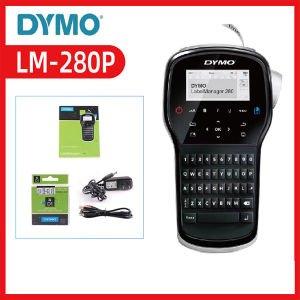
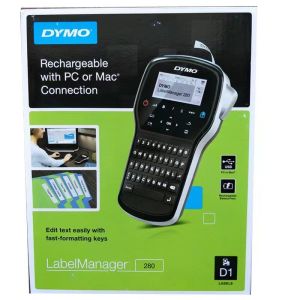
The DYMO LM280 Label Printer, also known as the Handheld Label Manager, is a rechargeable label maker designed for users who need a reliable, portable solution for creating custom labels. This versatile device supports label sizes ranging from 6mm to 12mm, making it ideal for various applications, including inventory management, organization, and labeling projects.
Overview of DYMO LM280 Label Printer
The DYMO LM280 Label Printer is a compact, handheld label maker that offers a simple and efficient way to create custom labels. With its rechargeable battery, this device provides users with the freedom to print labels wherever they may be. Its compact design makes it easy to store and transport, while its intuitive interface ensures a seamless user experience.
Key Features of DYMO LM280 Label Printer
- Rechargeable Battery: The DYMO LM280 Label Printer is powered by a rechargeable battery, providing users with the convenience of printing labels without the need for disposable batteries.
- Handheld Design: The compact, handheld design of the DYMO LM280 Label Printer allows users to easily carry it wherever they go, making it ideal for both home and office use.
- Support for 6mm/9mm/12mm Labels: The DYMO LM280 Label Printer supports label sizes ranging from 6mm to 12mm, providing users with the flexibility to create custom labels for various applications.
- Portable Label Printer: The DYMO LM280 Label Printer is a portable label printer that offers users the convenience of printing labels on-the-go.
How to Use DYMO LM280 Label Printer
Using the DYMO LM280 Label Printer is a straightforward process. Follow these steps to get started:
Preparing Your Label Printer
- Charge the battery by connecting the included cable to a power source.
- Insert the label tape into the printer, making sure it is properly aligned and secured.
Creating Custom Labels
- Press the "Create" button to begin creating a new label.
- Enter the desired text using the keyboard.
- Customize the font, size, and alignment of the text as needed.
- Preview the label before printing by pressing the "Preview" button.
Printing and Applying Labels
- Press the "Print" button to print the label.
- Peel the printed label from the backing tape and apply it to the desired surface.
DYMO LM280 Label Printer Compatibility
The DYMO LM280 Label Printer is compatible with various label sizes and types, making it a versatile solution for labeling needs.
Supported Label Sizes
The DYMO LM280 Label Printer supports label sizes ranging from 6mm to 12mm, providing users with the flexibility to create custom labels for various applications.
Compatible Label Types
The DYMO LM280 Label Printer is compatible with a variety of label types, including DYMO 280 labels, making it easy to find the right label for your needs.
DYMO LM280 Label Printer Maintenance and Troubleshooting
To ensure the best performance and longevity of your DYMO LM280 Label Printer, follow these maintenance and troubleshooting tips:
Cleaning and Maintenance Tips
- Regularly clean the label printer to prevent dirt and debris from accumulating.
- Store the label printer in a cool, dry place to protect it from damage.
Common Issues and Solutions
- Problem: The label printer is not printing. Solution: Check that the label tape is properly inserted and aligned.
- Problem: The battery is not charging. Solution: Ensure that the cable is securely connected to both the label printer and the power source.
Conclusion: DYMO LM280 Label Printer - A Reliable Choice for Label Management
The DYMO LM280 Label Printer is a reliable, rechargeable label maker that offers users a simple and efficient way to create custom labels. Its compact, handheld design and support for various label sizes make it a versatile solution for labeling needs. With its intuitive interface and easy-to-follow instructions, the DYMO LM280 Label Printer is a must-have tool for anyone looking to streamline their labeling process.

Yoko Label
Review
You May Also Like
AOS Compatible Upper Fuser Roller/ Fusing Roller for Fuji Xerox DC S1810/S2010/S2011/S2220/S2420 S2320 Brown
Samsung D111s T111s Compatible Black Toner Cartridge (MLT D111s) for 2020 2022w 2070w
ERYONE 1KG TPU Hyper Speed 95A Premium Filament 3D PrintMax Print Speed 300mm/sMulticolor AvailableDiameter:1.75mm1KG/Spool
ETQ Compatible Laser Printer Toner Cartridge C325Z C325 Fuji Xerox CT203486 CT203487 CT203488 CT203489 (C325)
CUYI DTF Ink Textile Pigment Ink 1000ML Very Convenient for DTF Printers
![[LIXIAOJU] 1 2Set T04D1 Maintenance Box Sponge Waste Ink Pad For Epson L4260 L4261 L4263 L4265 L4266 L4267 L4268 L4269 Printers](https://img.lazcdn.com/g/p/7db13af5d33f779deb97b93fe7c822e5.jpg_300x300q80.jpg)
[LIXIAOJU] 1 2Set T04D1 Maintenance Box Sponge Waste Ink Pad For Epson L4260 L4261 L4263 L4265 L4266 L4267 L4268 L4269 Printers
ORIGINAL Sony Ultrasound Thermal Paper UPP 110S Type 1 - 1 roll
LIOTOG Adhesive Print Paper Sticker Thermal Paper for C9, C15, and C19 Smart Mini Portable Bluetooth Thermal Printers 57mm
![[COD] SHGMYD Filament Plastic For 3D Printer Multi-colored Optional Rubber Consumables Material](https://img.lazcdn.com/g/p/b90dd0b8fb0f92dbc6651b7a86633386.jpg_300x300q80.jpg)
[COD] SHGMYD Filament Plastic For 3D Printer Multi-colored Optional Rubber Consumables Material
Portable Mini Kids Instant Photo Printer Children Pocket Label Maker New Wireless Thermal Technology Small Thermal Pocket Sticker Printer
ETQ ADF Pickup Roller Separation Pad for HP M101 M102 M103 M130 M131 M132 M133 M125 M126 M127 M128 M176 M177 M203 M206 M227 M230
![[COD] Yaokeqi 1 2Set T04D1 Maintenance Box Sponge Waste Ink Pad For Epson L4260 L4261 L4263 L4265 L4266 L4267 L4268 L4269 Printers](https://img.lazcdn.com/g/p/5609fb825d3105e8643a57adbd3a791e.jpg_300x300q80.jpg)


















