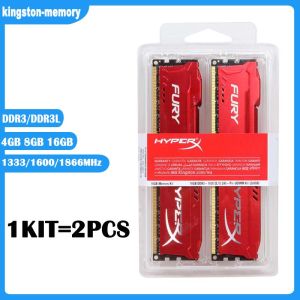
High-Performance DDR3 RAM: Kingston 4GB, 8GB & 16GB HyperX FURY Gaming Memory
High-Performance DDR3 RAM: Kingston 4GB, 8GB & 16GB HyperX FURY Gaming Memory
Introduction to Kingston HyperX FURY Gaming Memory
Kingston's HyperX FURY Gaming Memory is a top-tier DDR3 RAM solution designed for gaming enthusiasts and power users. Available in 4GB, 8GB, and 16GB capacities, this memory module is compatible with most desktop systems and offers exceptional performance.
Key Features & Benefits
- High Performance: With frequencies of 1333MHz, 1600MHz, and 1866MHz, HyperX FURY Gaming Memory delivers lightning-fast performance.
- Compatibility: Compatible with both DDR3 and DDR3L systems, the Kingston HyperX FURY Gaming Memory supports 1.5V and 1.35V voltages.
- Reliability: Built with high-quality components, this memory module ensures stable operation under demanding conditions.
- Stylish Design: The sleek red color scheme and low-profile heatsink make this memory module a stylish addition to any system.
Compatibility & Usage Scenarios
Kingston HyperX FURY Gaming Memory is compatible with most desktop systems that support 240-pin DIMMs. It's perfect for gaming, video editing, and other demanding applications.
Understanding DDR3 RAM & Its Benefits
DDR3 RAM is a type of dynamic random-access memory (DRAM) that has become a standard in modern computing. It offers faster data transfer rates and lower power consumption compared to its predecessor, DDR2 RAM.
DDR3 vs. DDR3L: What's the Difference?
DDR3L is a low-voltage version of DDR3 RAM that operates at 1.35V instead of the standard 1.5V. While DDR3L consumes less power, it may not be compatible with all systems.
How to Choose the Right Frequency (1333MHz, 1600MHz, 1866MHz)
When selecting the right frequency for your system, consider the following factors:
- System Compatibility: Check your motherboard's specifications to ensure compatibility with the desired frequency.
- Performance Needs: Higher frequencies generally offer better performance, but may not be necessary for all applications.
- Heat Dissipation: Higher frequencies may generate more heat, so ensure proper cooling.
Installation & Setup Guide
Installing Kingston HyperX FURY Gaming Memory is a straightforward process. Follow these steps to ensure a successful installation:
Preparing Your System for Installation
- Power Off: Shut down your computer and unplug it from the power source.
- Ground Yourself: Touch a grounded metal object to discharge static electricity.
- Open Case: Remove the side panel of your computer case.
Step-by-Step Installation Process
- Locate the DIMM slots on your motherboard.
- Align the notches on the memory module with the slots.
- Insert the memory module at a 45-degree angle until it clicks into place.
- Close the side panel and reconnect the power source.
Post-Installation Troubleshooting Tips
If you encounter issues after installation, try the following troubleshooting steps:
- Check Connections: Ensure the memory module is properly seated in the slot.
- Update BIOS: Update your motherboard's BIOS to the latest version.
- Check Compatibility: Verify that the memory module is compatible with your system.
Maximizing Performance & Compatibility
To get the most out of your Kingston HyperX FURY Gaming Memory, follow these tips:
Optimizing Your System Settings for Best Performance
- Enable XMP: Activate the Extreme Memory Profile (XMP) feature in your BIOS to automatically set optimal settings for your memory module.
- Adjust Voltage: Increase the voltage if necessary to maintain stability at higher frequencies.
- Monitor Temperatures: Keep an eye on temperatures to ensure proper cooling.
Best Practices for Maintaining DDR3 RAM
- Keep Clean: Dust can accumulate on memory modules, so clean them regularly.
- Avoid Overclocking: Unless you have experience, avoid overclocking your memory module.
- Replace Faulty Modules: Replace any faulty memory modules to prevent system crashes.

kingston-memory
Review
You May Also Like
24cm Adjustable Speed Cooling Fan Set for Computer Case and Greenhouse Ventilation AC100-240V 2750rpm
Ultra-Thin Strip Light Switch & 24V Linear Power Supply: A Comprehensive Guide

PC Tech Laptop LED Screen 14 inch Slim Type 30 Pins 1366 x 768 HD Replacement N140BGE-E43 N140BGE-EB3 EA3 EA2 HB140WX1-301 401
Wide Potential Nonbrush Motor BL3625S 4 24V DIRECT CURRENT Integrated Control Board Bronze Factors for Automation Consumer Electronics

Newfast Wifi USB Adapter Dual Band 2.4G&5Ghz Wireless WiFi Receiver Transmitter USB3.0 Dongle Network Card For Win XP/7/8/10/11
【E-WOITD】 High Power DC 5V-24V LCD TV Switching Flyback Power Supply Module Universal Receiver EVD Power Supply

Kingston DDR3 DDR3L 2GB 4GB 8GB Laptop RAM 1066/1333/1600MHz 1.35V 1.5V PC3 SODIMM Memory notebook
【Philippines Spot】Variable Dc power Supply 0-30V 0-10A with USB interface 4 Digits Display LED High Precision 60V 5A 48V 80V 100V 120V 3A Switching Power Supply cellphone repair
Circuitrocks Button Digital For Arduino and Raspberry Pi
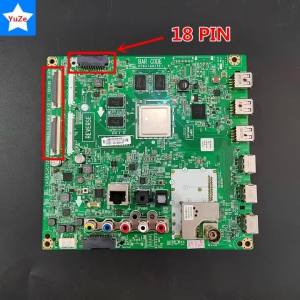
EACH 65363904 Compatible LG Motherboard TV 42 47 50 55LB6300 42LB6300-UQ 47LB6500 47LB6500-UM 42LB6500 50LB6500 Main Board
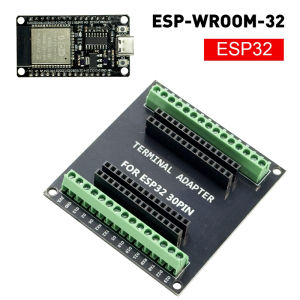
ESP32 WROOM-32 Development Board TYPE-C Micro USB WiFi Bluetooth Ultra-Low Power Consumption Dual Core Wireless BT Module 30 pin