Hynix DDR3 SODIMM 204pin Memory: A Comprehensive Guide
Hynix DDR3 SODIMM 204pin Memory: A Comprehensive Guide
Understanding Hynix Laptop RAM
What is DDR3 SODIMM Memory?
DDR3 SODIMM memory is a type of memory module used in laptops and other small form factor devices. It stands for Double Data Rate 3 Small Outline Dual Inline Memory Module. This memory technology is designed to provide faster data transfer rates and lower power consumption compared to its predecessors.
Key Features of Hynix DDR3 RAM
- Non-ECC: Hynix DDR3 laptop RAM is non-ECC, which means it does not have error correction capabilities. This makes it ideal for consumer-grade laptops and notebooks.
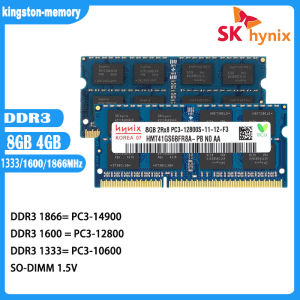
- Frequency: Hynix DDR3 SODIMM memory comes in different frequencies, including 1066MHz, 1333MHz, and 1600MHz.
- Number of Pins: All Hynix DDR3 SODIMM memory modules have 204 pins, which makes them compatible with most laptops and notebooks.
- Memory Capacity: Hynix DDR3 SODIMM memory comes in different capacities, including 4GB and 8GB.
- Memory Voltage: Hynix DDR3 SODIMM memory operates at 1.5V.
Comparing DDR3 & DDR3L: Which One Should You Choose?
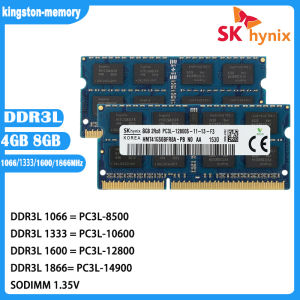
DDR3L is a low-voltage version of DDR3 memory. It has the same specifications as DDR3 memory, but it operates at a lower voltage of 1.35V instead of 1.5V. This makes it ideal for laptops and notebooks that require lower power consumption. However, if your laptop or notebook does not support DDR3L memory, you will need to stick with DDR3 memory.
Choosing the Right Hynix RAM for Your Laptop
Identifying Compatible Memory Specifications
Before purchasing Hynix DDR3 SODIMM memory, it is important to check your laptop or notebook's specifications to ensure compatibility. Look for the number of pins, frequency, and memory capacity required by your device.
Frequency, Voltage & Capacity Considerations
When choosing Hynix DDR3 SODIMM memory, consider the frequency, voltage, and capacity that best suits your needs. Higher frequencies provide faster data transfer rates, while higher capacities provide more storage space. Lower voltages consume less power, which is ideal for laptops and notebooks.
How to Determine Your Laptop's RAM Needs
To determine your laptop's RAM needs, consider the type of applications you use and how much memory they require. For example, if you frequently use resource-intensive applications such as video editing software or games, you may need more RAM than someone who primarily uses their laptop for browsing the internet and checking email.
Installing & Optimizing Your New Hynix RAM
Step-by-Step Installation Guide
To install Hynix DDR3 SODIMM memory, follow these steps:
- Power off your laptop or notebook and unplug it from the power source.
- Remove the battery (if applicable).
- Locate the memory slots on your laptop or notebook.
- Carefully insert the new memory module into the slot, making sure it clicks into place.
- Replace the battery (if applicable) and plug your laptop or notebook back into the power source.
- Power on your device and check if the new memory is recognized.
Maximizing Performance with Proper Configuration
To maximize the performance of your new Hynix DDR3 SODIMM memory, make sure it is properly configured in your device's BIOS settings. Check if dual-channel mode is enabled, which allows data to be transferred simultaneously between two memory modules, resulting in faster data transfer rates.
Troubleshooting Common Issues
If you encounter issues with your new Hynix DDR3 SODIMM memory, try the following troubleshooting steps:
- Make sure the memory module is properly seated in the slot.
- Check if the memory module is compatible with your device.
- Reset your device's BIOS settings to default.
- Try booting your device in safe mode to see if the issue persists.

kingston-memory
Review
You May Also Like
Circuitrocks TFT 2.8" Touch Shield for Arduino w/ Capacitive Touch
80mm Fan 12V 1.35A Inline Duct Blower Double Ball Bearing Design For Greenhouse Pet House And Soldering Fume Extraction

Intelligent PWM Fan Controller for PC Workstations Synchronizes 4 Cooling Fan with Stable RPM Regulation
APROTII Raspberry Pi Touchscreen Monitor 1024X600 7" IPS Raspberry Pi Screen with Case Capacitive Touch Screen Display USB/HDMI for PC Phones Raspberry Pi 4B 3B+ 3B 3A+ 2B B+ (with Stand)

17.3" 144Hz Laptop LCD Screen B173HAN03.0 B173HAN03.1 B173HAN03.2 Gaming Display Matrix Panel Replacement 1920x1080 eDP 40 Pins
Lanrui T5 UV Cooling Fan 3W Curing & Heat Dissipation for Mobile Phone Repair 3-Speed Adjustable with PD Fast Charge Tool
GIGABYTE B450M-K Ultra Durable Motherboard with GbE LAN and Bandwidth Management PCIe Gen3 x4 M.2 Anti-Sulfur Resistor Design
XTUGA E-22: The Ultimate Audio Interface for Studio Recording & Live Broadcast
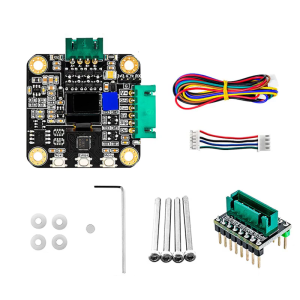
3D Printer Accessories Stepper Motor MKS SERVO42C PCBA Board Kit Current 0-3000mA Drive Silent Support 1-256 subdivision
SZBOX TX18 2 in 1 Laptop Intel Core i5 1250P 10.95 Inch Touch Screen Face Recognition Type-C Charging 3000mAh Battery DDR4 16GB 512GB WiFi 6 BT5.2 Desktop Office Computer Business Notebook Wins 11
Small ESP32-S3 Voice Robot ESP32N16R8 Development Board Clock with 1.28inch Display for Maker And Educators