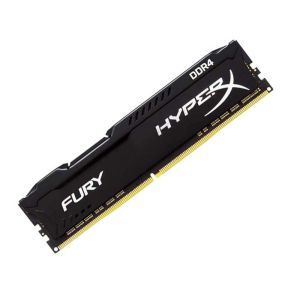
HyperX FURY 16GB 8GB 4GB DDR4 3200MHz 2666MHz 2400MHz 2133MHz Desktop RAM Memory 1.2V DIMM 288-pin Desktop Inter&AMD Memory\\n\\nIn this comprehensive guide, we will explore the world of HyperX FURY DDR4 RAM, including its specifications, benefits, compatibility, installation, optimization, and troubleshooting. We will cover various aspects of the HyperX FURY RAM, including its 3200MHz & 2666MHz speeds, 288-pin DIMM desktop design, and 1.2V low voltage operation. This guide aims to help you make an informed decision about which HyperX FURY RAM configuration best suits your needs.\\n\\n Understanding HyperX FURY RAM Specifications\\n\\n What is 3200MHz & 2666MHz RAM?\\n\\nHyperX FURY DDR4 RAM is available in various speeds, including 3200MHz and 2666MHz. These speeds refer to the clock frequency of the RAM, which determines how quickly it can transfer data to and from the system. Higher clock frequencies generally result in faster performance. However, it's important to note that the actual performance improvement depends on other factors, such as the CPU, motherboard, and storage devices used in the system.\\n\\n How Does 288-pin DIMM Desktop RAM Work?\\n\\nHyperX FURY DDR4 RAM is designed as a 288-pin DIMM module, which is a standard form factor for desktop computers. This type of RAM is installed in the memory slots on the motherboard and communicates with the CPU via the memory controller. The 288-pin design allows for a high-speed data transfer rate, ensuring that the RAM can keep up with the demands of modern applications and games.\\n\\n What Are the Benefits of 1.2V Low Voltage RAM?\\n\\nHyperX FURY DDR4 RAM operates at a low voltage of 1.2V, which offers several benefits. Lower voltage requirements result in reduced power consumption, leading to lower operating temperatures and improved energy efficiency. Additionally, low voltage RAM can help extend the lifespan of the memory module by reducing the stress on its components.\\n\\n Choosing the Right HyperX FURY RAM\\n\\n How to Select Between 16GB, 8GB, & 4GB RAM?\\n\\nHyperX FURY DDR4 RAM is available in various capacities, including 16GB, 8GB, and 4GB. When choosing the right configuration, consider the demands of your applications and games. More RAM allows for better multitasking and improved performance in memory-intensive tasks. However, it's essential to balance capacity with cost and system requirements.\\n\\n How Does HyperX FURY RAM Compare to Other Brands?\\n\\nHyperX FURY DDR4 RAM competes with other popular brands like Corsair, G.Skill, and Crucial. While all these brands offer high-quality RAM, HyperX FURY stands out due to its low voltage operation, compatibility with both Intel and AMD platforms, and excellent performance at various clock speeds.\\n\\n What Are the Compatibility Requirements for Inter&AMD Memory?\\n\\nHyperX FURY DDR4 RAM is designed to work with both Intel and AMD platforms, ensuring broad compatibility. However, it's important to check the specifications of your motherboard and CPU to ensure they support the desired RAM configuration. Additionally, some systems may require specific BIOS updates or settings adjustments to achieve optimal performance.\\n\\n Installing & Optimizing HyperX FURY RAM\\n\\n How to Install 1x RAM Memory Module?\\n\\nInstalling HyperX FURY DDR4 RAM is relatively straightforward. First, power off your computer and unplug all cables. Next, open the case and locate the memory slots on the motherboard. Insert the RAM module at a 45-degree angle, then press down until it clicks into place. Finally, close the case, reconnect the cables, and power on the system.\\n\\n How to Optimize Performance with HyperX FURY RAM?\\n\\nTo optimize performance with HyperX FURY DDR4 RAM, consider the following tips:\\n\\n- Ensure that your motherboard and CPU support the desired RAM configuration.\\n- Install the RAM modules in pairs for dual-channel operation, if possible.\\n- Adjust the BIOS settings to enable XMP (Extreme Memory Profile) or manually configure the RAM timings and voltage.\\n- Keep the system clean and well-ventilated to maintain optimal operating temperatures.\\n\\n Troubleshooting Common Issues with HyperX FURY RAM\\n\\nIf you encounter issues with HyperX FURY DDR4 RAM, consider the following troubleshooting steps:\\n\\n- Verify that the RAM is properly seated in the memory slots.\\n- Check the system BIOS for any updates or settings adjustments.\\n- Ensure that the RAM configuration is supported by the motherboard and CPU.\\n- Try installing the RAM in a different slot or removing other RAM modules to isolate the issue.\\n\\nBy following this comprehensive guide, you'll be well-equipped to choose, install, optimize, and troubleshoot HyperX FURY DDR4 RAM for your desktop computer. Remember to consider your system requirements, compatibility, and performance goals when making your decision.\n}
HyperX FURY 16GB 8GB 4GB DDR4 3200MHz 2666MHz 2400MHz 2133MHz Desktop RAM Memory 1.2V DIMM 288-pin Desktop Inter&AMD Memory\
In this comprehensive guide, we will explore the world of HyperX FURY DDR4 RAM, including its specifications, benefits, compatibility, installation, optimization, and troubleshooting. We will cover various aspects of the HyperX FURY RAM, including its 3200MHz & 2666MHz speeds, 288-pin DIMM desktop design, and 1.2V low voltage operation. This guide aims to help you make an informed decision about which HyperX FURY RAM configuration best suits your needs.
\
Understanding HyperX FURY RAM Specifications\
\
What is 3200MHz & 2666MHz RAM?\
HyperX FURY DDR4 RAM is available in various speeds, including 3200MHz and 2666MHz. These speeds refer to the clock frequency of the RAM, which determines how quickly it can transfer data to and from the system. Higher clock frequencies generally result in faster performance. However, it's important to note that the actual performance improvement depends on other factors, such as the CPU, motherboard, and storage devices used in the system.
\
How Does 288-pin DIMM Desktop RAM Work?\
HyperX FURY DDR4 RAM is designed as a 288-pin DIMM module, which is a standard form factor for desktop computers. This type of RAM is installed in the memory slots on the motherboard and communicates with the CPU via the memory controller. The 288-pin design allows for a high-speed data transfer rate, ensuring that the RAM can keep up with the demands of modern applications and games.
\
What Are the Benefits of 1.2V Low Voltage RAM?\
HyperX FURY DDR4 RAM operates at a low voltage of 1.2V, which offers several benefits. Lower voltage requirements result in reduced power consumption, leading to lower operating temperatures and improved energy efficiency. Additionally, low voltage RAM can help extend the lifespan of the memory module by reducing the stress on its components.
\
Choosing the Right HyperX FURY RAM\
\
How to Select Between 16GB, 8GB, & 4GB RAM?\
HyperX FURY DDR4 RAM is available in various capacities, including 16GB, 8GB, and 4GB. When choosing the right configuration, consider the demands of your applications and games. More RAM allows for better multitasking and improved performance in memory-intensive tasks. However, it's essential to balance capacity with cost and system requirements.
\
How Does HyperX FURY RAM Compare to Other Brands?\
HyperX FURY DDR4 RAM competes with other popular brands like Corsair, G.Skill, and Crucial. While all these brands offer high-quality RAM, HyperX FURY stands out due to its low voltage operation, compatibility with both Intel and AMD platforms, and excellent performance at various clock speeds.
\
What Are the Compatibility Requirements for Inter&AMD Memory?\
HyperX FURY DDR4 RAM is designed to work with both Intel and AMD platforms, ensuring broad compatibility. However, it's important to check the specifications of your motherboard and CPU to ensure they support the desired RAM configuration. Additionally, some systems may require specific BIOS updates or settings adjustments to achieve optimal performance.
\
Installing & Optimizing HyperX FURY RAM\
\
How to Install 1x RAM Memory Module?\
Installing HyperX FURY DDR4 RAM is relatively straightforward. First, power off your computer and unplug all cables. Next, open the case and locate the memory slots on the motherboard. Insert the RAM module at a 45-degree angle, then press down until it clicks into place. Finally, close the case, reconnect the cables, and power on the system.
\
How to Optimize Performance with HyperX FURY RAM?\
To optimize performance with HyperX FURY DDR4 RAM, consider the following tips:
\
- Ensure that your motherboard and CPU support the desired RAM configuration.\
- Install the RAM modules in pairs for dual-channel operation, if possible.\
- Adjust the BIOS settings to enable XMP (Extreme Memory Profile) or manually configure the RAM timings and voltage.\
- Keep the system clean and well-ventilated to maintain optimal operating temperatures.
\
Troubleshooting Common Issues with HyperX FURY RAM\
If you encounter issues with HyperX FURY DDR4 RAM, consider the following troubleshooting steps:
\
- Verify that the RAM is properly seated in the memory slots.\
- Check the system BIOS for any updates or settings adjustments.\
- Ensure that the RAM configuration is supported by the motherboard and CPU.\
- Try installing the RAM in a different slot or removing other RAM modules to isolate the issue.
By following this comprehensive guide, you'll be well-equipped to choose, install, optimize, and troubleshoot HyperX FURY DDR4 RAM for your desktop computer. Remember to consider your system requirements, compatibility, and performance goals when making your decision. }

kingston-memory
Review
You May Also Like
1 Set Cycle Computer Case Scratch Proof Shock Resistant Design with Protector Film For ELEMNT Bolt 3 Repair
Dell E7450 Speaker Compatible Laptop Audio System 0754CD PK23000OK00 Notebook Computer Part Other Brand Digital Accessory
3PCS Efficient 4Pin Cooling Fan for RTX3050 3060 3060TI Ensures Stable Prolongs Graphics Life 77cm PLD08010S12HH
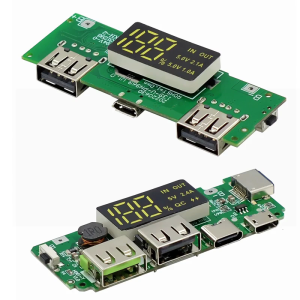
18650 Charging Board Double USB Output Mobile Power Module 5V 2.4A/2A 1A with Overcharge and Shortcircuit Protections

Space Saving Mini Desktop Computer N150 12GB Memory 256GB SSDs 4K Two Monitors Support Silents Fan Advanced Cooling

Memoria RAM DDR4 3200MHz 2666MHz 3600 2400MHz 8G 16G Gaming Desktop Memory Compatible with Intel and AMD CPUs PC4-25600 PC4-19200 17000 288Pin DIMM RAM NEW
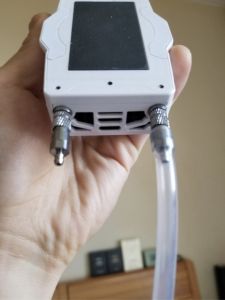
Quick Lock Microscopic Self-Locking Threaded Water Cooling Radiator Connector Single Double Leak-Proof Rapid Connector

SY168 Sound Card Broadcast Speaker: High-Quality Audio & Professional Broadcast
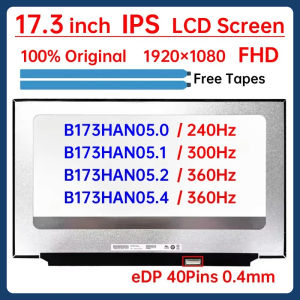
17.3" Laptop LCD Screen B173HAN05.0 B173HAN05.1 B173HAN05.2 B173HAN05.4 Display Matrix Panel Replacement 1920x1080 eDP 40 Pins
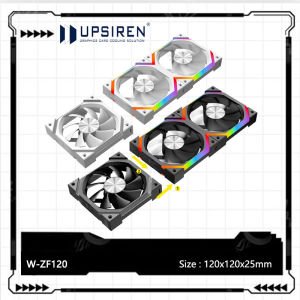
UPSIREN W-ZF120 Wireless Splicing Chassis Cooler Fan 3-in-1 ARGB 120x120x25mm CPU Cooling Fan PWM/ARGB Motherboard Sync
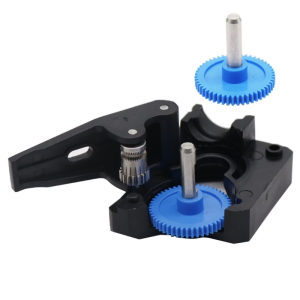
Upgraded 3D Printer Drive Gear POM Gear for For VORON Btech Extruder Shaft Accurate Extrusion Operation