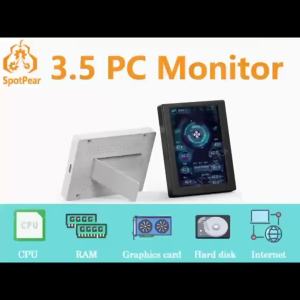
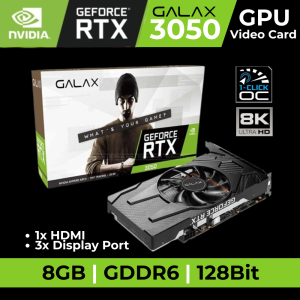
GALAX RTX 3050 8GB GDDR6 128-bit Graphics Card - 1-Click OC | HDMI & DisplayPort
GALAX RTX 3050 8GB GDDR6 128-bit Graphics Card - 1-Click OC | HDMI & DisplayPort
Overview
The GALAX RTX 3050 graphics card is a top-of-the-line GPU designed to provide exceptional performance and compatibility with modern gaming and computing systems. With its 8GB GDDR6 memory and 128-bit interface, this powerful graphics card is capable of handling even the most demanding applications and games. Additionally, the GALAX RTX 3050 supports both HDMI and DisplayPort connectivity, making it a versatile choice for any setup.
Key Features
- 8GB GDDR6 graphics card
- 128-bit graphics card
- 1-Click OC graphics card
- HDMI and DisplayPort graphics card
- Compatible with modern gaming and computing systems
Performance & Compatibility
The GALAX RTX 3050 graphics card is built to deliver outstanding performance, whether you're playing the latest games or running complex applications. With its powerful GPU and ample memory, this graphics card can handle even the most demanding tasks with ease. In addition, the GALAX RTX 3050 is compatible with a wide range of systems, including those running Windows 10 and macOS, making it a versatile choice for any setup.
Installation Guide
Installing the GALAX RTX 3050 graphics card is a straightforward process that can be completed in just a few steps. Follow the instructions below to get started:
Preparing Your System
Before installing the GALAX RTX 3050 graphics card, make sure your system meets the minimum requirements. This includes having a compatible motherboard, power supply, and operating system.
Installing the Graphics Card
- Power off your computer and unplug it from the power source.
- Open the case and locate the available PCIe slot.
- Remove the backplate from the case and install the GALAX RTX 3050 graphics card.
- Connect the power cables to the graphics card.
- Close the case and reconnect the power source.
Maximizing Performance
To get the most out of your GALAX RTX 3050 graphics card, there are several steps you can take to optimize its performance:
Enabling 1-Click OC
The GALAX RTX 3050 graphics card includes a built-in 1-Click OC feature that allows you to easily overclock the GPU for improved performance. To enable this feature, simply press the button on the graphics card and follow the on-screen instructions.
Optimizing Settings
To further optimize the performance of your GALAX RTX 3050 graphics card, consider adjusting the settings in your operating system and applications. This may include increasing the resolution, enabling anti-aliasing, or adjusting the refresh rate.
Troubleshooting Common Issues
If you encounter any issues with your GALAX RTX 3050 graphics card, there are several steps you can take to troubleshoot and resolve them:
Connectivity Problems
If you're experiencing connectivity problems with your GALAX RTX 3050 graphics card, make sure that all cables are securely connected and that the power supply is providing enough power.
Performance Bottlenecks
If you're experiencing performance bottlenecks with your GALAX RTX 3050 graphics card, consider upgrading other components in your system, such as the CPU or RAM, to improve overall performance.

OPENPINOY - The Legit MAR PC Store
Review

You May Also Like
Intel Xeon E5-2667 v2 3.3Gz (8 Cores / 16 Threads up to 4.0GHz Turbo)

ELSA Radeon RX550 4GB DDR5: Affordable Gaming Graphics Card
NerdAxe Bitcoins Mining Machine Delivering BM1366 Chip High Hash Rate and Energy Savings

IDEAL LIFE 12V 1.5A Uninterruptible Power Supply Mini UPS up for WiFi Router Modem

12RPM to 1360 RPM 25GA370 Micro Speed Reversible Geared Motor 6V/12V/24V High Torque Motor with Eccentric Output Shaft

Switch Power Supply 220V to 18V for Access Control Intercom Building Door Voltage Conversion 5A 10A 20A 360W DC Electrical Hardware

COXBYTE CPU Cooler ITX 4Pin PWM RGB 6 Heat Pipes CPU Air Cooler For AMD AM4/5 Intel LGA1700 1150 1155 1200 Processor Cooling Fan

1500W Adjustable Power Supply 0-12V 15V 24V 27V 30V 36V 48V 60V 68V 72V 85V 90V 100V 110V 150V 200V Digital Display Power AC-DC
3Series Lithiums Steps Up Charging Module Boost Charging Board With Overcharge Protections LED Indicators Safe Features
SAMSUNG SSD 870 EVO 500GB 1TB Internal Hard disk Solid State Drive SATA 2.5 Laptop Desktop 5Years Warranty

MSI 15 2025 i9-14900HX RTX5060 15.6" 2560x1440 165Hz IPS 16GB RAM 1TB SSD ZZM Trading