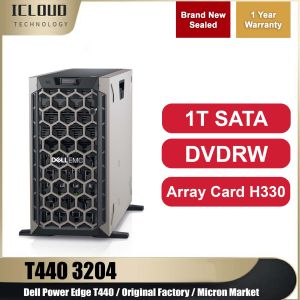
Dell PowerEdge T440: A Comprehensive Guide to Tower Servers
Dell PowerEdge T440: A Comprehensive Guide to Tower Servers
Overview of Dell PowerEdge T440
The Dell PowerEdge T440 is a powerful tower server designed for small and medium-sized businesses, providing high performance and reliability. This server supports up to 16 cores with Intel® HT Technology (2 threads/core), Intel® Turbo Boost technology, and between 85W-105W TDP. It features a 1TB/socket memory capacity on all standard 2nd generation processors, socket P, and 14nm process technology.
Key Features
- Up to 16 cores with Intel® HT Technology
- Intel® Turbo Boost technology
- 1TB/socket memory capacity
- Support for Intel AVX-512
- Up to 48 PCIe lanes per CPU
- PCI Express 3.0
Intel® Processor Technology
The Dell PowerEdge T440 supports a wide range of Intel® processors, including 2S, 4S, and 8S scalable platforms. The server features a rebalanced cache hierarchy with 1.375MB last level cache/core, Intel® Ultra Path Interconnect (UPI) with bandwidth up to 10.4GT/s, and support for Memory Protection Extensions (MPX).
Understanding H330 Array Card
The H330 array card is a high-performance RAID controller that enhances the storage capabilities of the Dell PowerEdge T440.
What is an H330 Array Card?
The H330 array card is a low-profile PCIe 3.0 x4 RAID controller that supports SATA and SAS hard drives, providing advanced data protection and performance optimization.
Benefits of Using H330 Array Card
- Improved storage performance
- Enhanced data protection
- Simplified management and deployment
Integration with Dell PowerEdge T440
The H330 array card seamlessly integrates with the Dell PowerEdge T440, enabling users to take advantage of its advanced features and capabilities.
Exploring DVDRW Optical Drive
A DVDRW optical drive allows users to read, write, and rewrite data on DVDs, providing a convenient way to store and share files.
Choosing the Right DVDRW Optical Drive
When selecting a DVDRW optical drive for the Dell PowerEdge T440, consider factors such as compatibility, speed, and reliability.
Compatibility with Dell PowerEdge T440
Ensure that the chosen DVDRW optical drive is compatible with the Dell PowerEdge T440, supporting its SATA interface and power requirements.
Original Factory DVDRW Drive Options
Dell offers a range of original factory DVDRW drives that are compatible with the Dell PowerEdge T440, providing users with a reliable and high-performance storage solution.
Micron Market Server & Magnesium
Micron Market Server is a high-performance server solution designed for small and medium-sized businesses, featuring Micron Market Magnesium technology.
Introduction to Micron Market Server
Micron Market Server provides users with a powerful and reliable server solution, optimized for performance and efficiency.
Micron Market Magnesium: A Closer Look
Micron Market Magnesium is a cutting-edge technology that enhances the performance and reliability of the Dell PowerEdge T440, offering improved data protection and energy efficiency.
Enhancing Dell PowerEdge T440 Performance
By integrating Micron Market Magnesium technology, the Dell PowerEdge T440 can achieve higher levels of performance and efficiency, making it an ideal choice for small and medium-sized businesses.
1T SATA Hard Drive & Personal Server
A 1T SATA hard drive provides ample storage capacity for personal servers, enabling users to store and manage large amounts of data.
What is a Personal Server?
A personal server is a dedicated server that is used for personal or small business purposes, providing users with a reliable and efficient way to store and manage data.
Benefits of Using a 1T SATA Hard Drive
Using a 1T SATA hard drive in a personal server offers users a cost-effective and reliable storage solution, providing ample capacity for storing and managing large amounts of data.
Setting Up a Personal Server with Dell PowerEdge T440
To set up a personal server using the Dell PowerEdge T440, users can follow these steps:
- Install the necessary hardware components, including the 1T SATA hard drive, DVDRW optical drive, and H330 array card.
- Configure the server settings, including network connectivity, storage configuration, and security settings.
- Install the desired operating system and software applications.
- Test the server to ensure it is functioning properly.

iCloudddd8888
Review

You May Also Like
New G12038ha2 Kowloon Cooling Fan 4-Inch Ac220v Chassis Electric Welding Machine Cabinet Fan 3

OMNIA O156IPC 15.6" PORTABLE MONITOR 60HZ IPS 1920X1080 FHD HDMI MINI TYPE C AUDIO OUT W/ BUILT IN SPEAKER
Practical Small Desktop Fan Clip On Fan Office Fan 4 Speed Setting Air Cooling Fan ABS Texture Suitable for Cooling
SUNON Sunon EEC0382B1-0000-A99 24V 9.2w 12038 Cooling Fan 2Lines
GOOJODOQ Portable Monitor 1920*1080P FHD for Laptop Extender Stand Speaker Ps4 Phone PC Android Switch Macbook HDMI
BenQ ZOWIE XL2546X+ | Fast TN 280Hz | DyAc™ 2 | Gaming Monitor for Esports
![[COD] Laogeliang 1Set CA-901 LCD TV Switching Power Supply DC Sampling Power Module Chip](https://img.lazcdn.com/g/p/efb741e95a6b6eeac4e3d8c609cc07f7.jpg_300x300q80.jpg)
[COD] Laogeliang 1Set CA-901 LCD TV Switching Power Supply DC Sampling Power Module Chip
ZEUSLAP 15.6 Inch Portable Gaming Monitor: Multi-Platform Compatibility & High-Quality Display
4PCS Vibration Absorption Pads for Lab X1/P1 Mini 3D Printers Anti Shock Rubber Foot Pad

Tiny Transportable Device with Double USB Outputs 21700 Structure Permanent Plastic Housing Multiple Dyes
Universal 4.5V LR03 USB Power Converters Eliminators Replace 3pcs LR03 for LED Light Radio Toys with Switches