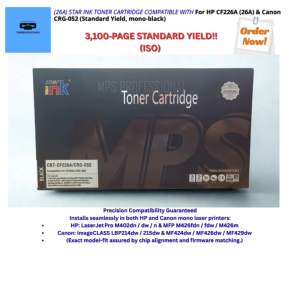
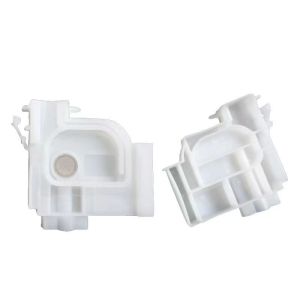
2PCS Printer Ink Damper Replacement For Epson L301 L130 L310 L313 L111 L201 L455 L101 L3310 L351 L360 L365 L380 L565 L1800 L805
2PCS Printer Ink Damper Replacement For Epson L301 L130 L310 L313 L111 L201 L455 L101 L3310 L351 L360 L365 L380 L565 L1800 L805
Understanding Your Printer's Ink Damper
What is an ink damper?
An ink damper, also known as an ink damper assembly or ink damper module, is a crucial component of your Epson printer that helps maintain consistent ink flow and pressure within the printer's ink system. This ensures optimal print quality and minimizes the risk of clogging.
How does an ink damper work?
The ink damper works by regulating the air pressure inside the ink cartridge and printhead. As ink is consumed during printing, the ink damper allows air to enter the cartridge to compensate for the volume loss, preventing air bubbles from forming and disrupting the ink flow.
Why replace your ink damper?
Over time, the ink damper may wear out or become clogged, leading to poor print quality, frequent nozzle cleaning cycles, and increased ink usage. Replacing the ink damper can help restore your printer's performance and extend its lifespan.
Compatible Ink Dampers for Your Printer
L455 L101 compatible ink dampers
If you own an Epson L455 or L101 printer, you'll need to find compatible ink dampers specifically designed for these models. Make sure to check the product description and compatibility list before purchasing.
L310 L313 printer parts
For Epson L310 and L313 printers, you'll need to look for ink dampers that are specifically designed for these models. Again, ensure you check the product description and compatibility list before making a purchase.
L3310 L351 L360 L365 L380 L565 L1800 L805 ink dampers
If you have an Epson L3310, L351, L360, L365, L380, L565, L1800, or L805 printer, you'll need to find ink dampers that are compatible with these models. Be sure to check the product description and compatibility list before buying.
How to Replace Your Printer's Ink Damper
Tools & Materials Needed
- Replacement ink damper
- Small screwdriver (if required)
- Clean cloth or paper towel
Step-by-Step Guide
- Turn off and unplug your printer.
- Open the printer's ink cartridge access door.
- Remove the ink cartridges from their slots.
- Locate the ink damper assembly, usually found near the ink cartridges.
- Carefully disconnect the ink damper from the printhead and ink cartridge connections.
- Remove the old ink damper and replace it with the new one.
- Reconnect the ink damper to the printhead and ink cartridge connections.
- Insert the ink cartridges back into their slots.
- Close the ink cartridge access door.
- Turn on your printer and allow it to initialize.
Troubleshooting Common Issues
- If you encounter issues during the replacement process, consult your printer's user manual or contact Epson support for assistance.
Benefits of Replacing Your Printer's Ink Damper
Improved Print Quality
Replacing your ink damper can help restore optimal print quality by ensuring consistent ink flow and pressure within the printer's ink system.
Extended Printer Lifespan
By replacing worn-out or clogged ink dampers, you can extend the lifespan of your printer and minimize the risk of costly repairs or replacements.
Cost Savings
Properly maintaining your printer's ink system can help reduce ink usage and minimize the frequency of nozzle cleaning cycles, leading to cost savings over time.

Jimmy Ya
Review

You May Also Like
QR Code Module Scanner Reader USB TTL Embedded 1D 2D Barcode Reader QR Code Scanner Module for Vending machine Access Control
AOS SC2022 WASTE TONER CONTAINER
(Combination )80mm Width Thermal Bluetooth Receipt Printer with Auto Cutter Android 13 Handheld POS Work on Loyverse POS Support Cash Drawer in Kitchen Cashier Restaurant Supermarket No Need Ink

GTCODESTAR GT-3303 Portable 2D Barcode Scanner Wireless Barcode Scanning QR Code Reader Bluetooth Mini Barcode Reader for Inventory
Newest XP-15000 XP15010 DTF CISS Ink Supply System With White Ink Strrier For Epson XP15000 CISS Convert Kit
Ellipsoid White Adhesive Labels For Storage Canisters Crafting Editable Face 150 Per Roll
Epson L5290 Printer Ink Box: Brightly Colored Replacement Ink for L3210 & L3250
child 3D DIY For Digital Print Graffiti Pen Educational Toys With USB Cable Intelligent Pens Set
ETQ Compatible Fuji Xerox Universal Mono Toner Powder: A High-Quality Solution
Applicable HP Hp 805 Ink Cartridge Can Add Ink Black Colors 2720 1210 2330 2722 1212 2332
Epson Xp 352 Resetter Tools