BV-1R Din Rail Single Phase Voltage Meter AC 80-500V Mini Modular Voltmeter LED Digital Display
BV-1R Din Rail Single Phase Voltage Meter AC 80-500V Mini Modular Voltmeter LED Digital Display
Introduction to the BV-1R Mini Modular Voltmeter
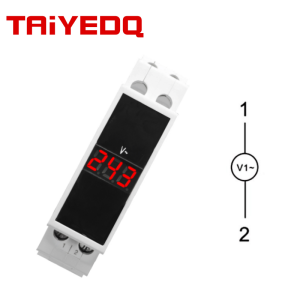
The BV-1R Din Rail Single Phase Voltage Meter is a highly accurate and reliable device designed for monitoring AC voltage in industrial settings. This mini modular voltmeter offers a compact design that can easily fit into tight spaces, making it ideal for applications where space is limited. The BV-1R features a LED digital display, providing clear and easy-to-read voltage measurements.
Key Features & Specifications
The BV-1R mini modular voltmeter boasts a range of features that make it an excellent choice for various applications. Some of its key features include:
- Din Rail Mounting: The BV-1R is designed for din rail mounting, allowing for easy installation in control panels and electrical cabinets.
- Single Phase Voltage Monitoring: The meter is specifically designed to monitor single phase voltages, with a measurement range of 80-500V AC.
- LED Digital Display: The LED digital display provides clear and easy-to-read voltage measurements, making it simple to interpret the data.
- Compact Design: The BV-1R has a small form factor, making it perfect for applications where space is limited.
Benefits of Using a Modular Voltage Meter
Using a modular voltage meter like the BV-1R offers several benefits, including:
- Accurate Voltage Monitoring: The BV-1R provides accurate voltage measurements, allowing you to monitor the performance of your electrical system.
- Easy Installation: The din rail mounting design makes it easy to install the voltmeter in control panels and electrical cabinets.
- Compact Design: The small form factor of the BV-1R makes it ideal for applications where space is limited.
- Cost-Effective: Modular voltage meters like the BV-1R offer a cost-effective solution for monitoring voltage in industrial settings.
Installation & Setup of the BV-1R Voltmeter
Installing and setting up the BV-1R voltmeter is a straightforward process. Here are some steps to follow:
Choosing the Right Location for Installation
When choosing a location for the BV-1R voltmeter, consider the following factors:
- Space Requirements: Ensure that the location has enough space to accommodate the voltmeter and its mounting hardware.
- Access to Power Supply: Make sure that the location provides access to the power supply needed to operate the voltmeter.
- Proximity to Electrical System: Install the voltmeter close to the electrical system being monitored to minimize the risk of signal interference.
Connecting the Voltmeter to the Power Supply
To connect the BV-1R voltmeter to the power supply, follow these steps:
- Turn off the power supply to the electrical system being monitored.
- Connect the voltmeter to the power supply using the appropriate wiring.
- Turn on the power supply and verify that the voltmeter is functioning properly.
How to Read & Interpret Voltage Measurements
The BV-1R voltmeter features a LED digital display that provides clear and easy-to-read voltage measurements. Here are some tips for reading and interpreting the data:
Understanding the LED Digital Display
The LED digital display on the BV-1R voltmeter shows the voltage measurement in volts (V). The display may also show other information, such as the measurement range and any error messages.
Interpreting Voltage Readings
To interpret the voltage readings on the BV-1R voltmeter, consider the following factors:
- Voltage Range: Ensure that the voltage measurement falls within the specified range of 80-500V AC.
- Accuracy: Verify that the voltage measurement is accurate and within the acceptable tolerance range.
- Error Messages: Check for any error messages displayed on the LED digital display and take appropriate action to resolve any issues.
Troubleshooting Common Issues with the BV-1R Voltmeter
Like any electronic device, the BV-1R voltmeter may encounter some common issues during operation. Here are some tips for troubleshooting these problems:
Addressing Connection Problems
If the voltmeter is not displaying a voltage reading, check the following:
- Power Supply: Ensure that the voltmeter is connected to a stable power supply.
- Wiring: Verify that the wiring connections are secure and properly connected.
- Grounding: Check that the voltmeter is properly grounded.
Resolving Measurement Errors
If the voltmeter is displaying inaccurate voltage readings, try the following:
- Calibration: Calibrate the voltmeter according to the manufacturer's instructions.
- Interference: Check for any sources of interference that may be affecting the accuracy of the voltage measurement.
- Replacement: Replace the voltmeter if it is faulty or damaged.

Taiye Electric
Review

You May Also Like
Flexible Sink Spring Hose: A Comprehensive Guide

Moito 10Pcs Waterproof Adhesive Patches Sensor Covers Patch Clear CGM Overpatch-Tape
Glue Spreaders 5 Pieces Leather Scraping Spreader Flexible Glue Smear Sticks Glue Applicators for Art Craft DIY Card Making

Lengthening pipes dredgers sewer toilets kitchens sinks bathrooms dredging pipes and removing blockages
CROWN Fast Trim Machine (Double Head) (MODEL CR-05GH) (BRAND NEW)

Foldable Ladder Bamboo 3 Steps Stool Portable Ladder Heavy Duty Step Ladder Folding Hagdan
SNB50 Impeller For Yamma 7Hp 2X2 Water Pump 178F Gasoline Engine

ladder foldabl aluminum heavy duty can bear 400KG length 3.7/4.7/5.7M anti slip for large joints
6 In1 Diamond Cutting Disc Blade Multi Functional Cutting Disc Saw Blade For Tiling Rock Slab Marble Tile Metal Blade
KINKELDER FUSION NX LOGO PRECUT BLADE 2.0 & 2.5 1PC KADA ORDER

SK-520SS SUS304 STAINLESS STEEL KITCHEN SINK (80x50x20)