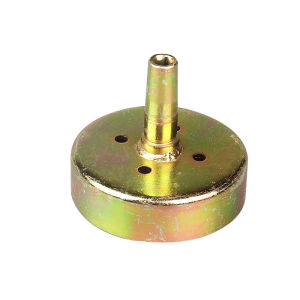
9T Clutch Drum Gear Driver Sprocket For GX35 & GX31 Grass Cutter Parts
9T Clutch Drum Gear Driver Sprocket For GX35 & GX31 Grass Cutter Parts
Introduction to High-Quality Sprockets for GX35
Grass cutting is an essential part of lawn maintenance, and having a reliable grass cutter is crucial. One of the key components of your grass cutter is the sprocket, which plays a vital role in transferring power from the engine to the cutting mechanism. In this article, we will discuss the importance of choosing high-quality sprockets, specifically the 9T Clutch Drum Gear Driver Sprocket for GX35 and GX31 grass cutters.
What is a 9T Clutch Drum Gear Driver Sprocket?
A 9T Clutch Drum Gear Driver Sprocket is a specialized component designed to work with GX35 and GX31 grass cutters. This sprocket has a 9-tooth design that ensures optimal power transfer and smooth operation of your grass cutter. It is specifically engineered to work with the clutch drum gear driver system, which is a critical part of the grass cutter's transmission.
Why Choose High-Quality Sprockets for Your Grass Cutter?
Investing in high-quality sprockets for your grass cutter offers several benefits:
- Durability: High-quality sprockets are built to last, ensuring that your grass cutter will operate smoothly for a long time.
- Efficiency: A well-designed sprocket will transfer power efficiently, reducing wear and tear on other components of your grass cutter.
- Compatibility: High-quality sprockets are designed to fit seamlessly with your grass cutter's existing parts, ensuring optimal performance.
How to Install & Replace 9T Clutch Drum Gear Driver Sprocket
Installing or replacing a 9T Clutch Drum Gear Driver Sprocket is a straightforward process. Here's a step-by-step guide to help you through the installation:
Step-by-Step Guide to Installing a New Sprocket
- Prepare your workspace: Ensure you have a clean, well-lit area to work in. Gather all necessary tools, including a wrench, screwdriver, and replacement sprocket.
- Disconnect the spark plug: To prevent accidental engine starts, disconnect the spark plug wire before beginning the installation process.
- Remove the old sprocket: Use a wrench to loosen and remove the old sprocket from the clutch drum gear driver system.
- Install the new sprocket: Carefully place the new sprocket onto the clutch drum gear driver system, ensuring proper alignment.
- Reconnect the spark plug: Once the new sprocket is installed, reconnect the spark plug wire.
Troubleshooting Common Issues During Installation
Some common issues you may encounter during installation include:
- Improper alignment: Ensure that the new sprocket is properly aligned with the clutch drum gear driver system.
- Loose fit: Check that the new sprocket is securely fastened onto the clutch drum gear driver system.
Maintaining Your GX35 & GX31 Grass Cutter Parts
Regular maintenance is essential to keep your grass cutter running smoothly. Here are some tips for maintaining your grass cutter parts:
Regular Maintenance Tips for Optimal Performance
- Clean the sprocket: Regularly inspect and clean the sprocket to prevent debris buildup.
- Check for wear: Inspect the sprocket for signs of wear or damage, such as cracks or missing teeth.
- Lubricate moving parts: Apply lubricant to moving parts to reduce friction and wear.
Signs That It's Time to Replace Your Sprocket
It's time to replace your sprocket if you notice any of the following:
- Excessive wear: The sprocket shows signs of excessive wear, such as missing teeth or cracks.
- Poor performance: Your grass cutter is not operating smoothly, and the sprocket may be the cause.
Engine Accessories for Lawn Mowers
Enhancing your grass cutter experience can be achieved by investing in additional accessories. Here are some popular engine accessories for lawn mowers:
Enhancing Your Grass Cutter Experience with Additional Accessories
- Replacement parts: Keep a stock of replacement parts, such as the 9T Clutch Drum Gear Driver Sprocket, to ensure your grass cutter is always ready to go.
- Maintenance tools: Invest in quality maintenance tools to keep your grass cutter running smoothly.
Ensuring Compatibility Between Accessories and Your Grass Cutter
When choosing accessories for your grass cutter, ensure that they are compatible with your specific model. Refer to the manufacturer's specifications to find the right accessories for your GX35 or GX31 grass cutter.
By following these guidelines, you'll be able to maintain optimal performance of your grass cutter and enjoy a beautiful, well-manicured lawn.

Champs Mall
You May Also Like

Sigarilyas 7 Seeds Kalamismis Winged Beans Binhi Pantanim Vegetable Outdoor Garden Plant Binhi Pantanim
10PCS Plastic Flower Pot Plant Tray Indoor And Outdoor Decoration Plant Flower Pot Tray
48V MAX Cordless Car Motor Wash Cleaner High Pressure Washers Water Handheld Spray Gun

Cycloazinone Herbicide: A Powerful Solution for Grass, Bamboo & Tree Control

220V LED Mosquito Killer Lamp LED Light Insect Killer 8W Energy Saving Anti Mosquito Lamp Electric Shock Repellent Industrial Electric Professional Fly Insect Bug Spider Pest Mosquito Biting Insects Killer UV Easy Hygienic Effective High Performance
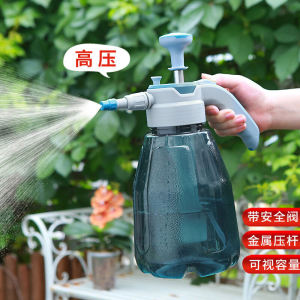
Large Capacity Thickened High Pressure Sprayer Watering Can for Gardening Flower Care Vegetable Planting Home Garden Care
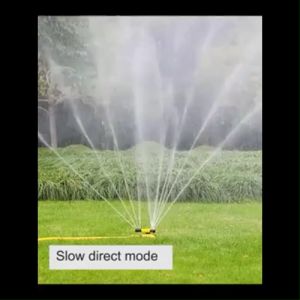
360 Degree Garden Sprinkler Automatic Rotating Irrigation Sprinkler Tandem Sprinkler Flower Waterer

Gecko UV LED Portable Mosquito Killer: Safe Mosquito Control Device

Garden Nylon Trellis Nettin Net Climbing Vine Plants Support Net Garden Plant Support Net

Home Plant Slow Release Stick for Year-Round Family Garden Suitable for All Ages Continuous Nutritional Supply 7 Days to Revitalize Plant Vitality

Red Clay Potted Planters Breathable Terracotta Pots for Home Use Succulent Plant Containers Ceramic Roof Tile Flower Pots