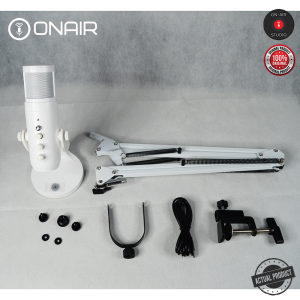
ONAIR JD950 RGB Gaming Mic with Boom Kit USB Condenser
ONAIR JD950 RGB Gaming Mic with Boom Kit USB Condenser
The ONAIR JD950 RGB Gaming Mic is a top-of-the-line USB condenser microphone designed specifically for gamers and streamers. This high-quality gaming mic comes equipped with a boom kit, allowing for optimal positioning and sound quality.
What is the ONAIR JD950 RGB Gaming Mic?
The ONAIR JD950 RGB Gaming Mic is a cutting-edge gaming microphone that combines advanced technology with sleek design. It features RGB lighting gaming accessories, making it an eye-catching addition to any gaming setup. This USB condenser microphone offers superior audio quality and is compatible with both Windows and Mac operating systems.
Key Features & Specifications
- RGB Lighting: Customizable RGB lighting adds a vibrant touch to your gaming setup.
- USB Condenser Microphone: Plug-and-play connectivity ensures easy setup and use.
- Boom Kit: Adjustable boom arm allows for precise positioning and optimal sound quality.
- Noise-Canceling Technology: Advanced noise-canceling capabilities ensure crystal-clear audio.
- Compatibility: Works seamlessly with Windows and Mac operating systems.
How It Stands Out in the Market
The ONAIR JD950 RGB Gaming Mic stands out from its competitors due to its combination of high-quality audio performance and customizable RGB lighting. Its sleek design and ease of use make it a popular choice among gamers and streamers alike.
Setting Up Your ONAIR JD950 RGB Gaming Mic
Setting up your ONAIR JD950 RGB Gaming Mic is a straightforward process. Follow these steps to get started:
- Connect the microphone to your computer using the included USB cable.
- Adjust the boom arm to position the microphone at the desired angle and distance from your mouth.
- Configure the RGB lighting settings through the accompanying software or via manual adjustments.
Connecting the Mic to Your Computer
To connect the ONAIR JD950 RGB Gaming Mic to your computer, simply plug the USB cable into the appropriate port on your device. The microphone will automatically detect and install the necessary drivers, allowing you to start using it right away.
Configuring RGB Lighting Gaming Accessories
Customize the RGB lighting on your ONAIR JD950 RGB Gaming Mic by adjusting the settings through the accompanying software or manually. Choose from various color schemes and effects to match your gaming setup.
Maximizing the Performance of Your ONAIR JD950 RGB Gaming Mic
To get the most out of your ONAIR JD950 RGB Gaming Mic, follow these tips:
- Using the Boom Kit for Optimal Positioning: Adjust the boom arm to position the microphone at the ideal angle and distance from your mouth. This will help minimize background noise and ensure clear audio.
- Fine-Tuning Audio Settings for High-Quality Sound: Experiment with different audio settings to achieve the best possible sound quality. Pay attention to factors such as gain, EQ, and compression.
Troubleshooting Common Issues
If you encounter any issues while using your ONAIR JD950 RGB Gaming Mic, try the following solutions:
Fixing Connection Problems
- Check the USB Cable: Ensure that the USB cable is securely connected to both the microphone and your computer.
- Update Drivers: Make sure that your computer's audio drivers are up-to-date.
Addressing Audio Quality Concerns
- Adjust Gain Levels: Increase or decrease the gain levels to achieve the desired volume.
- Use Noise-Canceling Software: Utilize noise-canceling software to further improve audio clarity.
In conclusion, the ONAIR JD950 RGB Gaming Mic is a top-tier gaming microphone that offers exceptional audio quality and customizable RGB lighting. With its easy setup and versatile design, it's no wonder this microphone has become a favorite among gamers and streamers.

ON-AIR STUDIO
You May Also Like
LC094 – LCD KEYPAD Mounting Plate Keypad matrix holder 20x4 LCD module holder
Oppo K3 Privacy Screen Protector High Definition Tempered Glass Anti Blue Light Anti Glare Mobile Phone Film Full Screen Protection

Leather Strap for Xiaomi Mi Band 7 Pro: A High-Quality Upgrade
Portable Sound Amplifier Phone Holder Stand Universal Phone Holder Audio Speaker Holder Bracket Stand For Mobile Phones 2024
100W 6A Super Fast Charging Cable 3 in 1 USB Cable Quick Charging Wire USB C Android Fast Charger MicroUSB Type C Charger

LuBang Anti-Fall Silicone Phone Case for OPPO K11X Ultra-Thin Transparent Full-Coverage Soft Edges Quadrant Thickened Lens Protective Cover
Transparent Soft Silicone Case for Xiaomi Redmi 9T Mobile Phone Protective Cover Anti-Fall Wear-Resistant Clear Plastic Shell
Universal Desktop Computer Keyboard Stickers Key Cap Decal Film Women Simple Host Decorative Creative 104 Key 87 Cap Color Change Letter Sticker Film Cute Cartoon Paint Repair
NILLKIN CAMSHIELD PROP Camera Cover Shockproof Case IPHONE 17 PRO MAX
Full Coverage Hard PC Case with Tempered Glass Screen Protector for Apple Watch 45mm 41mm 44mm 40mm Series 9/8/7/SE/6/5/4
Apple 14 Privacy Tempered Glass Screen Protector Full Screen Iphone 14 plus 14 pro Max Anti Protective Film with Airbag