FEELWORLD LUT7 PRO: A Comprehensive Guide to 7 Inch Ultra Bright Monitor
FEELWORLD LUT7 PRO: A Comprehensive Guide to 7 Inch Ultra Bright Monitor
What is FEELWORLD LUT7 PRO?
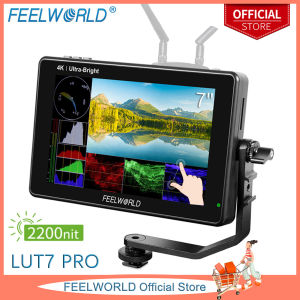
FEELWORLD LUT7 PRO is a top-of-the-line 7 inch ultra bright monitor designed specifically for DSLR camera monitoring. This monitor boasts a 2200 nits brightness, making it perfect for outdoor shoots, and offers 4K HDMI input/output capabilities, ensuring you capture every detail in your footage. The LUT7 PRO features an IPS panel touch screen, providing accurate color representation and easy navigation. Additionally, it comes equipped with an HDR waveform display, enabling you to fine-tune your exposure and contrast settings effortlessly.
Key Features
- 7 inch ultra bright monitor with 2200 nits brightness
- 4K HDMI input/output capabilities
- IPS panel touch screen
- HDR waveform display
- 3D LUT support
Package Contents
The FEELWORLD LUT7 PRO comes with the following items:
- 1x LUT7 PRO Monitor
- 1x Mini/Micro HDMI to HDMI Cable
- 1x Tilt Arm
- 1x Disassemble Wrench
- 1x Manual
Please note that the battery and power adapter are not included in the package. You will need to purchase a 12V 3A power adapter separately.
How to Set Up FEELWORLD LUT7 PRO?
Setting up the FEELWORLD LUT7 PRO is straightforward and easy. Follow these steps to get started:
Connecting the Monitor
To connect the monitor to your DSLR camera, simply plug the Mini/Micro HDMI to HDMI cable into the camera's HDMI output port and the monitor's HDMI input port.
Installing the Tilt Arm
The tilt arm included in the package allows you to adjust the monitor's angle and position. To install the tilt arm, first, attach the base plate to the back of the monitor using the disassemble wrench provided. Then, attach the tilt arm to the base plate, ensuring it is securely fastened.
Powering Up the Monitor
To power up the monitor, connect the power adapter to the monitor's DC input port and plug it into a power outlet. Once powered on, the monitor will display the FEELWORLD logo and then enter the main menu.
How to Use FEELWORLD LUT7 PRO?
Now that you have set up the FEELWORLD LUT7 PRO, let's explore how to use it effectively:
Adjusting Display Settings
The IPS panel touch screen allows you to adjust various display settings, such as brightness, contrast, and color temperature. Access these settings by tapping the 'Settings' icon on the main menu.
Utilizing HDR Waveform Display
The HDR waveform display is a powerful tool for fine-tuning your exposure and contrast settings. To access the waveform display, tap the 'Waveform' icon on the main menu. You can then adjust the waveform display settings, such as the color range and brightness levels, by tapping the 'Settings' icon within the waveform display.
Applying 3D LUT
The FEELWORLD LUT7 PRO supports 3D LUTs, which allow you to apply custom color grading to your footage. To apply a 3D LUT, first, import the LUT file onto the monitor using a USB drive. Then, access the '3D LUT' menu by tapping the 'Settings' icon on the main menu and select the desired LUT file.
FEELWORLD LUT7 PRO: The Future of DSLR Camera Monitoring
With its impressive features and ease of use, the FEELWORLD LUT7 PRO is poised to become the go-to monitor for DSLR camera users. Its 7 inch ultra bright monitor, 4K HDMI input/output capabilities, IPS panel touch screen, HDR waveform display, and 3D LUT support make it an indispensable tool for capturing high-quality footage. Whether you're a professional videographer or a hobbyist, the FEELWORLD LUT7 PRO is the perfect monitor to elevate your DSLR camera monitoring experience.

FEELWORLD Official Store
Review

You May Also Like
DN8/10/15/20/25 Quick Conntect Water Reverse Osmosis System Electric Water Oil Solenoid Valve 12/24/220V Normally Closed
Neutrik Professional Speak-On Cable Connector male
Lightweight Silicone Phone Case for Huawei Honor X50: Gradient Cartoon Flash Powder INS Summer Cream Pattern Chain Transparent Anti-Fall
1 Piece Desktop Speaker Stand Metal Audio Bracket Universal Tabletop Holder Compatible with Kantos
Fast Charging Head 18W Single Head Android Mobile Phone Charger Quick Charge Adapter Compatible with Vivo Huawei Oppo Xiaomi
Applicable to Huawei Nova11 Tempered Film Nova11pro Mobile Phone Film 11ultra All-Inclusive 5G Full Screen Cover Nove11se New Arrival Drop-Resistant Huawei HD Por Protection Novo Water Coagulation Pr0
Autumn Winter Coffee Colored Double Chain Mobile Phone Strap Elegant Star Tassel Versatile Bag Charm Crystal Material
Honor 60SE/60Pro/60SE Silicone Phone Case with Lens Film Transparent Matte Protective Cover Anti-Fall for Men And Women
2Pcs High and Low Pressure Reducing Filter Valve Natural Gas Liquefied Gas Gas Filter For Boiler Gas Water Heater
Cyan Jade Translucence Keycap: A Comprehensive Guide
【Top Selling Item】 Galaxy Tab A8 10.5 Inch Clear Soft TPU Shockproof Case Cover TabA8 SM X200 SM X205 X200 X205 X207 Case