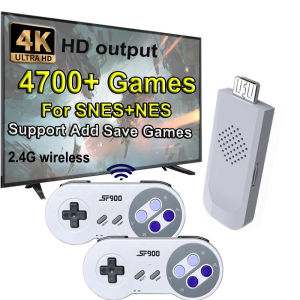
VR Paddle Handle Table Tennis Racket Grip For Oculus Quest 2 VR Controller Accessories Highly Realistic Improve VR Experience
VR Paddle Handle Table Tennis Racket Grip For Oculus Quest 2 VR Controller Accessories Highly Realistic Improve VR Experience
Introduction to VR Paddle Handle Table Tennis Racket Grip
Table tennis is a popular sport enjoyed by millions worldwide, and now you can experience it in virtual reality with the VR Paddle Handle Table Tennis Racket Grip! This highly realistic VR gaming accessory is designed specifically for Oculus Quest 2 VR controllers, allowing you to enhance your VR table tennis experience.
Key Features & Benefits
The VR Paddle Handle Table Tennis Racket Grip offers several key features and benefits that make it stand out:
- Highly Realistic VR Gaming Accessories: With this grip, you'll feel like you're holding a real table tennis racket, providing a more immersive VR experience.
- Improve VR Experience: By customizing your VR paddle handle, you can fine-tune your VR table tennis setup and enjoy a more enjoyable gaming experience.
- Table Tennis VR Controller Grip: This grip is designed specifically for Oculus Quest 2 VR controllers, making it easy to install and use.
Compatibility with Oculus Quest 2 VR Controllers
The VR Paddle Handle Table Tennis Racket Grip is compatible with Oculus Quest 2 VR controllers, ensuring a seamless integration with your VR setup. This compatibility allows you to focus on enjoying your virtual table tennis matches without worrying about technical issues.
How to Install the Table Tennis Racket Grip
Installing the Table Tennis Racket Grip is simple and straightforward. Follow this step-by-step guide to get started:
- Unpack the Table Tennis Racket Grip and Installation Manual.
- Carefully remove the protective cover from the grip.
- Align the grip with your Oculus Quest 2 VR controller.
- Securely attach the grip to the controller, ensuring it fits snugly.
Troubleshooting Tips
If you encounter any issues during installation, here are some troubleshooting tips:
- Make sure the grip is properly aligned with the controller before attaching it.
- Double-check that the grip is securely attached to the controller.
- Refer to the Installation Manual for additional guidance.
Improving Your VR Table Tennis Experience
Now that you've installed the VR Paddle Handle Table Tennis Racket Grip, it's time to customize your VR paddle handle and fine-tune your VR table tennis setup.
Customizing Your VR Paddle Handle
To get the most out of your VR table tennis experience, consider customizing your VR paddle handle. Here are some tips:
- Adjust the grip size to fit your hand comfortably.
- Experiment with different grip materials to find the one that suits your preferences.
- Personalize your VR paddle handle with custom designs or colors.
Fine-Tuning Your VR Table Tennis Setup
To further enhance your VR table tennis experience, fine-tune your VR setup by:
- Adjusting the sensitivity settings in your VR game to match your playing style.
- Calibrating your VR headset to ensure accurate tracking and movement.
- Setting up a dedicated gaming space to minimize distractions and improve gameplay.
Conclusion & Final Thoughts
The VR Paddle Handle Table Tennis Racket Grip is a must-have accessory for any Oculus Quest 2 VR controller owner who wants to enhance their VR table tennis experience. With its highly realistic design and easy installation process, this grip offers a unique way to enjoy virtual table tennis matches. So why wait? Order your VR Paddle Handle Table Tennis Racket Grip today and take your VR gaming to the next level!

DISOUR Store
You May Also Like
Portable Handheld Device R36XX Handheld Game Console linux Open Source Handheld Console Can Be Connected Online WiFi Can be played in pairs
Mocute 061 Gamepad Wireless Bluetooth Left Right Split Game Controller Type-C Gaming Portable Joystick Gamepads For Android PC - Lazada
Original 1983 Nintendo Family Computer Famicom (Japan) AV Modded for Modern TVs
Racing Game Steering Wheel for Gamepad Gaming Wheel Game Controller 3D Mini Steering Wheel Gamepad Accessories
Arcade Box Video Game Console for PS1/DC/N64 50000+Games Game Box Plug and Play Game Console 4K HD Display Emulator Console
【E-WOITD】 1pc Google Cardboard 3D Vr Virtual Reality Glasses For Android or Phone NEW
![Follow Get New[Bloom Z] 3D Glasses Red Blue Black Frame For Dimensional Anaglyph TV Movie DVD Game](https://img.lazcdn.com/g/p/ecccea7c9bac5f21a3388595d3d323f8.jpg_300x300q80.jpg)
Follow Get New[Bloom Z] 3D Glasses Red Blue Black Frame For Dimensional Anaglyph TV Movie DVD Game

F.E.A.R. 3 - Xbox 360
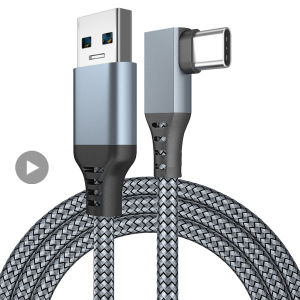
Accessories For Oculus Quest2 Quest 2 Cable Link Smart 3D Virtual Reality VR Glasses USB A To Type C 3 5M Headset Oculis Helmet
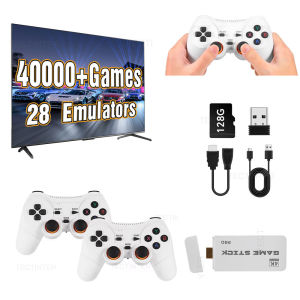
M15 Pro Game Stick Retro Video Game Console with Wireless Gamepads Controller Mini TV Handheld Game Player 64/128G 40000+ Games

Efficient Cake Themed Celebration Glasses With Soft Nose Pad Eyewear Property For Extended Wear Comfort