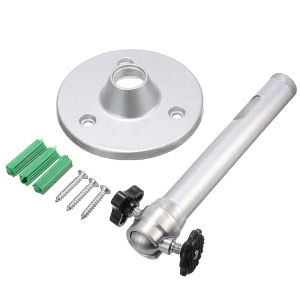
Wall Mount Ceiling Projector Bracket: 18cm Adjustable Metal Projector Bracket 360 Degree Rotatable Holder for DV Camera
Wall Mount Ceiling Projector Bracket: 18cm Adjustable Metal Projector Bracket 360 Degree Rotatable Holder for DV Camera
Introduction to Wall Mount Ceiling Projector Bracket
A Wall Mount Ceiling Projector Bracket is a device designed to securely mount and support a projector onto a wall or ceiling. This particular model, the 18cm Adjustable Metal Projector Bracket, offers a range of benefits, including easy installation, flexibility, and stability.
What is a Wall Mount Ceiling Projector Bracket?
The Wall Mount Ceiling Projector Bracket is a mounting system designed to hold projectors in place while providing adjustability and ease of use. It ensures that your projector remains secure and stable during operation, preventing any potential damage from accidental bumps or movements.
Key Features & Benefits
- Adjustable: The 18cm Adjustable Metal Projector Bracket allows for easy adjustments to accommodate different projector sizes and angles.
- Sturdy Construction: Made from high-quality metal, this bracket provides excellent durability and stability.
- Rotatable: With a 360-degree rotation capability, you can easily adjust the angle of your projector to achieve optimal viewing angles.
- Easy Installation: The included installation screws make it simple to mount the bracket onto walls or ceilings.
How to Install the 18cm Adjustable Metal Projector Bracket
Installing the Wall Mount Ceiling Projector Bracket is a straightforward process that can be completed in just a few steps.
Step-by-Step Installation Guide
- Choose a Suitable Location: Select a location on your wall or ceiling that is free from obstructions and has sufficient space for the projector and bracket.
- Mark the Mounting Points: Use a pencil to mark the positions where the screws will be inserted.
- Drill Pilot Holes: Drill pilot holes at the marked points to ensure smooth screw insertion.
- Insert the Screws: Insert the included screws into the pilot holes and tighten them securely.
- Attach the Bracket: Attach the Wall Mount Ceiling Projector Bracket onto the screws and adjust it to the desired position.
- Mount the Projector: Carefully mount your projector onto the bracket, ensuring it is securely fastened.
Tips for Successful Installation
- Check the Weight Capacity: Ensure that the bracket can support the weight of your projector before installation.
- Use Leveling Tools: Utilize leveling tools to ensure the bracket is mounted at the correct angle.
- Follow Manufacturer Instructions: Always refer to the manufacturer's instructions for specific installation details.
Choosing the Right Wall Mount Ceiling Projector Bracket
Selecting the appropriate Wall Mount Ceiling Projector Bracket depends on several factors.
Factors to Consider
- Projector Size: Choose a bracket that is compatible with your projector's dimensions.
- Weight Capacity: Ensure the bracket can support the weight of your projector.
- Adjustability: Opt for a bracket that offers adjustability to accommodate different viewing angles.
- Mounting Surface: Select a bracket suitable for the type of surface you plan to mount it on.
DV Camera Projector Bracket Recommendations
For DV camera projectors, consider the following recommendations:
- Adjustable Metal Projector Holder: Provides flexibility and stability for various projector sizes.
- Wall Mount Ceiling Projector Bracket: Offers easy installation and adjustability for optimal viewing angles.
- 18cm Projector Bracket: Ensures compatibility with different projector sizes and angles.
- 360 Degree Rotatable Projector Bracket: Allows for effortless adjustment of the projector's angle.
Troubleshooting Common Issues
Encountering issues with your Wall Mount Ceiling Projector Bracket? Here are some common problems and solutions.
Common Problems & Solutions
- Bracket Not Securely Mounted: Double-check the mounting screws and ensure they are tightened properly.
- Projector Wobbles: Adjust the bracket to achieve a stable position and recheck the mounting screws.
- Incorrect Viewing Angle: Utilize the rotatable feature to adjust the projector's angle to the desired position.
Additional Tips for Optimal Performance
- Regular Maintenance: Periodically inspect the bracket and projector for any signs of wear or damage.
- Avoid Overloading: Do not exceed the bracket's weight capacity to prevent potential accidents.
- Follow Manufacturer Instructions: Always refer to the manufacturer's guidelines for proper usage and maintenance.

Jimmy Ya
Review
You May Also Like

2 in 1 Case For Tecno Camon 40 Pro 5G 4G CM6 CM7 Phone Case Luxurious Sparkling Crystal Electroplated Case with Ceramic Film
Fibre Optic SC Butterfly Connector SC Connector Fiber Optical Twist Type Fast Connector

Cartoon Mickey Mouse Phone Case Womens Style Green And Yellow Pattern Hard Shell Protective Cover for Apple Huawei Oppo Vivo Xiaomi

CCLCC For Apple Watch case series 8 7 45mm 41mm diamond watch case 40mm 44mm protective case for smart watch 6 SE 5 4 3 2 42mm Two-tone shiny PC diamond cover bumper
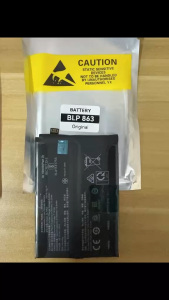
linshun blp863 Battery for Oppo Reno 6 5G PEQM00 CPH2251 | BLP-863 replacement phone batteries
Silicone Soft Shockproof Charger Case cover Protector Wear Resistant for 2021-2023 Apple Macbook Air 15 Pro 14 M1 Pro 13 2020 A2289 Air 13.6 2022 M2 A2681 inch case Touch ID Retina Pro 13 15 16 inch Touch Bar Breathable Radiating
Cute Bear Cartoon Phone Case for Oppo A3/1Pro A78 A53 Anti-Fall A58X A93S/A92S A97/A96 New A95 Womens A56/A55 Full Cover Silicone Protective Shell

KW Flower Candy Phone Keychain Chain Lanyard Key
Shockproof Case For Samsung A13 A23 A33 A53 A73 A14 A24 A34 A54: Durable & Shockproof Cases for Samsung Galaxy A Series

CAG 100pcs Disposable Eyeglasses Lens Cleaning Cloth Anti Fog Wet Wipe Glasses Tissue Screen Remove Dust
Creative Retractable Air Conditioning Panel & Suspended Air Guide Plate