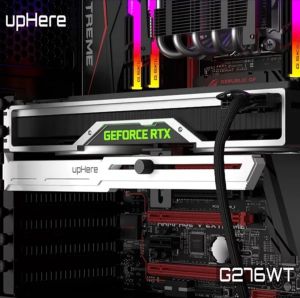
UpHere GPU Bracket Support: High-Performance & Anti-Sag ARGB Bracket
UpHere GPU Bracket Support: High-Performance & Anti-Sag ARGB Bracket
Introduction to UpHere GPU Bracket Support
UpHere GPU bracket support is a high-performance gaming accessory designed to provide anti-sag support for your graphics card. This innovative product is compatible with 5V 3-pin connectors, ensuring seamless integration with your existing hardware.
Understanding the Importance of GPU Support
A graphics card, or GPU, is a critical component of any gaming setup. It processes visual data and renders images onto your monitor, making it essential for a smooth gaming experience. However, over time, the weight of the GPU can cause it to sag, potentially leading to damage or reduced performance. This is where UpHere GPU bracket support comes in. By providing anti-sag support, this product helps maintain optimal performance and extend the lifespan of your graphics card.
Features of UpHere GPU Bracket Support
UpHere GPU bracket support boasts several features that make it an essential addition to any gaming setup:
- High-performance support for graphics cards
- Anti-sag design to prevent damage and maintain optimal performance
- 5V 3-pin compatible bracket for seamless integration
- ARGB lighting for a visually stunning gaming experience
How to Install & Use UpHere GPU Bracket Support
Installing UpHere GPU bracket support is a straightforward process that can be completed in just a few simple steps.
Step-by-Step Installation Guide
- Power off your computer and unplug all cables from the back of your case.
- Open your case and locate your graphics card.
- Carefully remove the graphics card from its slot.
- Attach the UpHere GPU bracket support to the back of your case, ensuring it is securely fastened.
- Reinsert the graphics card into its slot, making sure it is properly seated and connected to the bracket.
- Close your case and reconnect all cables.
- Power on your computer and enjoy the benefits of UpHere GPU bracket support.
Tips for Optimal Performance
To get the most out of your UpHere GPU bracket support, keep the following tips in mind:
- Ensure the bracket is securely attached to your case before inserting the graphics card.
- Double-check that the graphics card is properly seated and connected to the bracket.
- Keep your computer clean and free of dust to maintain optimal performance.
Benefits of UpHere GPU Bracket Support
UpHere GPU bracket support offers several benefits that make it an essential addition to any gaming setup.
High-Performance GPU Support
UpHere GPU bracket support provides high-performance support for your graphics card, ensuring optimal performance and preventing damage caused by sagging. This results in a smoother gaming experience and extended lifespan for your hardware.
Anti-Sag Gaming Accessory
The anti-sag design of UpHere GPU bracket support helps prevent damage caused by the weight of your graphics card. By providing support at the back of your case, this product maintains optimal performance and extends the lifespan of your hardware.
5V 3Pin Compatible Bracket
UpHere GPU bracket support is compatible with 5V 3-pin connectors, ensuring seamless integration with your existing hardware. This makes it easy to install and use, even if you have a complex setup.
Conclusion: Why Choose UpHere GPU Bracket Support?
UpHere GPU bracket support is a high-performance gaming accessory designed to provide anti-sag support for your graphics card. With its 5V 3-pin compatibility and ARGB lighting, this product seamlessly integrates with your existing hardware and enhances your gaming experience. By preventing damage caused by sagging and maintaining optimal performance, UpHere GPU bracket support is an essential addition to any gaming setup.

Eualix Computer Parts and Accessories Trading
Review
You May Also Like
DIY Box 4x18650 Outer Case Shells with Multiple Color Choices Not Included 5V/2.4A USB Output

Viltrox DC-A1 Digital Camera Monitor 7 Inch Wide Monitor 2800 Nits 1080P 4K HDMI Touch Screen Monitor

Fantech AERO CG80 RGB Gaming PC Case Mid Tower ATX Micro ATX Mini ITX Tempered Glass With 4 Fans Included
CPU Air Cooler 4PIN PWM PC Processors Ventilador Silent Cooling fan for Intel 1150/1151/1155/1156/1700/1200/1366 PC Radiator
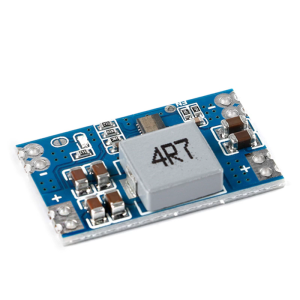
Mini560 DCBuck Converters 5A Output Voltages Regulator Stabilizeds Power Supply Module Board for Versatility Use

1PC High Frequency Power Supply SR12W2-WDM For Sany Excavator
AJVXI 38 Inch Gaming Monitor: Features & Benefits
Lenovo Laptop/Lenovo ThinkPad/14 inch/Intel Core i7/Intel HD Graphics/Built in WIFI and network camera
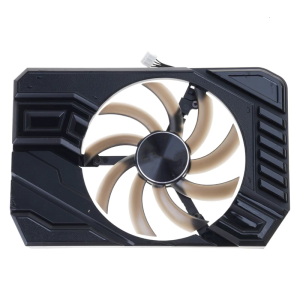
85mm 4Pin Graphics Cooling Fan GPU Coolers Replacement Fan for GTX1660 2060 StormX Graphics Management Accessories
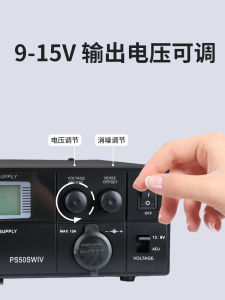
Refinement 4th Generation PS50SWIV: A Comprehensive Guide to Vehicle-Mounted Shortwave Radio Communication
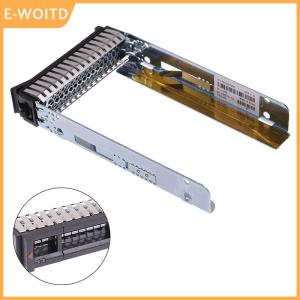
【E-WOITD】 2.5" SAS Hard Drive Caddy Tray for Thinksystem ST550 SR550 SR650 SR850 SR590