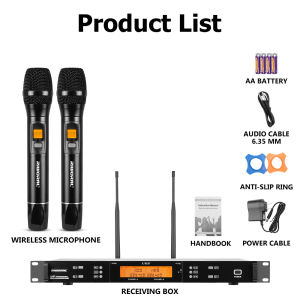
Versatile Microphone Set for Meetings & Karaoke: Dual UHF Handheld Microphones
Versatile Microphone Set for Meetings & Karaoke: Dual UHF Handheld Microphones
Key Features & Specifications
Frequency Range & Modulation Method
The versatile microphone set for meetings and karaoke features a system index frequency range of 740-790MHz and utilizes broadband frequency modulation. This wide frequency range ensures reliable operation and reduced interference from other wireless devices.
Channels & Frequency Stability
The wireless microphone system boasts 200 channels with a spacing of 250KHz, offering a variety of options to avoid interference. Additionally, the frequency stability is within 0.005%, ensuring consistent performance and reliable operation.
Audio Response & Signal-to-Noise Ratio
The audio response of the dual UHF handheld microphones ranges from 80Hz to 18KHz (3dB), providing a wide frequency response for clear and natural sound reproduction. Furthermore, the comprehensive signal-to-noise ratio is greater than 105dB, ensuring excellent sound quality and minimal noise.
How to Choose the Right Wireless Microphone Set
Identifying Your Needs
Before purchasing a wireless microphone set, it is crucial to identify your specific needs. Consider factors such as the intended use (meetings, karaoke, etc.), desired range (work range 100m / 328ft), and budget. Additionally, ensure the microphone set is suitable for your environment, such as meeting rooms, churches, DJ setups, weddings, and home karaoke systems.
Comparing Different Models
Once you have identified your needs, compare different models of wireless microphone sets to find the best fit. Consider factors such as frequency range, modulation method, number of channels, audio response, signal-to-noise ratio, and budget. Additionally, read reviews and consult with experts to make an informed decision.
Budget Considerations
When choosing a wireless microphone set, it is essential to consider your budget. While more expensive models may offer better features and performance, they may not be necessary for your specific needs. Therefore, it is crucial to balance cost and functionality to find the best value for your investment.
Setting Up Your Wireless Microphone System
Assembling the Components
To set up your wireless microphone system, first assemble the components, including the microphones, receiver, and any accessories. Follow the manufacturer's instructions carefully to ensure proper assembly and operation.
Configuring the System
Once the components are assembled, configure the system according to the manufacturer's instructions. This may include setting the frequency range, adjusting the sensitivity, and configuring the audio response. Proper configuration ensures optimal performance and reliability.
Troubleshooting Common Issues
If you encounter issues with your wireless microphone system, refer to the manufacturer's troubleshooting guide or contact customer support for assistance. Common issues may include interference, poor sound quality, and connectivity problems. By addressing these issues promptly, you can ensure a seamless and enjoyable experience.

RIWORAL
Review
You May Also Like
VTUOGE A6S Bluetooth Headset with Mic Touch Control Noise Reduction Wireless Earbuds for Gaming Waterproof TWS Headphone Stereo Earphone for Xiaomi Huawei
2025 new style Wearable Single Wireless Bluetooth Earbuds with Digital LED Display USB Rechargeable Ear Clip Bud 5.3 Headphones High Battery Long Range Digital Display For Christmas Gift Suitable for business use
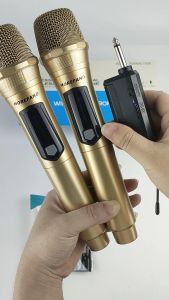
108V1-S UHF Wireless Microphone: Portable Charging & 1280mA Rechargeable Lithium Battery
1 Pair Earpads Replacement Earpads Memory Foam Ear Pad Covers Replacement for SR225x SR325x Headsets Accessories
High Fidelity Audio Amplifier Volume Potentiometer Dual Alps RK163 A20K A50K A100K Carbon Film Potentiometer for Electronics Market
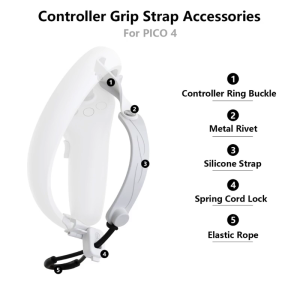
Lightweight Controller Belt Hand Straps for Pico 4 VR Headset Anti-Drop Hand Grip Straps Gaming Controller Belts
J225 Stylish TWS Bluetooth Earphones With 3D Curved Charging Case And Transparent Design Smart Touch HD Audio 200mAh Battery
FT STAR 4\" PROFESSIONAL HI-FI MID RANGE KW-1000M W/ FREE CAPACITOR
Butterfly Radio Earpiece Earphone Headset Mic For Kenwood BF-888s Two-way Radio
Space Saving Headphone Stand Flexible Headrest Headphone Hangers For Home Office Or Gaming Setups Headset Holder
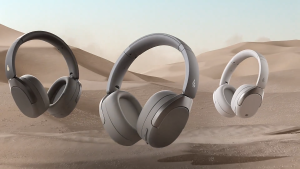
Funhouse | Edifier W830NB Wireless Over-Ear Headphones Bluetooth 5.4 45db Noise 94hrs Battery life