Google Assistant & Smart TV Remote Control: A Comprehensive Guide
Google Assistant & Smart TV Remote Control: A Comprehensive Guide
Understanding Your Xiaomi MI Box S Remote Control
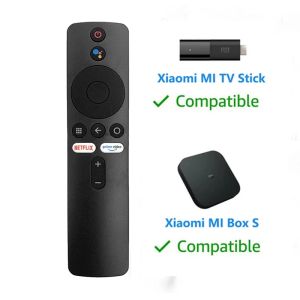
The Xiaomi MI Box S remote control, including models XMRM-006, MDZ-22-AB, and MDZ-24-AA, is a versatile Bluetooth voice remote control that offers a range of features to enhance your smart TV experience. These remotes come equipped with a built-in microphone and speaker, allowing you to interact with your smart TV using voice commands powered by Google Assistant.
Key Features of the XMRM-006 & MDZ-22-AB Remotes
The XMRM-006 and MDZ-22-AB remotes offer several key features that make them stand out among other smart TV remote controls. Some of these features include:
- Bluetooth connectivity
- Voice control capabilities
- Dedicated Google Assistant button
- Backlighted buttons
- Sleek, ergonomic design
How to Connect Your Remote Control to Smart TV
Connecting your Xiaomi MI Box S remote control to your smart TV is a straightforward process. Here's how to do it:
- Power on your smart TV and Xiaomi MI Box S.
- Press and hold the "Source" button on the remote until the LED light on the remote blinks.
- On your smart TV, navigate to the settings menu and select "Input" or "Source".
- Select "Bluetooth" as the input source.
- On your remote control, press and hold the "Source" button again until the LED light turns solid.
- Your remote control should now be connected to your smart TV.
Setting Up Voice Control with Google Assistant
Setting up voice control with Google Assistant on your Xiaomi MI Box S remote control is simple. Follow these steps:
- Press and hold the dedicated Google Assistant button on the remote.
- When prompted, say "Ok Google" followed by your voice command.
- Your smart TV will respond to your voice command, allowing you to control various functions and features.
Exploring the Benefits of Voice Control
Voice control offers several benefits that enhance your smart TV experience. Here are some of the advantages:
Enhanced User Experience with Voice Commands
Voice commands provide a hands-free experience that allows you to control your smart TV without having to physically interact with the remote control. This can be particularly useful when you're watching a movie or TV show and don't want to pause the action to change channels or adjust settings.
Accessibility for Users with Disabilities
Voice control can also be beneficial for users with disabilities who may have difficulty using traditional remote controls. Voice commands provide an alternative method of controlling their smart TV, making it easier for them to enjoy their favorite shows and movies.
Time-Saving Features for Busy Users
For busy users, voice control can save time by allowing them to quickly and easily perform tasks such as changing channels, adjusting volume, or accessing streaming services. This can be particularly useful when you're short on time or have multiple things to do at once.
Troubleshooting Common Issues
While voice control offers many benefits, there may be times when you encounter issues with your Xiaomi MI Box S remote control. Here are some common problems and how to troubleshoot them:
Pairing Issues with Bluetooth Remote Control
If you're having trouble pairing your remote control with your smart TV, try the following steps:
- Ensure your smart TV and Xiaomi MI Box S are powered on.
- Press and hold the "Source" button on the remote until the LED light blinks.
- On your smart TV, navigate to the settings menu and select "Input" or "Source".
- Select "Bluetooth" as the input source.
- On your remote control, press and hold the "Source" button again until the LED light turns solid.
Voice Recognition Problems with Google Assistant
If you're experiencing issues with voice recognition, try the following steps:
- Ensure the microphone on your remote control is clean and unobstructed.
- Speak clearly and slowly when giving voice commands.
- Try pressing and holding the dedicated Google Assistant button on the remote to initiate voice commands.
Compatibility Concerns with Smart TV Models
If you're having trouble with compatibility between your Xiaomi MI Box S remote control and your smart TV model, check the manufacturer's website for compatibility information. Some smart TV models may require specific firmware updates or software installations to work with your remote control.
Maximizing the Potential of Your Remote Control
There are several ways to maximize the potential of your Xiaomi MI Box S remote control. Here are some tips:
Customizing Voice Commands for Personalized Experience
Customize your voice commands to suit your preferences and needs. You can create custom voice commands for specific functions or features, such as changing channels or adjusting volume.
Integrating Other Smart Home Devices with Your Remote Control
Integrate your remote control with other smart home devices to create a seamless experience. For example, you can use voice commands to control your smart lights or thermostat while watching TV.
Staying Up-to-Date with Firmware Updates
Stay up-to-date with firmware updates to ensure your remote control is functioning at its best. Check the manufacturer's website for the latest firmware updates and install them as needed.
Conclusion
In conclusion, the Xiaomi MI Box S remote control, including models XMRM-006, MDZ-22-AB, and MDZ-24-AA, offers a range of features and benefits that enhance your smart TV experience. From voice control capabilities to Bluetooth connectivity, these remotes provide a hands-free, accessible, and time-saving way to control your smart TV. By troubleshooting common issues and maximizing the potential of your remote control, you can enjoy a seamless and personalized smart TV experience.

remote2020
You May Also Like
Liquid Silicone Full Cover Dragon Fruit Pattern iPhone17Promax Case Apple16E Simple Style Protective Shell Dirt Resistant
Lithium Batteries Pack Cell Module 21V Lithium Charging Protective Board Power Circuit Board Replacement

Durable Leather Action Camera Wrist Strap Quick Release Safety Anti-Loss Accessory for DJI Action5pro/4/3 Photography Equipment
Magic Keyboard Magnetic for iPad 11th 10th Bluetooth Keyboard Wireless for IPad Air 4 5 6 Pro 11 Tablet Smart Case Spanish cover
Xiaomi 15Pro Frosted Film & Phone Cases: A Comprehensive Guide
Detachable Strong Magnetic Acrylic Transparent Hard Case for Huawei MatePad Air 11.5S MatePad 12 X Air 12 MatePad 11 2023 2021
100%Original BM4Y For xiaomi Poco F3 & Redmi K40 Pro battery replacement 4520mAh+tool
XUNDD MAGNETIC AND BACK CLIP MOBILE PHONE COOLER XDOT-079
Xbox One Controller Headset Adapter Audio Mic Converter for Gaming Headphones with 3.5mm Jack

Replacement Remote Control Compatible for 6711A90032S AKB32788902 6711A90032L 6711AR2664B 6711A20083D Air Conditioner
Oppo FindX8 pro Dustproof Net Metal Mobile Phone Charging Port Plug Protection Dust Sticker X8P Speaker Grille Dust Plug