UpHere 150cm/59inch LED Atrip Light: A Comprehensive Guide
UpHere 150cm/59inch LED Atrip Light: A Comprehensive Guide
Introduction to UpHere 150cm/59inch LED Atrip Light
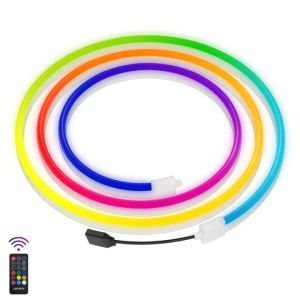
UpHere 150cm/59inch LED Atrip Light is a versatile and stylish lighting solution designed specifically for enhancing your TV and PC viewing experience. This USB-powered, flexible neon RGB LED light offers dream color settings, remote control operation, and an adhesive base for easy installation. Whether you're looking to create a cozy atmosphere or enhance your gaming setup, UpHere LED Atrip Light is the perfect choice.
Key Features
- 150cm/59inch flexible neon LED light
- Adhesive base for easy installation
- Remote control for TV/PC
- Dream color LED light with customizable settings
- USB-powered for convenience
Benefits & Applications
UpHere LED Atrip Light is an excellent addition to any home entertainment system. It enhances the viewing experience by creating a relaxing ambiance and improving visibility. Additionally, the remote control functionality allows you to adjust the lighting settings effortlessly, making it perfect for both casual movie nights and intense gaming sessions.
How to Install & Set Up Your UpHere LED Atrip Light
Installing and setting up your UpHere LED Atrip Light is a straightforward process. Follow these steps to get started:
Preparing the Adhesive & Cables
- Unpack the product and remove the protective film from the adhesive base.
- Position the LED light strip along the desired surface, ensuring it is straight and even.
- Press firmly to adhere the LED light strip to the surface.
Installing the Holder & Connecting the Remote Control
- Attach the holder to the LED light strip by aligning the clips and pressing firmly.
- Connect the USB cable to the LED light strip and plug it into a power source.
- Pair the remote control with the LED light strip according to the manufacturer's instructions.
Enhancing Your TV/PC Viewing Experience with UpHere LED Atrip Light
UpHere LED Atrip Light is designed to enhance your TV and PC viewing experience. Here's how:
Using the Remote Control for TV/PC
The remote control allows you to adjust the lighting settings effortlessly. Simply point the remote at the LED light strip and use the buttons to change the color, brightness, and other settings.
Customizing Dream Color LED Light Settings
UpHere LED Atrip Light offers a wide range of dream color settings, allowing you to create a personalized atmosphere. Experiment with different colors and effects to find the perfect setting for your needs.
UpHere LED Atrip Light: Maintenance & Troubleshooting
To ensure your UpHere LED Atrip Light continues to perform optimally, follow these maintenance and troubleshooting tips:
Cleaning & Care Tips
- Clean the LED light strip gently with a soft cloth and mild detergent.
- Avoid using harsh chemicals or abrasive materials, as they may damage the LED light strip.
- Store the LED light strip in a cool, dry place when not in use.
Common Issues & Solutions
- If the LED light strip does not turn on, check that the USB cable is securely connected and the power source is functioning properly.
- If the remote control does not work, try pairing it again according to the manufacturer's instructions.
- If the LED light strip flickers or shows inconsistent performance, try replacing the USB cable or power source.
In conclusion, UpHere 150cm/59inch LED Atrip Light is a versatile and stylish lighting solution that enhances your TV and PC viewing experience. With its dream color settings, remote control functionality, and easy installation, it's the perfect addition to any home entertainment system.

Eualix Computer Parts and Accessories Trading
Review

You May Also Like
ARGB Controller 12V 5A 6Pin ARGB Cooling Fan Hub Splitter Smart Remote Control PC Computer Case Cooling Chassis Silent Radiator
3D Printer Mainboard Fan 4010 3010 5020 DC24V Fast Cooling and Silents Fan for SV08 Models
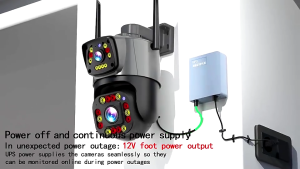
12V 1.5A Outdoor Power Bank Uninterruptible Power Supply Mini UPS Backup Battery Outage Endurance Monitor Power Supply For WiFi Router Modem CCTV Security Camera
5Pcs 3D Printer Accessories Nozzle Brush Replacement Hotbed Mounted PEI Sheet Nozzle Wiper Cleaning Tool for Plus 4
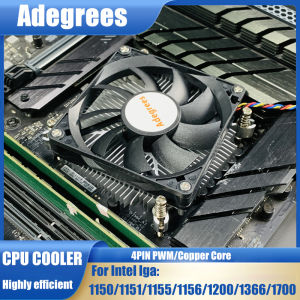
80MM MINI CPU Air Cooler PC Processor Cooling Radiator 4PIN PWM Ventilador for Intel LGA1155 1156 1150 1151 1366 1700 1200
Commercial Demonstration Unit With Functional Type Dock Replicated Heat Pipe Associates For Technical Training
D350 AVR Lorey Somer Generator AVR Digital Automatic Voltage Regulator Original
![[COD] SAjeNH SPORT 10pcs CPU Clamshell Tray Box AMD Case Holder Protection For AMD AM2 AM3 FM1 FM2](https://img.lazcdn.com/g/p/b4cb556d13dfc2a1ab720028f1f3d9ad.jpg_300x300q80.jpg)
[COD] SAjeNH SPORT 10pcs CPU Clamshell Tray Box AMD Case Holder Protection For AMD AM2 AM3 FM1 FM2
Samsung UA32D4000 motherboard # BN41-01661
LPO Desktop Segotep Intel Core i5-7400: A Comprehensive Guide
GenMachine S773 AMD Ryzen7 7730U Windows11 DDR4 NVMe WiFi6 BT5.2 Gaming Mini Computer