Wistino 4G SIM/WIFI CCTV Solar Panel Camera: A Comprehensive Guide
Wistino 4G SIM/WIFI CCTV Solar Panel Camera: A Comprehensive Guide
Introduction to Wistino 4G SIM/WIFI CCTV Solar Panel Camera
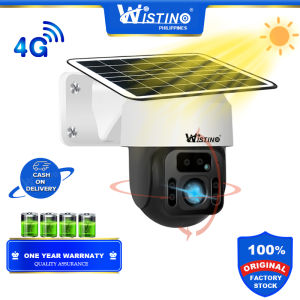
The Wistino 4G SIM/WIFI CCTV Solar Panel Camera is a top-of-the-line surveillance solution that combines the convenience of solar power with the flexibility of both WiFi and 4G SIM connectivity. This camera offers a robust security system that provides crystal-clear 2MP HD outdoor camera footage, making it ideal for monitoring your home or business. In this comprehensive guide, we will explore the key features, installation process, usage, troubleshooting, and maintenance of this innovative solar panel security camera.
Installation & Setup
How to Install the Wistino 4G SIM/WIFI CCTV Solar Panel Camera
Installing the Wistino 4G SIM/WIFI CCTV Solar Panel Camera is a straightforward process that involves mounting the camera, setting up the solar panel, and connecting it to either WiFi or 4G SIM. Here are the steps:
- Mount the camera in a suitable location that provides optimal coverage.
- Connect the solar panel to the camera using the provided cables.
- Place the solar panel in a sunny spot to ensure maximum power generation.
- Connect the camera to either WiFi or 4G SIM by following the instructions in the manual.
Setting Up the Solar Panel
To set up the solar panel, follow these steps:
- Attach the solar panel to the camera using the provided cables.
- Position the solar panel in a sunny spot to maximize power generation.
- Adjust the angle of the solar panel to capture the most sunlight during the day.
Connecting to WiFi or 4G SIM
To connect the Wistino 4G SIM/WIFI CCTV Solar Panel Camera to either WiFi or 4G SIM, follow these steps:
- Power on the camera by connecting it to the solar panel.
- Access the camera's settings menu.
- Select either WiFi or 4G SIM connectivity.
- Follow the on-screen instructions to connect to your desired network.
Usage & Functionality
How to Use the Wistino 4G SIM/WIFI CCTV Solar Panel Camera
Using the Wistino 4G SIM/WIFI CCTV Solar Panel Camera is simple and intuitive. Here are some tips to get started:
- Access the camera's settings menu to adjust various parameters, such as resolution, frame rate, and motion detection sensitivity.
- Use the camera's mobile app to view live video feeds, receive motion alerts, and control the camera remotely.
- Customize the camera's motion detection zones to focus on specific areas of interest.
Smart Home Surveillance Capabilities
The Wistino 4G SIM/WIFI CCTV Solar Panel Camera offers a range of smart home surveillance capabilities, including:
- HD video quality with 2MP resolution and 1080P smart home surveillance.
- Motion detection with customizable sensitivity levels and alert notifications.
- Remote viewing and control via a mobile app.
- Compatibility with popular smart home platforms, such as Amazon Alexa and Google Assistant.
Viewing Live Video Feed
To view live video feeds from the Wistino 4G SIM/WIFI CCTV Solar Panel Camera, follow these steps:
- Access the camera's mobile app.
- Select the camera you want to view.
- Tap the live video feed button to start streaming.
Troubleshooting & Maintenance
Common Issues & Solutions
Some common issues that may arise with the Wistino 4G SIM/WIFI CCTV Solar Panel Camera include:
- Poor video quality: Ensure the camera is properly focused and positioned, and adjust the resolution and frame rate settings.
- Connectivity issues: Check the WiFi or 4G SIM connection, and ensure the camera is within range of the network.
- Motion detection false alarms: Adjust the motion detection sensitivity levels to minimize false alerts.
Regular Maintenance Tips
To ensure the Wistino 4G SIM/WIFI CCTV Solar Panel Camera continues to function optimally, follow these maintenance tips:
- Clean the camera lens regularly to maintain optimal video quality.
- Inspect the solar panel for any damage or debris, and clean it as needed.
- Update the camera firmware periodically to ensure compatibility with the latest software versions.
Conclusion & Next Steps
In conclusion, the Wistino 4G SIM/WIFI CCTV Solar Panel Camera is a versatile and reliable security solution that offers exceptional HD video quality, smart home surveillance capabilities, and convenient solar power. By following the installation, setup, usage, and maintenance guidelines outlined in this guide, you can maximize the effectiveness of your smart home security system.
Next Steps for Your Smart Home Security
Now that you have learned about the Wistino 4G SIM/WIFI CCTV Solar Panel Camera, consider taking the following steps to enhance your smart home security:
- Install additional cameras to cover blind spots and provide comprehensive coverage.
- Integrate the camera with other smart home devices, such as door locks and alarms.
- Monitor your home remotely using the camera's mobile app.
By implementing these strategies, you can create a secure and connected smart home environment that provides peace of mind and convenience.

Wistino Official Store
You May Also Like
TECHZONE CCTV Camera V380 Pro SD Card Storage WIFI Dual Lens 2K 4MP HD Outdoor CCTV 2 way Audio
LS VISION 3 Lens 7K 15MP WIFI CCTV PTZ Camera IP66 Waterproof Outdoor Bluetooth Security Camera Humanoid Detection Automatic Tracking Full Color Night Vision Two-Way Audio IP Cameras
Flexible Height Adjustable CCTV Camera Stand Ceiling Camera Mount Holder Extending from 20cm to 40cm Easy Installation

2024 DJI Class Drone 8K Camera Digital Mapping GPS Camera Drone Flight Distance 18000m High 800m 5G Professional 8K 3-Axis Gimbal Camera Strong Wind Resistance Laser Obstacle Avoidance One Key Flyback Low Power Return

Y33 1080P HD PTZ IP Camera with Human Detection Wireless & Waterproof Design

【BUY 1 TALE 1】Mini CCTV Camera 1080P HD Hot Link Remote Surveillance small CCTV Camera Surveillance Cameras Mini Camera Wireless Camera Hidden camera Spy camera with Night Vision Mini Portable Indoor Night Vision Baby Monitor CCTV SecurityCamera
Action Camera Outdoor Diving DV 30FPS Camera 4K HD Waterproof Anti-shake Underwater Sports Camera

TTArtisan 25mm F/2.0 APS-C Format Sony E | Nikon Z | M43 Micro Four Thirds | FUJIFILM X Mount Portrait Pancake Prime Lens Large Aperture Full Metal Body MF Manual Focus 9.8" Focusing Distance for Smooth Bokeh and Low Light Photography | JG Superstore

JOZUZE 1.3inch Screen 1080P Sports HD Mini Camera Portable Digital Video Recorder BodyCam Infrared Night Vision Police Camcorder
XIAOMI Dual Lens Waterproof Indoor Outdoor CCTV Camera Wifi Connect 360 AI Motion Detect Infrared Night Vision Two-Way Voice Audio Surveillance Monitoring Security Color Camera Video WIFI Wireless Connection Phone Remote
PAPERSHOOT V3 20MP Paper Shoot CORK SERIES Screen Free Digital PSVIII PSV3 20MP MVP CAMERA