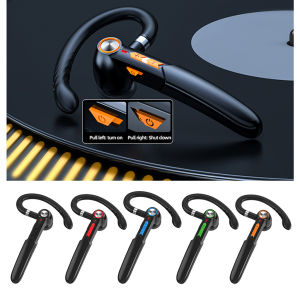
JBMBHC ME-100 Single Business Ear-Hook Wireless Bluetooth Headset 5.0 Touch Control Earphone Noise Canceling Stereo Earphone for Huawei Samsung Oppo
JBMBHC ME-100 Single Business Ear-Hook Wireless Bluetooth Headset 5.0 Touch Control Earphone Noise Canceling Stereo Earphone for Huawei Samsung Oppo
What Are Wireless Ear-Hook Headphones?
Wireless ear-hook headphones, like the JBMBHC ME-100, are a type of Bluetooth headset designed for hands-free communication and listening. They feature a lightweight, ergonomic design that comfortably wraps around the ear, allowing users to stay connected without the need for wires. This makes them ideal for use during work meetings, phone calls, or listening to music while on-the-go.
Key Features of JBMBHC ME-100
The JBMBHC ME-100 offers several features that make it stand out from other wireless ear-hook headphones:
- Bluetooth Version: Supports Bluetooth 5.0, ensuring stable and fast connections with your devices.
- Noise Canceling: Equipped with advanced noise canceling technology, it filters out unwanted background noise for clearer communication.
- Touch Control: Features touch-sensitive controls for easy operation, including volume control, track skipping, and call answering.
- Stereo Compatibility: Compatible with popular brands like Huawei, Samsung, and Oppo, ensuring seamless connectivity with your device.
Benefits of Ear-Hook Design
The ear-hook design of the JBMBHC ME-100 offers several advantages:
- Comfort: Lightweight and ergonomic, the ear-hook design ensures long-lasting comfort, even during extended use.
- Secure Fit: The ear-hook shape securely holds the headset in place, reducing the risk of accidental dislodging.
- Hands-Free Operation: With touch controls and noise canceling, users can focus on their tasks without being distracted by managing wires or buttons.
Understanding Noise Canceling Earphones
Noise canceling earphones, like the JBMBHC ME-100, use advanced technology to filter out unwanted background noise, resulting in clearer sound quality and communication.
How Does Noise Cancelation Work?
Noise canceling technology works by capturing ambient sounds using microphones and then emitting inverse sound waves to neutralize the noise. This process significantly reduces background noise, allowing users to focus on their conversations or music.
Key Features of JBMBHC ME-100's Noise Canceling Technology
The JBMBHC ME-100's noise canceling technology offers several benefits:
- Clear Communication: By filtering out unwanted noise, users can communicate clearly during phone calls or meetings.
- Improved Music Listening: Enjoy your favorite tunes without being distracted by background noise, enhancing your listening experience.
- Battery Efficiency: Advanced noise canceling technology requires minimal battery power, ensuring longer usage time.
Exploring Touch Control Earphone Capabilities
Touch control earphones, like the JBMBHC ME-100, allow users to operate their headset hands-free using simple gestures.
How to Use Touch Controls
Using touch controls on the JBMBHC ME-100 is straightforward:
- Volume Control: Adjust volume by swiping up or down on the ear-hook.
- Track Skipping: Skip tracks by swiping left or right on the ear-hook.
- Call Answering: Answer or end calls by tapping the ear-hook once.
JBMBHC ME-100's Touch Control Features
The JBMBHC ME-100 offers several touch control features:
- Easy Operation: Simple gestures make it easy to operate the headset without needing to reach for your device.
- Hands-Free Communication: With touch controls, users can focus on their tasks without being distracted by managing wires or buttons.
- Customizable Settings: Users can customize their touch controls to suit their preferences.
Stereo Earphone Compatibility with Huawei, Samsung, & Oppo
The JBMBHC ME-100 is compatible with popular brands like Huawei, Samsung, and Oppo, ensuring seamless connectivity with your device.
Connecting JBMBHC ME-100 to Huawei Devices
To connect the JBMBHC ME-100 to a Huawei device:
- Turn on Bluetooth on your Huawei device.
- Press and hold the power button on the JBMBHC ME-100 until the LED light blinks.
- Select 'JBMBHC ME-100' from the list of available devices on your Huawei device.
Connecting JBMBHC ME-100 to Samsung Devices
To connect the JBMBHC ME-100 to a Samsung device:
- Turn on Bluetooth on your Samsung device.
- Press and hold the power button on the JBMBHC ME-100 until the LED light blinks.
- Select 'JBMBHC ME-100' from the list of available devices on your Samsung device.
Connecting JBMBHC ME-100 to Oppo Devices
To connect the JBMBHC ME-100 to an Oppo device:
- Turn on Bluetooth on your Oppo device.
- Press and hold the power button on the JBMBHC ME-100 until the LED light blinks.
- Select 'JBMBHC ME-100' from the list of available devices on your Oppo device.
Getting Started with JBMBHC ME-100 Bluetooth Headset
To get started with the JBMBHC ME-100 Bluetooth headset, follow these simple steps:
Unboxing & Setup
- Carefully unbox the JBMBHC ME-100 Bluetooth headset.
- Charge the headset using the included USB cable.
- Connect the headset to your preferred device using the instructions provided above.
Charging & Battery Life
The JBMBHC ME-100 comes with a built-in rechargeable battery that provides up to 10 hours of continuous use. To charge the headset, connect the USB cable to the charging port on the headset and plug it into a power source. Charging time is approximately 2 hours.

Oudun
You May Also Like
New TWS Wireless Bluetooth Smart Headphones Support AI Translation Covered 134 Languages With LED Display Remote Control Stereo Bass Sound With Touch Control System LX-10 Waterproof Sports Gaming Headset
Professional In Ear Monitor Headphones for Stage Music Gaming 10mm Driver 4 Armatures Detachable Cable Ergonomic Comfort Fit
Tear Resistant Protein Ear Cushions Precise Fit Design for AVENTHO300 Headsets Earpads Replacement Easy Maintenance

K-12 Mini High End Wireless Audio Mini Home With 1 or 2 Microphones Professional Karaoke Speaker
Quansheng UV-K6 Walkie Talkie Portable Two Way Radio 50-600 MHz Full Band Long Range Handheld Radio Original COD Quansheng Uv K6 Price Quasheng Uv K8 - Lazada
Breathable Mesh Cloth Headband Pad Cover Washable Headbem Cushion Sleeve for HD660S2 Headphone Comfort
Umiio 93Plus 8.5 inches*3 multifunctional bluetooth speaker large knobs
INSTRUMENTAL SPEAKER CROWN PA-1550
NBY217 Colorful RGB Wireless Bluetooth Speaker V5.2 with AUX & USB Plug Hifi Sound
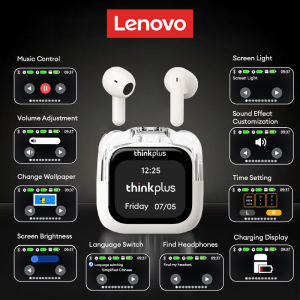
Original Lenovo LP70 Pro Bluetooth Earphones Screen Touch Active Noise Cancellation HiFi Sound Wireless Headphone Long Endurance

Crown HW-1505 Woofer Speaker 500Watts